
Account help
User not found on Instagram: what it means and how to tell why
User not found on Instagram can mean blocked, deactivated, deleted, banned or a new username. Use our quick test and table to tell which one it is.
Instagram · Account help
How to know if someone blocked you on Instagram: the signs, a friend test that settles it, and how a block differs from deactivated or restricted accounts.
Instagram never tells you when someone blocks you. Here is how to know if someone blocked you on Instagram anyway. Their profile will not open for you. Messages you send stop arriving. And you are no longer following them.
Then run one test to be sure. Ask a friend to open the same profile. If it opens for them and not for you, you were most likely blocked.
A block is easy to mix up with other things. The account may be deactivated, deleted or renamed. The person may have restricted you, removed you as a follower or hidden their Story. Each one leaves different clues, and this guide sets them side by side. If the app shows the words User not found, our guide on what user not found means on Instagram explains that message cause by cause.
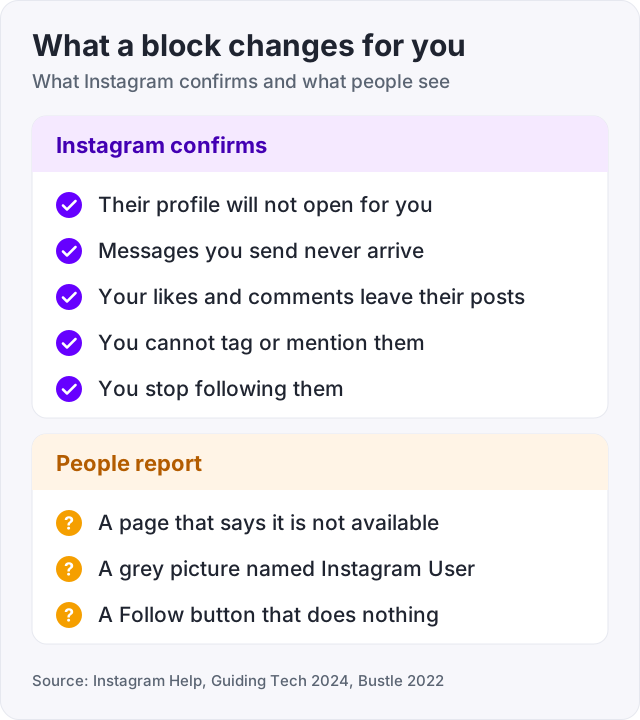
There are two kinds of signs. Some follow from rules on Instagram’s own help pages. Others come from people who were blocked and shared what they saw. Here are both, kept apart.
What Instagram confirms. These come straight from its rules for blocking.
What people report. Instagram does not describe these screens, but users see them again and again.
One sign is weak. Two or three together, plus a friend who can still open the profile, is as sure as you can get without asking.
A block is the only case where a profile vanishes for you alone. That one fact sets it apart from every look-alike. Match what you see to a row in this table.
| What happened | Their profile, for you | Their profile, for a friend | Other clues | Source |
|---|---|---|---|---|
| They blocked you | Will not open | Opens as normal | Your messages never arrive. You no longer follow them | Instagram Help, user reports |
| They deactivated | Will not open | Will not open | Comes back as it was when they log in again | Instagram Help |
| They deleted it | Will not open | Will not open | Gone for good after 30 days. The name can go to someone new | Instagram Help |
| They changed their username | Old name fails | Old name fails | The new name works. Followers may get a notice | Instagram Help |
| They restricted you | Opens as normal | Opens as normal | Your new comments show only to you. Your messages go to their requests | Instagram Help |
| They removed you as a follower | Opens. A private account shows This account is private | Opens as normal | The Follow button is back. No notice is sent | Instagram Help |
| They hid their Story from you | Opens as normal | Opens as normal | Posts show, but their Story never does | Instagram Help |
Restrict is the hardest one to spot, and Instagram built it that way. It works without alerting the person (Instagram, 2024). From your side, you only lose two small things. You stop seeing when they are online, and you never see that they read your messages (Instagram Help). But that also happens when someone turns off Activity Status. So you can suspect a restrict, but you cannot prove it.
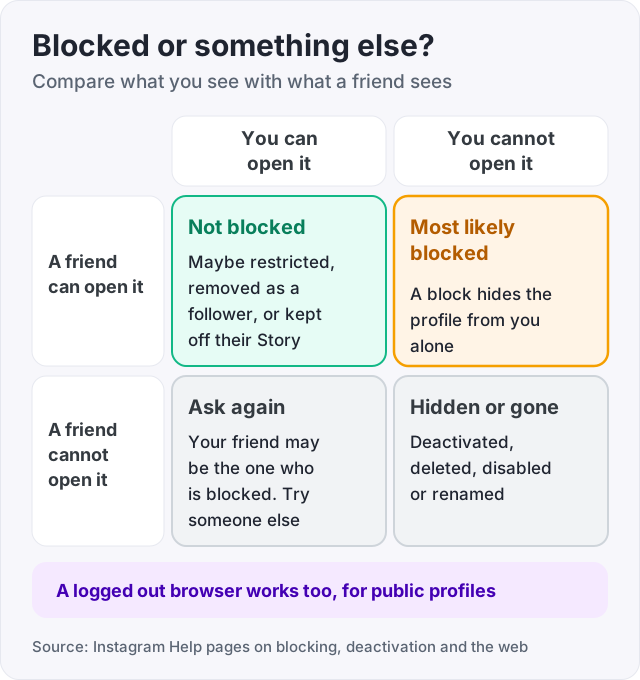
Work down this list in order and stop when you have your answer. Most people know by step five.
Tip: if the browser asks you to log in before it shows the profile, skip step four. The friend test gives the same answer.
Menus move between app versions. If you cannot find Blocked, look for Settings and privacy, then a section about who can see your content.
Watch out: a second account of your own is a weak test. When someone blocks you, Instagram lets them also block your other accounts and any new ones you create (Instagram Help). Your second account may be blocked too.
A block cuts almost every link between two accounts. Here is what changes in each place you might look.
Your old chat stays in your inbox. You can still type in it, but nothing you send gets delivered. Instagram says those messages are not delivered later either, even if the person unblocks you (Instagram Help). So you will never see Seen under them.
Group chats work differently. If you share a group, the person chooses to stay or leave. If they stay, you can both still see each other’s messages in that group (Instagram Help). That makes a group chat a poor test.
After a block, their Story is gone for you along with the rest of their content. But a missing Story on its own is not a block. People can hide their Story from you and still let you see their profile and posts (Instagram Help). They can also share a Story with Close Friends only, so only people on that list see it (Instagram Help). If the profile opens and only the Story is missing, you are not blocked.
Your likes and comments come off their posts, and an unblock does not restore them (Instagram Help). You also cannot tag them or mention their username.
One thing may confuse you. You can still see their likes and comments on other people’s public posts. Instagram says a block does not hide those (Instagram Help). Seeing one does not mean you were unblocked.
You stop following them, so your Following count drops by one (Instagram Help). Instagram does not say what happens to their follow of you. Open your Followers list to check.
A block explains a drop of one or two. If you lost dozens of followers, something else is going on. Our guide on why you are losing followers on Instagram covers the usual causes.
Instagram keeps these actions quiet. Nobody gets a notice when they are blocked, restricted, muted, unfollowed or removed as a follower.
| Action | Is the other person told? | Source |
|---|---|---|
| Block | No | Instagram Help |
| Restrict | No | Instagram, 2024 |
| Mute | No | Instagram Help |
| Unfollow | No | Instagram Help |
| Remove a follower | No | Instagram Help |
Instagram also keeps no list of people who blocked you. The only list it shows is the accounts you blocked yourself (Instagram Help). So an app that promises to show who blocked you is guessing at best. Many of them ask for your password. Instagram’s Terms of Use ban collecting other people’s login details. Instagram has also said that sharing a password with these apps makes an account less secure (Instagram, 2018).
Curious what else stays private on Instagram? Our guide on whether someone can see that you searched them has the full list.
A soft block means blocking someone and then unblocking them right away. People did it to make a follower go away without a lasting block. You do not need it anymore. Instagram now has a Remove button on your followers list, and it sends no notice (Instagram Help).
A soft block also costs more than it looks. A block deletes the person’s likes and comments on your posts, and unblocking does not bring them back (Instagram Help). If you only want someone off your list, remove them instead. Our guide on how to remove followers on Instagram has the steps.
Think it happened to you? The signs are a mix. You are no longer following them, and your old likes and comments on their posts are gone. But their profile opens again as normal.
Let it be. A block is a clear choice, and Instagram’s rules back it up.
A person blocking you is not the same as Instagram blocking you. If the app stops you from following or liking anyone, that is a limit on your account. See our guide on the Instagram action blocked message.
And no purchase can undo a block. We sell Instagram followers, and they raise a number on your profile. They will not make anyone unblock you, and they do not replace a friend.
Look for signs that add up. Their profile will not open for you, messages you send never arrive, and you are no longer following them (Instagram Help). Then ask a friend to open the same profile. If it opens for them and not for you, you are most likely blocked. If it fails for everyone, the account is deactivated, deleted, disabled or renamed.
Your old chat stays in your inbox, and you can still type in it. Nothing you send arrives, and Instagram says those messages are not delivered later, even after an unblock (Instagram Help). People also report a grey picture and the name Instagram User on the chat. Deleted and disabled accounts look the same, so use the friend test to be sure.
Check who else can open the profile. A block hides it from you alone, so a friend can still see it. A deactivated account is hidden from everyone until the owner logs back in (Instagram Help). If a friend can open it, you were blocked. If nobody can, it is deactivated or gone. Look again in a week, because a deactivated account can come back.
A soft block is blocking someone and then unblocking them right away, so they stop following you. You do not need it now. Instagram has a Remove button on your followers list that sends no notice (Instagram Help). A soft block also deletes their likes and comments on your posts for good, because unblocking does not bring them back.
No. Instagram Help says people are not notified when you block them. The same is true for restrict, mute and removing a follower. Instagram also has no list of people who blocked you. The only list it shows is the accounts you blocked yourself, under Blocked in your settings.
A missing Story is not enough on its own. After a block you cannot see their profile or posts either. If the profile and posts still open, you are not blocked. They may have hidden their Story from you, which leaves the rest of the profile visible (Instagram Help), or shared it with Close Friends only.
It depends on what you want. Unfollow or mute if you just want to see less of someone. Neither one sends a notice (Instagram Help). Remove them as a follower if you want them off your list. Restrict if they bother you in comments or messages. Block when you want no contact at all, since a block cuts off search, posts and messages.
The facts in this guide come from the places below. We check them again each time the guide is updated.
The services and free tools this guide talks about, with the prices you actually pay.
More Instagram guides from the same team.
Account help
User not found on Instagram can mean blocked, deactivated, deleted, banned or a new username. Use our quick test and table to tell which one it is.
Views
Can you see who viewed your Instagram post, Reel or profile? Names show for Stories and Live only. The rest shows counts. Who sees what, format by format.
Algorithm & timing
Instagram does not use the word shadowban. What people mean is a post not eligible for recommendation. Here is the built-in check, the causes, and the fix.