
Followers
Why am I losing followers on Instagram?
Losing Instagram followers is normal, and most of it is not about you. Here are the seven real causes, how to tell which one it is, and what fixes each.
Instagram · Followers
The "try again later, we limit how often" message means Instagram thinks your account acted too fast. Here are the causes, how long it lasts, and the fix.
The full message reads: “Try again later. We limit how often you can do certain things on Instagram, like following people, to protect our community.” Sometimes it shows as “Action Blocked” instead. Both mean the same thing.
Instagram saw your account do something too fast or too often, and it paused that action for a while. Almost always the action is following, unfollowing, liking or commenting. Instagram’s help page on temporary limits says the pause is there to stop activity that looks automated (Instagram Help).
The fix is to stop for a day, remove any app that logs in as you, and come back slowly. Below are the causes in order of how often we see them, with a way to check each one and the fix.
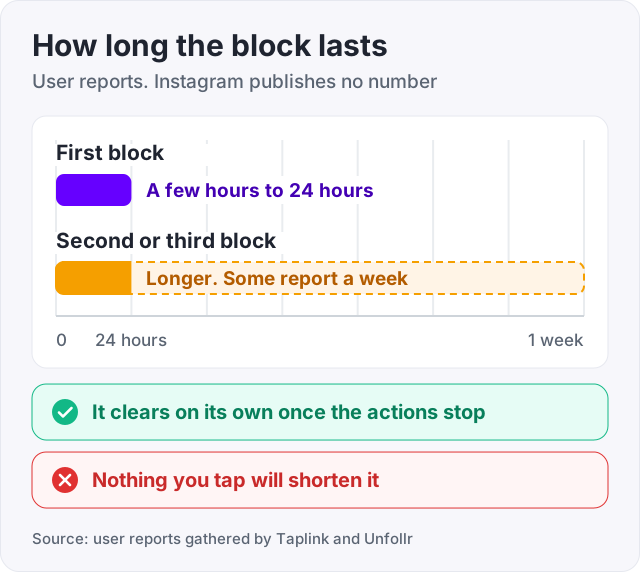
Instagram does not publish how long a block lasts. That is worth saying twice, because most pages on this topic give a number as if it came from Instagram. It did not.
Third-party tests and Reddit threads report a pattern (Taplink, Unfollr). A first block often clears within a few hours to 24 hours. A second or third block in a short span lasts longer, and some people report a week. Those are user reports, not rules.
What we can say for sure is that the block is temporary. The reported pattern is that it clears on its own once the actions stop, and that nothing you tap will shorten it.
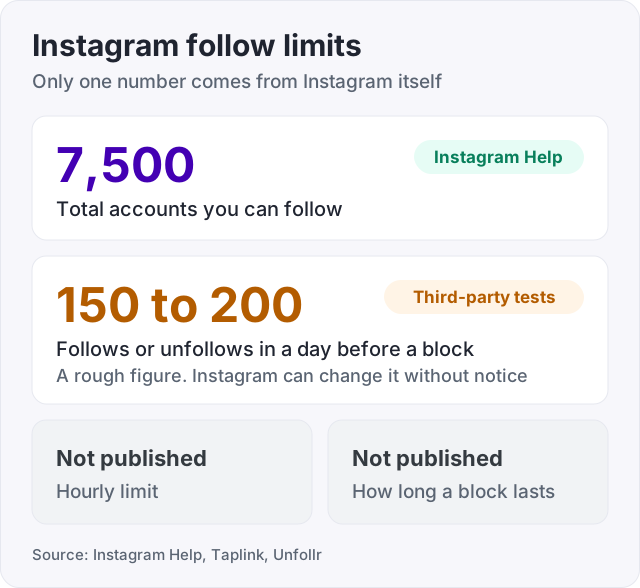
| Limit | Number | Who says so |
|---|---|---|
| Total accounts you can follow | 7,500 | Instagram Help |
| Follows or unfollows in a day before a block | Roughly 150 to 200 | Third-party tests (Taplink, Unfollr) |
| Follows within a few minutes before a block | A burst of many | Third-party reports |
| Hourly limit | Not published | Instagram does not publish one |
| How long a block lasts | Not published | Instagram does not publish one |
The 7,500 cap is the only number Instagram states. Everything else in the table is what people have measured, and Instagram can change it without notice.
This is the usual answer to “why can’t I follow people on Instagram”.
This is the cause behind most blocks. Follow-for-follow routines mean following 50 accounts in a sitting, then unfollowing the ones who did not follow back. Instagram sees that as machine behaviour even when a human did it.
How to check: think about the hour before the message. If you followed or unfollowed more than a couple of dozen accounts, this is it.
The fix: stop following anyone for 24 hours. When you return, follow a few accounts an hour, spaced out, and only accounts you want to see. Follow-for-follow does not scale anyway. The 7,500 cap ends it, and the people who follow back tend to leave again. Our guide on why you are losing followers on Instagram explains that churn.
Some apps promise followers by liking and following on your behalf. They work by logging into your account and doing the actions fast. Instagram’s help page says it limits activity that looks automated, and this is exactly what that looks like (Instagram Help). These apps are the usual cause of repeat blocks, because they keep going after the first one.
How to check: open Settings, then Website permissions (on some versions, Apps and websites). Anything listed there that you do not recognise had access to your account.
The fix: remove every app on that list. Then change your password, because an app that had it may still have it. The block itself will clear on its own once the actions stop.
Liking a few hundred posts in ten minutes, or pasting the same comment under twenty posts, trips the same limit. Instagram does not publish a number for likes or comments either.
How to check: the error appears when you tap like or post a comment, rather than when you tap follow.
The fix: stop for the day. Afterwards, write comments that differ from each other. A row of identical comments is what a spam bot does.
Another common trigger in the third-party reports is a new login. You sign in from a new phone or through a VPN and then act fast. So is a brand-new account doing a lot on day one. Instagram has no history for it, so any burst looks suspicious.
How to check: the block arrived within an hour of a new login, a new location, or creating the account.
The fix: turn the VPN off while you use Instagram. On a new account, post first and follow slowly for the first few weeks.
Instagram lets an account follow at most 7,500 accounts in total (Instagram Help). Past that number, the follow button stops working, and the message can look like a temporary block when it is not.
How to check: open your profile and look at your following count.
The fix: unfollow accounts you no longer read, slowly, over several days. Unfollowing in bulk triggers cause number one.
Sometimes the message comes with a “Tell us” button that lets you report the block as a mistake. Tapping it tells Instagram a human was behind the actions. It can clear a false block, and it is harmless to try. It does not always work, and there is no published rule for when it does.
While you wait, open Settings, then Account Status (Instagram Help, Check your Account Status). It shows whether any of your content was flagged. A block and a flag are separate things, but if both are there, fix the content too. Our guide on the Instagram shadowban walks through Account Status step by step.
Watch out: never give your password to a “growth service”. If it logs in as you, everything it does counts as your actions. That is how one block becomes a week-long block.
The first day back decides whether you get blocked again. The reports say a repeat block lasts longer than the first (Taplink, Unfollr), so go slowly.
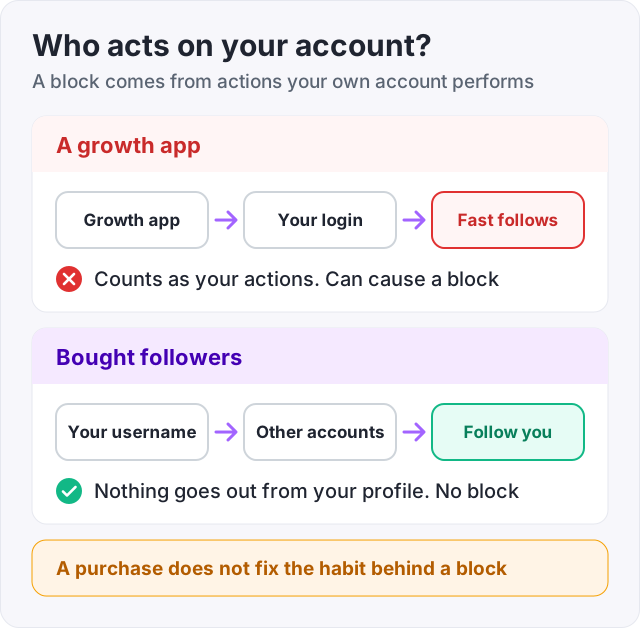
An action block comes from actions your own account performs. Buying followers does not touch your account at all. Nobody logs in, and no follow or like goes out from your profile. So it cannot trigger the message, and it cannot make an existing block longer.
That is different from a growth app, which does log in as you and is cause number two above. At GetLikes, Instagram followers need only your public username, 100 cost $3.95, and delivery is spread out so the count rises at a natural pace.
What bought followers do not do is talk back or buy anything. They give a profile the look of an audience, not the audience itself. And they do not fix the habit that caused the block. If you were following 200 people a day to grow, the block is telling you that method is over.
Do that and the message becomes rare. When it does show, you know it clears on its own, and most reports say within a day.
Instagram does not publish a duration. Third-party tests and Reddit threads report that a first block often clears within a few hours to 24 hours, and that repeat blocks last longer, sometimes up to a week (Taplink, Unfollr). Treat those as user reports, not rules. Stop the action for a full day, then try once. If it still shows, wait another day.
Instagram limits actions when it sees activity that looks automated or too fast, to protect other users (Instagram Help, Temporary limited access). The usual causes are following or unfollowing dozens of accounts in a sitting, liking hundreds of posts quickly, pasting the same comment many times, or a growth app that logs in as you and does those things on your behalf.
Instagram caps the total at 7,500 accounts (Instagram Help). Past that, the follow button stops working until you unfollow some. Instagram does not publish a daily or hourly follow limit. Third-party tests commonly report that around 150 to 200 follows or unfollows in a day, or a burst of many within minutes, triggers a temporary block (Taplink, Unfollr).
Stop all follows, likes and comments for 24 hours. Open Settings, then Website permissions or Apps and websites, and remove any app you do not recognise. Change your password if an app had it. Tap the "Tell us" button if the message offers one, which reports the block as a mistake. Then return at a slow pace, a few follows an hour at most.
Either you are in a temporary block, or you have reached the 7,500 total follow cap (Instagram Help). Check your following count first. If it is near 7,500, unfollow accounts you no longer read, slowly, over several days. If it is far below that, you are blocked for acting too fast. Wait 24 hours and come back gently.
No. An action block comes from actions your own account performs. Buying followers does not log anyone into your account and sends no follows or likes from it. A growth app is different. It logs in as you and follows and likes on your behalf, and that is one of the most common causes of the block.
The facts in this guide come from the places below. We check them again each time the guide is updated.
The services and free tools this guide talks about, with the prices you actually pay.
More Instagram guides from the same team.
Followers
Losing Instagram followers is normal, and most of it is not about you. Here are the seven real causes, how to tell which one it is, and what fixes each.
Followers
Instagram followers come from Reels, a searchable name field and a steady rhythm. Here is what moves the number, the steps in order, and what does not work.
Algorithm & timing
Instagram does not use the word shadowban. What people mean is a post not eligible for recommendation. Here is the built-in check, the causes, and the fix.