
Buying safely
How to check for fake Instagram followers in five minutes
You do not need an app or a password to spot fake Instagram followers. Here are the signs, a five-minute manual check, and how to remove ghost followers.
Instagram · Followers
How to remove followers on Instagram one at a time or in bulk, whether they get told, remove vs block vs restrict, and how to clear out fake followers safely.
Here is how to remove followers on Instagram. Go to your profile and tap Followers. Find the person, tap Remove next to their name, then tap Remove again to confirm. Instagram does not tell them (Instagram Help).
That is all it takes for one person. Removing many is harder, because Instagram has no button that clears your whole list. It does have one bulk tool, for followers it flags as spam. This guide covers both. It also shows how removing compares with blocking and restricting, and what it does to your numbers.
The steps are the same on iPhone and Android (Instagram Help).
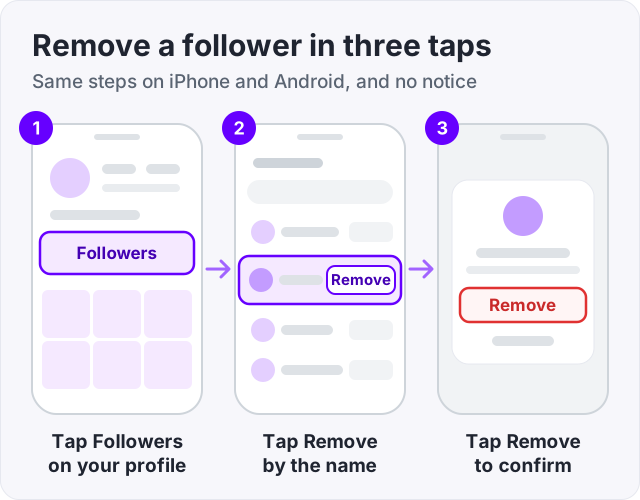
On a computer, click your profile picture, click Followers, then click Remove next to the person (Instagram Help).
Instagram’s main help page on this talks about private accounts. Public accounts can remove followers too. Instagram’s page on flagged followers is written for public accounts, and it has you tap Remove next to each one (Instagram Help).
No. Instagram Help says people are not notified when you remove them as a follower. There is no alert, no message and no email.
They can still work it out if they look. On a private account, your posts vanish from their view and your profile says the account is private. On a public account, they still see your posts, but the button on your profile says Follow again.
What the person can do next depends on your privacy setting.
| Your account is public | Your account is private | |
|---|---|---|
| Are they still a follower? | No | No |
| Can they see your posts? | Yes, like any visitor | No |
| Can they follow you again? | Yes, right away | Only if you accept a new request |
| Are they told? | No | No |
Instagram says anyone can see the posts of a public account, and only approved followers can see the posts of a private one (Instagram Help). So on a public account, removing someone only takes them off your list.
If you want a person kept out, you have two choices. Block them, or switch to a private account. Business profiles cannot go private, so switch back to a personal account first (Instagram Help).
Instagram has no button to remove all your followers, or a group you pick. The one bulk option is for accounts Instagram flags as spam, bots or irrelevant (Instagram Help).
To use it:
Instagram says this feature is on for public accounts and may not have reached everyone yet. Flagged accounts that try to follow you later arrive as requests, even on a public account. Requests you leave alone for 30 days are declined. You can turn the filter off under Menu, then Follow and invite friends (Instagram Help).
For everyone else on your list, you remove them one at a time. Go at a steady pace. If Instagram shows a Try again later message, stop for the day. Our guide on the Instagram action blocked message explains what it means.
Apps that promise to remove hundreds of followers in one tap need your Instagram login. That breaks Instagram’s Terms of Use. The terms ban collecting other people’s login details and using automated tools without permission. They also let Instagram stop providing the service to accounts that break them (Instagram Terms of Use).
Instagram has also said that people who give these apps their password make their accounts less secure. It warned that accounts which keep using such apps may find their Instagram experience impacted (Instagram, 2018).
Watch out: a mass remove app can only work by logging in as you. If Instagram asks you to change your password after using one, do it at once. Instagram says a new password cuts off the app’s access (Instagram, 2018).
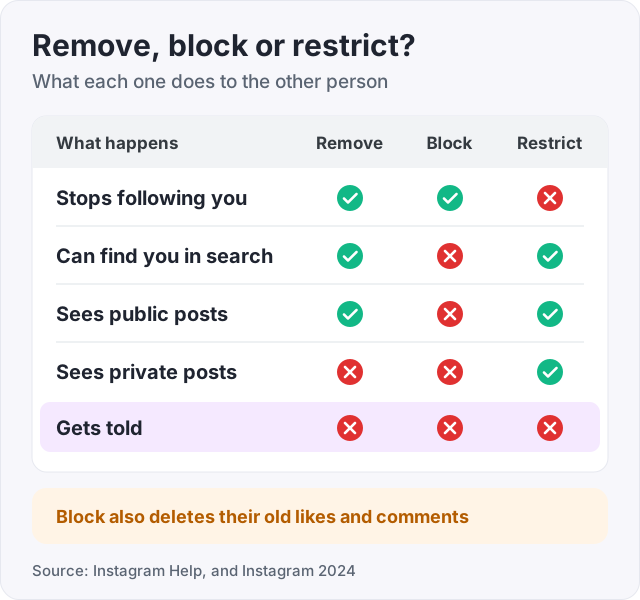
Remove ends the follow and nothing else. Block cuts the person off from your account. Restrict keeps them as a follower but quietly limits what they can do. None of the three sends a notice.
| Remove | Block | Restrict | |
|---|---|---|---|
| Stops following you | Yes | Yes | No |
| Can find you in search | Yes | No | Yes |
| Sees your posts on a public account | Yes | No | Yes |
| Sees your posts on a private account | No | No | Yes |
| Can message you | Your message settings decide | No | Yes, into your message requests |
| Can tag or mention you | Your tag settings decide | No | No |
| Gets told | No | No | No |
Each one also has a side effect worth knowing.
Wondering what this looks like from the other side? Our guide on how to know if someone blocked you on Instagram shows each case.
Start with Flagged for review if you have it. Instagram has already done the sorting there. Then check your newest followers by hand and remove the obvious bots one by one.
Our guide on how to check for fake Instagram followers lists the signs to look for. Think no profile photo, no posts and a name with a long string of numbers. It also has a five-minute test you can run on your own list.
Instagram also cleans house on its own. In May 2026 it removed a large batch of long-inactive accounts and bots in one go. Many accounts lost followers overnight (Geo News, 2026). Adam Mosseri, the head of Instagram, said these were not real followers and that the drop would not affect reach.
Ghost followers are a different case. They are real people who stopped using the app or stopped reacting. They break no rule, so removing them is your call. If your count keeps falling and you cannot see why, read why you are losing followers on Instagram.
Not every follower you do not know is a problem. Use this as a rough guide.
Work through a few dozen at a time rather than hundreds in one sitting.
Removing followers raises your engagement rate on paper. It does not bring you more reach.
Engagement rate is likes and comments divided by followers, times 100. Here is an example. Say you have 5,000 followers and your posts average 100 likes and comments. That is 2 percent. Remove 500 dead accounts, and the same 100 reactions on 4,500 followers come to about 2.2 percent. The people who react did not change. Only the bottom of the sum did.
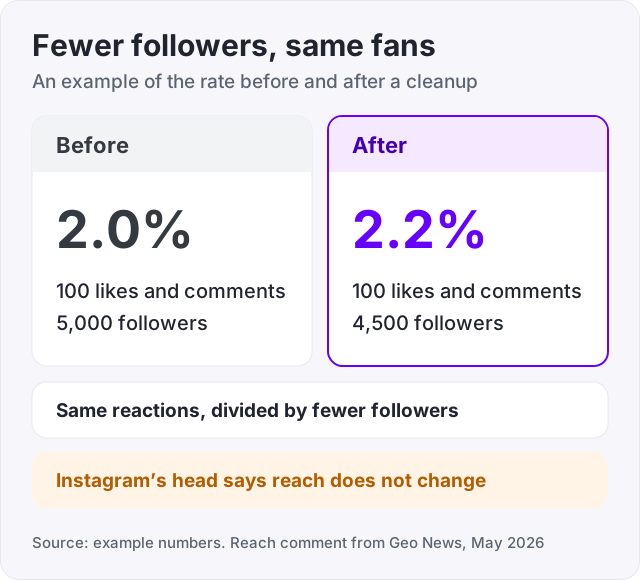
Reach is a different matter. Mosseri said the May 2026 cleanup would not change how many people you reach when you post (Geo News, 2026). In a July 2026 question session, he said removing followers does not meaningfully change ranking either. It only means those accounts stop seeing your posts (Kontentino, 2026).
So the honest reason to clean your list is trust. Brands and people who check your profile see numbers that mean what they say. Our guide on Instagram engagement rate shows what counts as a good rate.
Usually the cause is the app version, the feature you are looking for, or a limit. Try these in order.
We sell Instagram followers, so here is the plain version. Instagram followers from GetLikes start at $3.95 for 100. The order form asks for your public username, never your password. Delivery is spread out over time. They raise the number on your profile. They do not like, comment or watch your Stories.
Buying followers is against Instagram’s rules. Its usual response is to remove the fake accounts, not to ban the account that bought them. Our guide on whether it is safe to buy Instagram followers sets out the risks plainly.
If you plan to grow, clear out the obvious bots first. Then the number you build on is real, and you can see what new followers change. To track your count without logging in, use our free Instagram follower counter.
Use the Remove button on your followers list. Go to your profile, tap Followers, find the person, tap Remove next to their name, then tap Remove again to confirm (Instagram Help). On some app versions the button is an X. They stop following you, they are not blocked, and Instagram does not send them a notice.
No. Instagram Help says people are not notified when you remove them as a follower. They can still find out if they look. On a private account your posts disappear for them. On a public account the button on your profile says Follow again. There is no alert, message or email either way.
Only accounts that Instagram flags as spam, bots or irrelevant. If you see Flagged for review at the top of your followers list, tap it and tap Remove all (Instagram Help). Instagram says the feature may not be available to everyone yet. For all other followers there is no bulk button, so you remove them one at a time.
Start by updating the app, then look for an X or a three-dot menu instead of the word Remove, because the layout changes between versions. If you tried to use Flagged for review, it is for public accounts and may not have reached you yet (Instagram Help). If you see Try again later, you hit a limit on fast actions. Stop for a day and try again.
Yes. On a public account they can tap Follow again at any time. On a private account they have to send a new request, and you choose whether to accept it, because only approved followers see private posts (Instagram Help). To keep someone out for good, block them instead.
Open your followers list and look for Flagged for review first, which lets you remove flagged spam accounts in one go (Instagram Help). Then check your newest followers by hand for the usual signs: no photo, no posts and a name with a long string of numbers. Remove the obvious bots one by one. Never give your password to an app that offers to do it.
No. After Instagram removed a large batch of inactive accounts and bots in May 2026, its head Adam Mosseri said the drop would not affect how many people you reach (Geo News, 2026). Removing followers mainly means those accounts stop seeing your posts in their feed. It does not raise your reach either.
Go to the profile of each account you want to drop, tap Following, then tap Unfollow. Instagram says people are not notified when you unfollow them (Instagram Help). There is no official bulk unfollow tool, and apps that offer one need your login. If you only want to see less of someone, mute them instead.
The facts in this guide come from the places below. We check them again each time the guide is updated.
The services and free tools this guide talks about, with the prices you actually pay.
More Instagram guides from the same team.
Buying safely
You do not need an app or a password to spot fake Instagram followers. Here are the signs, a five-minute manual check, and how to remove ghost followers.
Followers
Losing Instagram followers is normal, and most of it is not about you. Here are the seven real causes, how to tell which one it is, and what fixes each.
Likes & engagement
A good Instagram engagement rate depends on who you are. Typical brand posts earn 0.30 to 0.45 percent, creators 1 to 5 percent. See the formula and benchmarks.