

Views
Instagram Story views order: what the viewer list means
Only you can see who viewed your Story, and only for 48 hours. Here is what the viewer list order means, why Instagram will not say, and how highlights work.
Instagram · Views
Can you see who viewed your Instagram post, Reel or profile? Names show for Stories and Live only. The rest shows counts. Who sees what, format by format.

No. Instagram does not show who viewed your post, your Reel or your profile. It shows counts. You can see who liked a post, because likes carry names, but a view is anonymous in every format except two.
Those two are Stories and Live. A Story shows a list of viewers for 48 hours after you post it (Instagram Help, View insights on your Instagram Stories). A Live shows the host who joins as it happens. Everything else, from feed video to highlights to profile visits, gives you a number and nothing more.
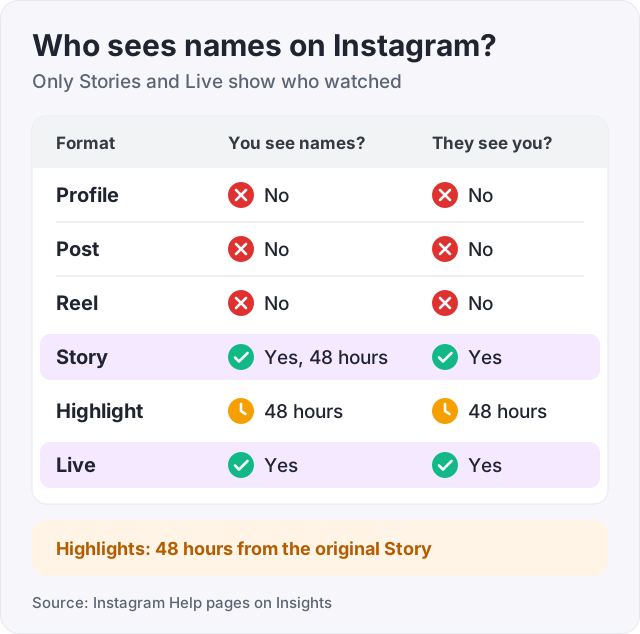
The same rule works the other way. Nobody can see that you looked at their profile, post or Reel. They can see you watched their Story. Here is the whole picture, format by format.
| Format | Can you see names? | Can they see you looked? |
|---|---|---|
| Profile | No. Professional accounts get a count of profile visits in Insights | No |
| Post, photo or video | No. Likes show names, views show a count | No |
| Reel | No. Counts only | No |
| Story | Yes, for 48 hours after posting | Yes, your name is in their viewer list |
| Highlight | Only within 48 hours of the original Story, then a count | Only inside that 48-hour window |
| Live | Yes, the host sees who joins as it happens | Yes |
Every row comes from Instagram’s own help pages on Insights, listed in the sources. The rest of this guide takes each row in turn.
This is the most searched question of all, and the answer has not changed. Instagram does not show who visited your profile. A professional account, creator or business, sees a number of profile visits in Insights (Instagram Help, About Instagram insights). A personal account does not even get the number.
No app can fill that gap, because Instagram never releases the names. Any app that says it can show your profile visitors is making it up. The ones that ask for your password are worse than useless. Once they have it, they have your account.
Watch out: “who viewed my profile” apps are the most common way Instagram accounts get stolen. Instagram does not have the data, so the app cannot either. Do not log in to anything to find out who looked at you.
On a feed post or a Reel you get two kinds of information. Likes and comments carry usernames, so you can tap through and see exactly who reacted. Views do not. They are a number.
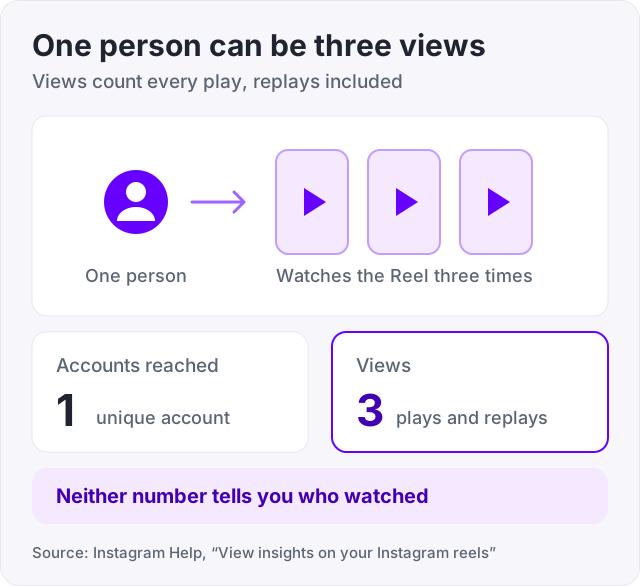
For professional accounts, Insights adds detail, but still no names. On a Reel, “Accounts reached” is the number of unique accounts that saw it at least once. “Views” is the number of times it started to play or replay (Instagram Help, View insights on your Instagram reels). Posts work the same way (Instagram Help, View insights on your Instagram posts). Personal accounts see likes and view counts only.
Feed videos follow the post rules. A count, a like list, and no viewer list.
If the numbers on a Reel confuse you, our guide on Instagram Reels views explained sets out what each one means. And if the count is simply too low, how to get more views on Instagram Reels covers what moves it.
Open one of your Stories and tap the viewer count at the bottom left. That list shows the username of every account that watched it. It is available while the Story is live and for 48 hours after you posted it, in the archive (Instagram Help, View insights on your Instagram Stories).
After 48 hours the names go. Only the count remains. If you want to know who watched, screenshot the list before the window closes.
The order of that list is its own question, and people read a lot into it. Our guide on the Instagram Story views order explains what the order does and does not mean.
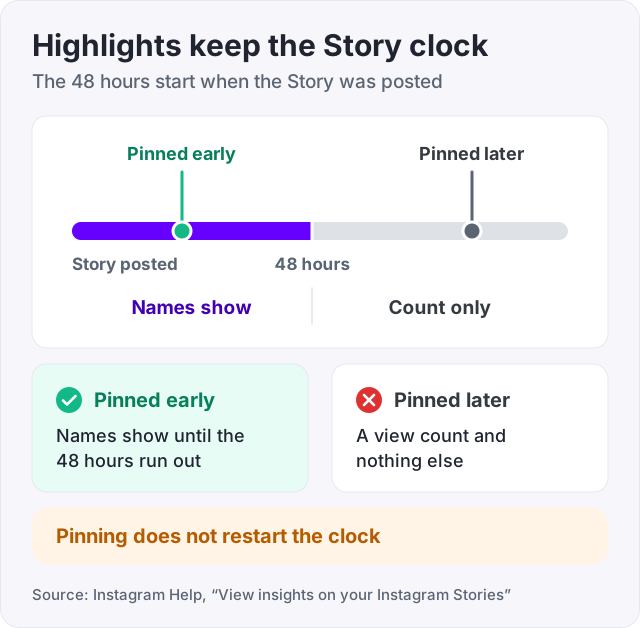
A highlight is a Story you pinned to your profile. It follows the same 48-hour rule, counted from when the original Story was posted, not from when you made the highlight (Instagram Help, View insights on your Instagram Stories).
So a highlight made from a Story you posted this morning still shows names until tomorrow. A highlight from last month shows a count and nothing else. Anyone watching that old highlight leaves no trace.
A Live is the other format with names. The host sees who joins in real time, as each person arrives, and can see comments and reactions as they come in. There is no hiding in a Live. If you open one, the host knows.
This is the mirror of everything above, and it comes down to a short list.
Screenshots do not change any of this. Instagram does not notify anyone when you screenshot a Story, a post or a profile. The only screenshot alert Instagram sends is for disappearing photos and videos sent in a DM (Instagram Help). Screenshot a Story and the owner sees a view, not a screenshot.
Since 2025 Instagram reports “Views” as the main number for every format, and it counts each play, including replays (Instagram Help on reels and Stories insights). One person watching a Reel three times is three views. That is why views run higher than accounts reached, and why neither number tells you who was behind it.
For a Story, the count works the same way, but for 48 hours you also get the names. That makes Stories the only format where the count and the list can be compared.
We sell views, so here is what they do in this picture. Bought Instagram views raise the view count on a Reel or video. That is the whole effect. Because Instagram shows counts and not names, nobody can open a list and see where the views came from. Views start at $2.95, and Reel views are on our Instagram Reels page.
What they do not do is bring likes, comments or followers, because a view does not carry a person who reacts. They do not change who can see what in the table above. And they do not make a Story viewer list longer, because we do not sell Story views.
If you want to test how a view order lands before paying, there is a free trial of 100 Reel views at our free Instagram views page. It is one per person, with no card and no password. To watch any public account’s numbers move without logging in, use our free Instagram follower counter.
If a page or an app tells you something different, it is wrong, and it may want your password. Instagram’s own help pages are the only source that counts here, and they say what this guide says.
No. Instagram does not show anyone who viewed a post, a Reel or a profile, whether you follow them or not. The owner sees a view count, and on posts they see who liked. If you do not like or comment, there is no trace of your visit. The one format that shows your name is a Story, and it does so for everyone who watches it.
You cannot, unless they liked or commented. Instagram shows a view count on posts and a list of likes, but never a list of viewers (Instagram Help, View insights on your Instagram posts). Apps that claim to show who opened your photos are guessing at best. The ones that ask for your password can steal your account.
No. A Reel shows views and, for professional accounts, Insights with accounts reached and how many times it played (Instagram Help, View insights on your Instagram reels). None of that includes names. You can see who liked the Reel and who commented, and that is the closest thing to a viewer list you will get.
You cannot. Instagram does not offer a list of profile visitors. A professional account can see a count of profile visits in Insights, and that is all (Instagram Help, About Instagram insights). No app can show the names, because Instagram never releases them. An app that promises to needs your password, and that is how accounts get stolen.
Personal accounts see likes and basic view counts only. To get Insights with views and accounts reached for every post, switch to a professional account, either creator or business (Instagram Help, About Instagram insights). Even then you get counts. There is no setting that reveals viewer names on a post.
Only within 48 hours of the original Story being posted. A highlight follows the same 48-hour viewer list rule as the Story it came from (Instagram Help, View insights on your Instagram Stories). After that window, the owner sees a count and no names, so watching an old highlight leaves no trace.
The facts in this guide come from the places below. We check them again each time the guide is updated.
The services and free tools this guide talks about, with the prices you actually pay.
More Instagram guides from the same team.
Views
Only you can see who viewed your Story, and only for 48 hours. Here is what the viewer list order means, why Instagram will not say, and how highlights work.

Views
Instagram shows Reels mostly to people who do not follow you and ranks them on watch time and shares. Here is what counts as a view and what moves the number.
Views
Instagram counts a Reel view every time it starts to play or replay, so one person can add many. The exact definition, a worked example, and what is a lot.