
Algorithm & timing
How to reset the Instagram algorithm, step by step
How to reset the Instagram algorithm with the built-in button under Content preferences: what the reset clears, what it keeps, and what to do next.
Instagram · Algorithm & timing
Instagram does not use the word shadowban. What people mean is a post not eligible for recommendation. Here is the built-in check, the causes, and the fix.
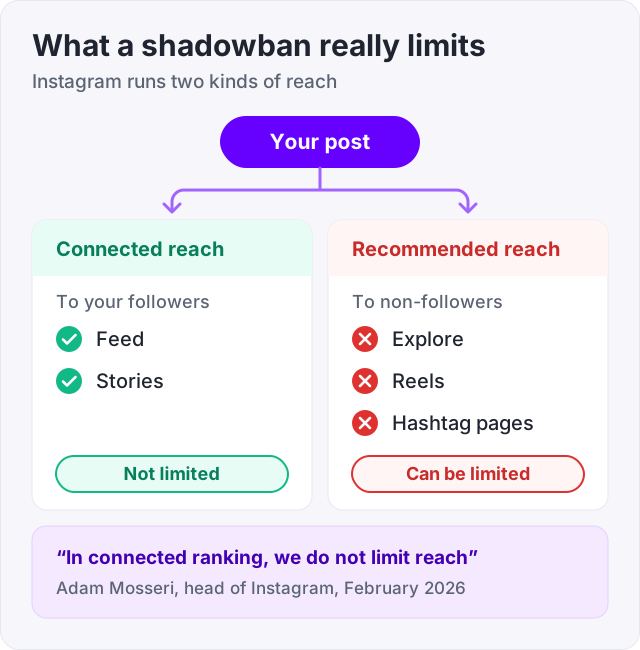
Instagram has never used the word “shadowban”. What people mean when they say it is real, though. A post can become “not eligible to be recommended”. Your followers still see it in Feed and Stories. People who do not follow you stop seeing it in Explore, Reels and hashtag pages.
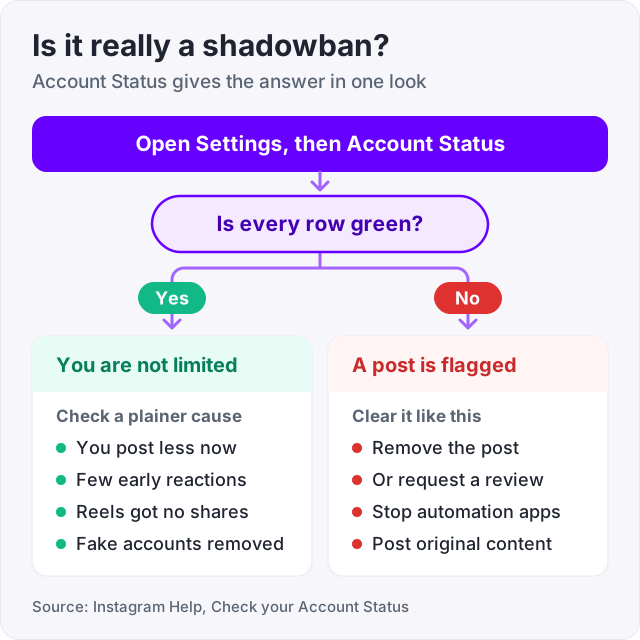
You do not have to guess whether this has happened. Instagram shows you. Open Settings, then Account Status, and it lists any post that breaks the Recommendation Guidelines and whether your account can be recommended (Instagram Help, Check your Account Status).
Here is what the limit actually is, how to check it, what causes it, and how to clear it.
Instagram runs two kinds of reach. Connected reach is your posts going to people who follow you. Recommended reach is your posts going to strangers in Explore, Reels and hashtag pages.
In a February 2026 question and answer session, Instagram head Adam Mosseri said “in connected ranking, we do not limit reach”. In plain words, Instagram does not throttle what your followers see. What it can limit is recommendations to people who do not follow you.
So a “shadowban” is not a ban and it is not hidden. It is one of these:
Both show up in Account Status. Neither one stops your followers from seeing you.
Instagram added Account Status for this in December 2022. Adam Mosseri announced it, and Engadget reported that it tells creators when and why a post is not being recommended. Here is how to open it.
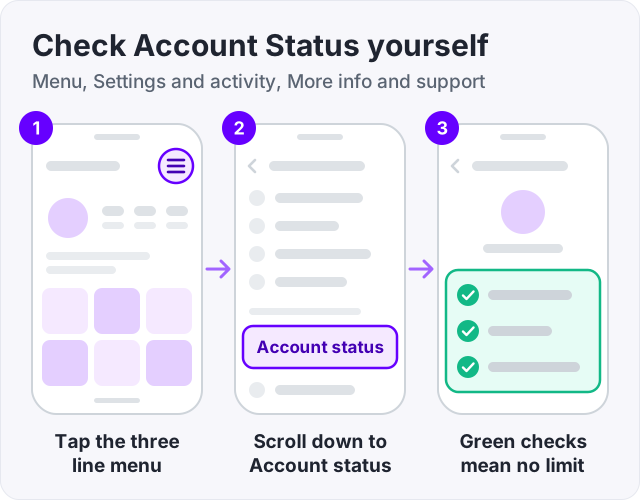
You will see a short list. Each row has a green check if all is well. If a post breaks the Recommendation Guidelines, it appears here with the reason. From that screen you can delete the post or request a review.
If every row is green, you are not limited. Whatever happened to your reach has another cause, and the next section covers the usual ones.
Watch out: third-party “shadowban checkers” cannot read Instagram’s data. The ones that ask for your password are after your account. Account Status is the only real test, and it is free and already on your phone.
Most people who think they are shadowbanned have green checks in Account Status. Their reach dropped for a plainer reason.
| What you see | More likely cause |
|---|---|
| One post did badly, the rest are normal | That post got few early reactions, so Instagram showed it to fewer people |
| Reach slid over a few weeks | You post less than you did, or your audience has gone quiet |
| Reels reach dropped, Feed is fine | Reels are ranked for strangers, and the last few did not earn shares or saves |
| Followers dropped too | Instagram removed fake accounts, see our guide on losing followers |
Instagram ranks every post on its own (Instagram ranking explained). One weak post does not carry over to the next. If three posts in a row did badly, the common thread is usually the posts, not a hidden flag.
Instagram publishes the list. The Recommendation Guidelines say content is less likely to be recommended if it is:
That last one is how a whole account, not just a post, ends up limited. In April 2026 Instagram went further and restricted the reach of accounts that mostly repost other people’s content (TechCrunch, April 2026). Reposting watermarked videos is now one of the fastest ways to lose recommended reach.
Beyond the guidelines, a few habits get accounts warned or limited:
Notice what is not on either list. Posting often is not a cause. Using many hashtags is not a cause on its own. Editing a caption is not a cause. Those are myths.
There is no support ticket for this and no waiting period. There is a short list of things to do, and reach comes back when new posts perform.
If you also reset your own feed while you are in Settings, our guide on how to reset the Instagram algorithm explains that button. It changes what you see, not your reach, so do not expect it to fix this.
There is no fixed length, because there is no formal shadowban with a clock on it.
A flagged post stays ineligible until you remove it or a review clears it. Once that is done, nothing is holding the account back. Your next post is ranked on its own merits, like every post. Reach recovers as new posts earn likes, shares, saves and watch time from the people who do see them.
For most accounts that means reach looks normal again within a few good posts. Not a set number of days, and not two weeks of silence.
Yes. Your followers see everything you post in Feed and Stories the whole time. Going quiet only costs you the audience you already have, and it gives Instagram nothing new to recommend once the flag is cleared.
Post as you normally would. Focus on the kind of post people share and save, because those are the reactions that carry a post to non-followers. Our guide on how to get more views on Instagram Reels covers what that looks like in practice.
We sell Instagram likes and Instagram views, so here is the plain answer.
Bought likes and views are added from the outside, to a public post, without logging in. They do not trigger an Account Status flag, because nothing runs on your account. What Instagram warns about is apps that log in as you and act on your behalf. Those are the ones that get accounts warned or limited, and we never log in. An order needs a username or a post link, nothing else.
What bought likes do not do is clear a flag or change the ranking. A flagged post stays flagged with 500 bought likes on it. Use them to make a post look active to the humans who land on it, after the account is clean.
Most accounts that do this never see a flag. The ones that do will know exactly why, and exactly what to remove.
Open your profile, tap the three-line menu, tap Settings and activity, scroll to More info and support, and tap Account status. If every section shows a green check, nothing is limited. If a post is flagged, Instagram names it and says why (Instagram Help, Check your Account Status). This is the only check that reads Instagram own data.
There is no set length, because Instagram has no formal shadowban with a timer. A post that is not eligible for recommendation stays that way until you remove it or a review clears it. Once that is done, reach comes back as your next posts earn reactions. Most people see normal reach return within a few new posts, not a fixed number of days.
Go to Account Status and deal with anything flagged. Either delete the post or tap Request a review. Then stop every app or service that logs in to your account and revoke its access in Settings. Take two or three days off any automation. Post original content, avoid reposting watermarked videos, and drop any hashtag that Instagram has blocked.
Yes. Your followers still see everything you post in Feed and Stories, so stopping only hurts you with the audience you already have. Each post is ranked on its own (Instagram ranking explained). Once the flagged post is gone, a strong new post can reach non-followers again. Silence does not clear anything faster.
Outside shadowban checkers cannot see Instagram data. Most of them look at whether your recent post shows up under a hashtag, which tells you little. The only test that reads Instagram own records is Account Status inside the app. Use that, and treat any third-party checker that asks for your password as a scam.
Bought likes and views are added from the outside and do not trigger an Account Status flag. What Instagram warns about is apps and services that log in as you and like, follow or comment on your behalf. Those can get an account warned or limited. A seller that needs only your username never touches the account.
The facts in this guide come from the places below. We check them again each time the guide is updated.
The services and free tools this guide talks about, with the prices you actually pay.
More Instagram guides from the same team.
Algorithm & timing
How to reset the Instagram algorithm with the built-in button under Content preferences: what the reset clears, what it keeps, and what to do next.
Followers
Losing Instagram followers is normal, and most of it is not about you. Here are the seven real causes, how to tell which one it is, and what fixes each.
Views
Instagram shows Reels mostly to people who do not follow you and ranks them on watch time and shares. Here is what counts as a view and what moves the number.