

Followers
Why am I losing followers on Instagram?
Losing Instagram followers is normal, and most of it is not about you. Here are the seven real causes, how to tell which one it is, and what fixes each.
Instagram · Account help
User not found on Instagram can mean blocked, deactivated, deleted, banned or a new username. Use our quick test and table to tell which one it is.
“User not found” on Instagram means the app cannot show you that profile right now. The person blocked you, the account is hidden or gone, the username changed, or the name was typed wrong.
If you searched “user not found Instagram”, you likely want one answer. Were you blocked? The message alone cannot tell you. Instagram’s Help Centre does not explain these three words, and Instagram never tells people when they get blocked (Instagram Help).
Each cause leaves its own clues, though. This guide lists all six causes and gives you a quick test to tell them apart. It also covers what to do when your own profile shows the message.
It means Instagram looked for a profile under that username and had nothing it could show you. There are six reasons that can happen. The first five rows below come from rules on Instagram’s own help pages.
| Cause | What happened | Who sees User not found | Can the profile come back? |
|---|---|---|---|
| Blocked | The person blocked your account | Only you | Yes, if they unblock you |
| Deactivated | The owner hid the account for a break | Everyone | Yes, when the owner logs back in |
| Deleted | The owner asked Instagram to delete it | Everyone | No, not after 30 days |
| Disabled or banned | Instagram took it down for breaking rules | Everyone | Only if the owner wins a review |
| Username changed | The account moved to a new name | Everyone who uses the old name | It is still there under the new name |
| Typo or old link | The name was typed or saved wrong | Anyone who uses that spelling | Yes, fix the spelling |
Start with the block, since it is the one most people fear. Instagram Help says that when someone blocks you, you can no longer find their profile, posts or story. You get no notice. The person’s account is still live for everyone else.
Now look at the third column. A block is the only cause that hides a profile from you alone. Every other cause hides it from the whole of Instagram. That one fact is the base of every test in this guide.
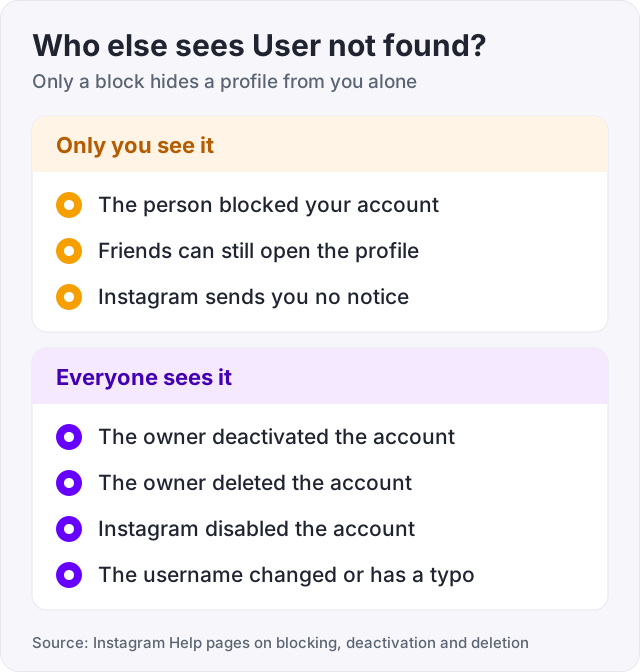
You cannot read the cause off the screen. You can read it off the clues around it. Match what you see to this table.
| What you notice | What it points to |
|---|---|
| A friend can open the profile, but you cannot | You were blocked |
| Nobody you ask can open the profile | Deactivated, deleted or disabled |
| The profile shows up again days or weeks later | It was deactivated, and the owner logged back in |
| A mutual friend knows the person under a new name | The username changed |
| Search finds nothing, but the exact username plus the Accounts tab works | Instagram made the account harder to find. You are not blocked |
| The name has dots, underscores or look-alike letters | Check for a typo first |
Be honest with yourself about one limit. From the outside, a deactivated account, a deleted account and a disabled account all look the same. Only the owner knows which one it is. Time is the one clue you get. A deactivated account can return at any moment. A deleted one cannot.
Work through these steps from the top. Most people have their answer by step three.
If a friend or the counter can see the profile and you cannot, the account is live. You are most likely blocked. If nobody can see it, the account is hidden, gone or renamed.
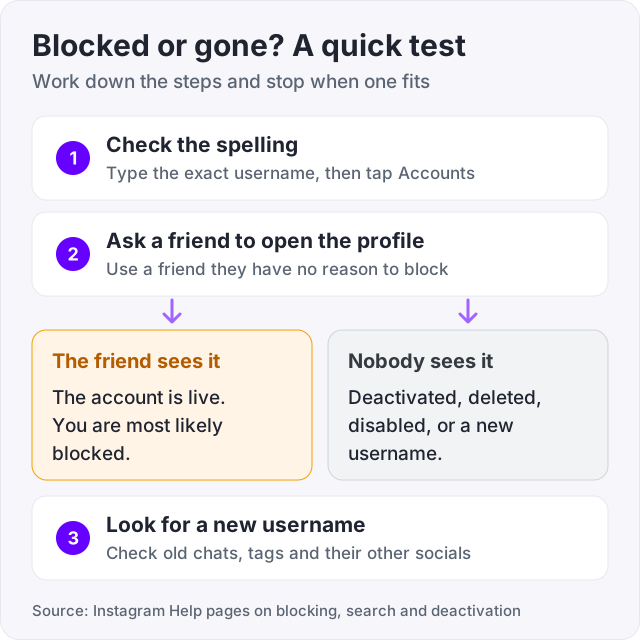
Watch out: a second account of your own is a weak test. When someone blocks you in the app, Instagram can also block other accounts you have and new ones you create (Instagram Help). A friend’s phone gives a cleaner answer.
So a friend checked, and they cannot open the profile either. You are not blocked. One of these things happened instead.
Instagram lets people pause an account. Instagram Help says a deactivated profile has its photos, comments and likes hidden until the owner logs back in. While it is hidden, nobody can open it. There is no end date. The account stays hidden until the owner chooses to return. An owner can deactivate only once a week.
Deleting is the lasting version. Instagram Help says the profile, photos, videos, comments, likes and followers are permanently removed. The profile is hidden from others as soon as the owner asks. After 30 days of the request, it cannot be restored. The number of days can vary by region. The full clean up can last up to 90 days. Later, a new person may sign up with the same username.
This is what most people call a ban. Instagram disables accounts that break its rules. Its help page says a disabled account is no longer visible to others. The owner sees a message when they try to log in and can ask for a review. From your side it looks the same as a deleted account.
A new username takes effect right away if the name is free (Instagram Help). The old name then points to nothing. Old links break, and a search for the old name fails. The account, its posts and its followers are all fine. Instagram says followers may be notified of the change, so a mutual friend may know the new name. The person’s other social profiles may list it too.
Instagram Help gives one more case. A hacked account often gets a new username from the thief. If a friend’s profile vanished overnight, message them another way and ask.
Two smaller rules can hide a live account. First, Instagram makes some accounts harder to find in Search when they keep posting content it will not recommend. You then need the exact username and the Accounts tab. Second, a professional account can set a minimum age for its viewers, for every country or for single ones (Instagram Help). Viewers under that age may not see the profile.
Many people see the message next to a name, a picture or an old chat. It feels like a clue. It is not a strong one.
Instagram does not explain this screen anywhere in its Help Centre. What it does say is that a block leaves old message threads in the inbox. So a chat, a name or a small picture can stay on your phone after the profile itself is out of reach.
That leftover picture looks the same whether you were blocked or the account was paused. Do not try to read it. Run the friend test from the list above. It takes two minutes and gives a real answer.
Tip: no app can show you who blocked you. Instagram does not notify anyone about a block (Instagram Help), and it has no list of people who blocked you. An app that promises a block list and asks for your password is after your account.
Sometimes the block is yours. A slip of the thumb is enough. Instagram Help gives one set of steps for the app, and it covers both iPhone and Android (“Block or unblock someone”).
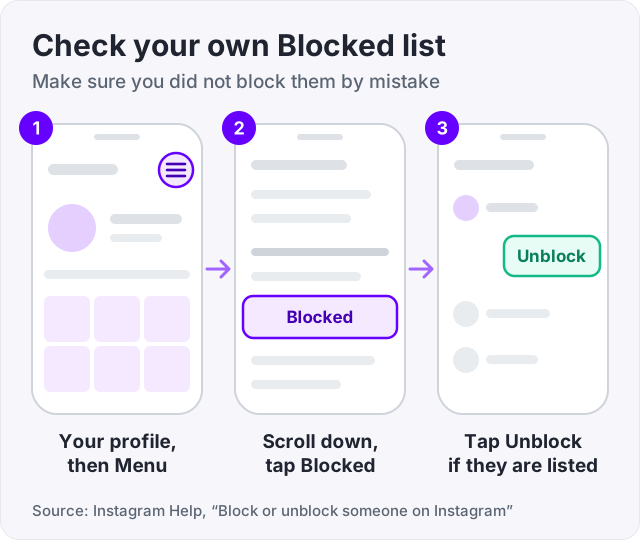
Unblocking does not put things back the way they were. Instagram Help says a block removes the other person’s likes and comments from your posts. Unblocking does not restore them. Messages they sent while blocked never arrive either.
Maybe a friend told you that your profile shows the message. Work through the same causes from your side.
If you can log in and post, check Account Status next. Go to your profile and tap Menu. Below More info and support, tap Account Status. It lists removed content and any features you can no longer use (Instagram Help). Our guide on the Instagram shadowban walks through every line of that screen.
If the app also stops you from following people, that is a different problem. See our guide on the Instagram action blocked message.
Accounts that vanish affect your numbers too. When a follower deletes their account, the profile is permanently removed (Instagram Help). It leaves your follower list with it. Our guide on why you are losing followers on Instagram covers the other reasons a count falls.
Your own choices matter more. Deactivating hides your profile until you log back in. Deleting removes your followers for good, and no one can restore them after 30 days (Instagram Help). If you only want a break, deactivate. Do not delete.
We sell Instagram followers from $3.95 for 100, so here is the plain version. An order needs a public username and a profile that loads. If your profile shows User not found, nothing can be delivered to it. Fix the profile first.
And buying fixes none of the causes in this guide. It will not make someone unblock you. It will not bring back a deleted profile or reverse a disabled one. It will not change what Account Status says. Bought followers make a live profile look more established, and that is all they do.
Not always. A block is one of six causes. Instagram Help says a blocked person cannot find your profile, posts or story, so a block can look like this. But the same message shows when an account was deactivated, deleted, disabled by Instagram or renamed. Ask a friend to open the profile. If they can see it and you cannot, a block is the likely answer.
Check who else can see the profile. A block hides the profile only from you, so your friends can still open it. A deactivated account is hidden from everyone until the owner logs back in (Instagram Help). Ask one friend to search the exact username. If it opens for them, you were blocked. If it fails for them too, the account is hidden or gone.
The account is most likely hidden, gone or renamed. The owner may have deactivated it for a break, which hides it until they log back in. They may have deleted it. Instagram may have disabled it for breaking its rules. Or they changed the username, so the old name leads nowhere. A typo in the username gives the same message, so check the spelling first.
Instagram does not explain this screen in its Help Centre. Old chats are not deleted when someone blocks you or leaves, so a name or picture can still show in your inbox. That leftover picture does not tell you which cause you are facing. Use the friend test instead. If a friend can open the profile and you cannot, you were most likely blocked.
Use your Blocked list instead of their profile. In the Instagram app, go to your profile and tap Menu in the top right. Scroll to Who can see your content and tap Blocked. Tap Unblock next to the account (Instagram Help). If the account is not on that list, you did not block it, and the message has another cause.
It can, but only the owner decides. Instagram Help says a deactivated profile stays hidden until the owner reactivates it by logging back in. There is no time limit in that rule. A deleted account is different. After 30 days the profile and all its information are permanently deleted, and the username may later go to a new person.
Yes. When someone changes their username, the change applies right away if the new name is free (Instagram Help). The old name then points to nothing, so old links and searches fail. The account itself is fine. Followers may get a notice about the change, so ask a mutual friend, or look for the new name on their other social profiles.
The facts in this guide come from the places below. We check them again each time the guide is updated.
The services and free tools this guide talks about, with the prices you actually pay.
More Instagram guides from the same team.
Followers
Losing Instagram followers is normal, and most of it is not about you. Here are the seven real causes, how to tell which one it is, and what fixes each.
Algorithm & timing
Instagram does not use the word shadowban. What people mean is a post not eligible for recommendation. Here is the built-in check, the causes, and the fix.

Followers
The "try again later, we limit how often" message means Instagram thinks your account acted too fast. Here are the causes, how long it lasts, and the fix.