
Views
Can you see who viewed your Instagram post, profile or Reel?
Can you see who viewed your Instagram post, Reel or profile? Names show for Stories and Live only. The rest shows counts. Who sees what, format by format.
Instagram · Account help
Does Instagram suggest users who search for you? No. Searches, saves and profile visits stay private. See what others can and cannot see, in one simple table.
No. Searching for someone does not tell them. So if you wonder whether someone can see if you search them on Instagram, the answer is no. Your searches are saved to your own account, so you can find people again (Instagram Help).
And does Instagram suggest users who search for you? Not by any rule it has published. Meta’s list of the signals behind Suggested for you does not include searches (Meta Transparency Center, 2025).
Most of what you do on Instagram is just as quiet. Visiting a profile, saving a post and tapping a link leave no name behind. A few things do show your name, and watching a Story is the big one. This guide takes each one in turn and puts them all in one table.
No. Instagram has no alert and no list that shows a person who searched for them. Your searches go into Recent searches, which sits in Your activity on your own account (Instagram Help). Instagram keeps them so you can find accounts and hashtags again quickly.
The same is true for what you do after the search. Opening their profile, scrolling their grid and watching their Reels do not notify anyone. Instagram gives the owner view counts, never a list of who looked. Our guide on who can see your Instagram views covers every format.
You leave a trace only when you act. Watch their Story, like a post, comment or follow them, and they can see your name.
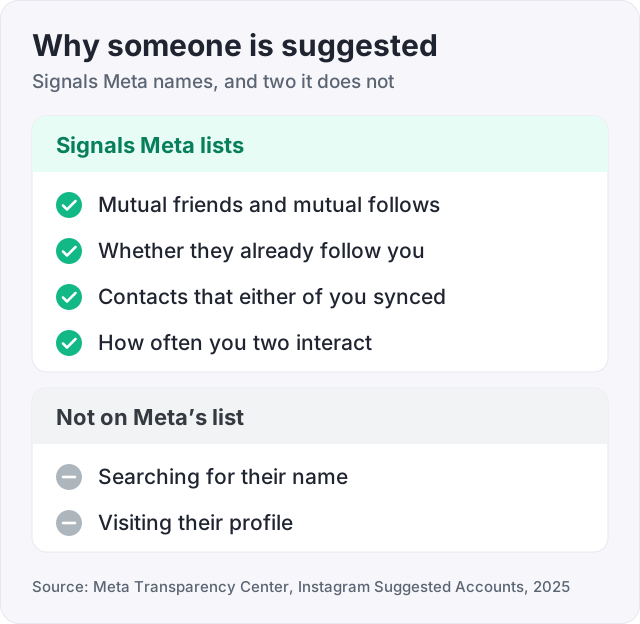
There is no sign that it does. Meta publishes the signals behind Instagram’s Suggested accounts. Searches and profile visits are not on that list (Meta Transparency Center, 2025).
What the list does include is about real links between two accounts.
So when someone shows up in your Suggested for you, the likely reason is plain. You share friends, you are in each other’s contacts, or they already follow you. It does not mean they looked you up. Meta says its models and signals change often, so treat this as the current picture, not a promise.
One more detail helps. Meta filters blocked and deactivated accounts out of suggestions (Meta Transparency Center, 2025). If someone you expected never appears, our guide on how to know if someone blocked you on Instagram can help you check.
You can also keep your account out of suggestions on other people’s profiles. This works on the web only. On instagram.com, open your profile, click Edit profile, and turn off Show account suggestions on profiles (Instagram Help). Once it is off, your profile stops showing suggestions, and you stop appearing as a suggestion on other profiles.
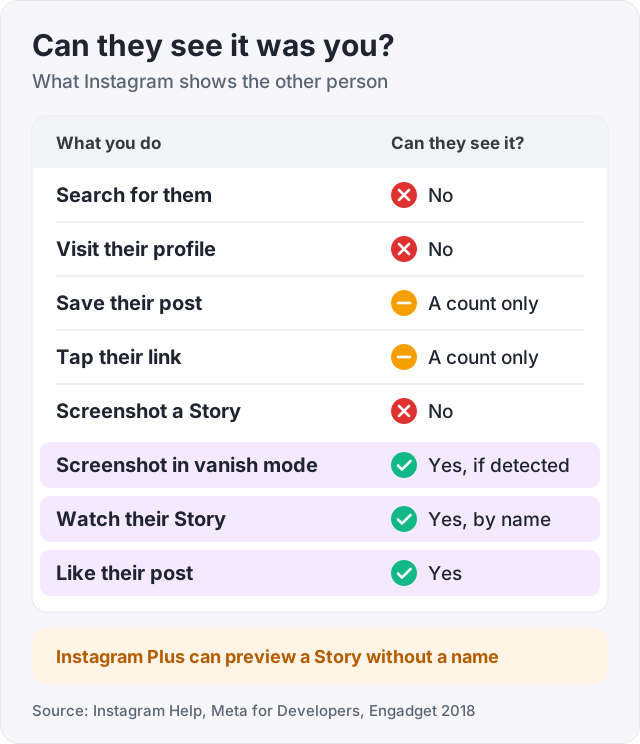
Here is everything in one place. The first column is something you do. The second says whether the other person can see it was you.
| What you do | Can they see it was you? | Source |
|---|---|---|
| Search for them | No | Instagram Help |
| Visit their profile | No | Instagram Help |
| Watch their Reel or video | No. They see a view count | Instagram Help |
| Save their post | No. They see a count of saves | Instagram Help |
| Tap the link in their bio or Story | No. They see a count of taps | Instagram Help, Meta for Developers |
| Screenshot their post, Reel or Story | No | Engadget, 2018 |
| Screenshot a chat in vanish mode | Yes, if Instagram detects it | Instagram Help |
| Watch their Story | Yes, by name. Instagram Plus subscribers can preview without it | Instagram Help |
| Like their post | Yes. The person who posted always can | Instagram Help |
| Be online | Yes, if your Activity Status is on | Instagram Help |
The last two rows have settings. A setting called Likes you’ve made decides who else sees what you like. The person who posted can always see it (Instagram Help). Activity Status shows when you were last active to people you follow and anyone you message. You can turn it off under Messages and story replies (Instagram Help).
No. Instagram Help says only you can see the posts you have saved. The person who posted cannot tell that you saved it. Your saves sit in a private section of your profile.
The owner gets a number, not a name. Saves count as interactions in their Insights (Instagram Help). So they can see how many times a post was saved, but never by whom.
There is one exception. A collaborative collection is a shared folder you make with friends in a chat. Everyone in that chat can see the posts in it and add more (Instagram Help). Even then, the person who posted is not told.
To find your own saves, go to your profile, tap Menu, and tap Saved.
Instagram does not tell anyone when you screenshot a post, a Reel, a profile or a Story. It tested Story screenshot alerts in 2018 and then ended the test (Engadget, 2018).
Private chats have two special cases.
Instagram’s help pages describe screenshot alerts only for those two cases. Ordinary chats are not on the list.
Tip: if a photo matters, do not send it as a disappearing message to someone you do not trust. A camera pointed at a screen beats every alert.
Your Story is the one big place your name shows. When you watch someone’s Story, they can tell you saw it (Instagram Help). Your username stays in their viewer list for up to 48 hours after they post it.
There is one new exception. Instagram Plus is a paid plan with a feature called Story Preview. It lets a subscriber peek at a Story without appearing in the viewer list (Instagram). Instagram Help confirms those previews are left out of the list.
Profile visits are the opposite. No one gets a list of who looked. If you care about the order of names in a viewer list, our guide on Instagram Story views order explains what it does and does not mean.
You can’t. Instagram shows how many times a link was tapped, never who tapped it. That is true for the link in your bio and for link stickers in Stories.
Here is where the counts live:
Insights work on any public account, personal or professional (Instagram Help). Open a post or Story and tap View insights. For your whole account, go to your profile and tap Your dashboard or Professional dashboard. Names vary a little by app version.
The same rule protects you. When you tap someone else’s link, they get a count, not your name. Links you open inside Instagram are saved to Link history in your own Your activity page for 30 days, and you can clear them there (Instagram Help).
Watch out: apps that promise to show who clicked your link, viewed your profile or searched for you usually want your Instagram login. Instagram’s Terms of Use ban collecting other people’s login details. Instagram never gives out those names, so the app cannot have them either.
Clearing takes four taps (Instagram Help).
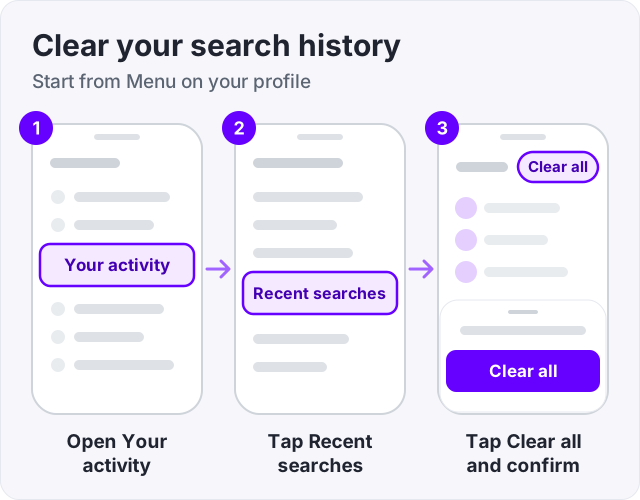
To remove one search, tap Clear next to it instead. Some accounts see these settings in Accounts Centre. There, tap Your information and permissions, then Search history (Instagram Help). Menus move between app versions, so look for those words if yours looks different.
Clearing is not forever. Instagram says a search you clear can come back after you search for it again.
Instagram does not label any follower as bought. But your follower count shows to everyone, even on a private account (Instagram Help). On a public account, anyone can also open your followers list and look at who is there. Our guide on how to hide followers on Instagram explains why no setting changes that. So people cannot see a purchase, but they can judge the accounts.
That is why quality matters. Our guide on how to check for fake Instagram followers shows what people look for. Instagram followers from GetLikes need only your public username, never a password, and start at $3.95 for 100. They raise the number on your profile. They do not like, comment or watch your Stories.
If you want to watch any public count without logging in, use our free Instagram follower counter.
No. Instagram has no alert or list that tells a person who searched for them. Your searches are saved to Recent searches in your own Your activity page, so you can find accounts again (Instagram Help). Opening their profile and scrolling their posts leaves no trace either. They only see your name if you watch their Story, like, comment or follow.
No. Meta publishes the signals behind Instagram's Suggested accounts, and profile visits and searches are not among them (Meta Transparency Center). The signals it names include mutual friends, mutual follows, synced contacts, how much two accounts interact, and whether one already follows the other. A suggestion usually means you share people, not that someone looked you up.
Only through your Stories. When someone watches your Story, their username shows in your viewer list for 48 hours after you post it (Instagram Help). Instagram Plus subscribers can preview a Story without showing up there. Profile visits, post views and Reel views give you counts only. No app can show the names, because Instagram never releases them.
Yes, for their profile, posts and Reels. None of those tell the owner who looked. Their Story is different. Watching it puts your name in their viewer list (Instagram Help). If you like, comment or follow, they see that too. And never use an app that asks for your password to view accounts, since Instagram's terms ban collecting logins.
No. Instagram Help says only you can see the posts you have saved, and the person who posted cannot tell you saved it. They may see the total number of saves in their Insights, but not who saved. The one exception is a collaborative collection you share with friends in a chat. Everyone in that chat can see what is in it.
Not for posts, Reels, profiles or Stories. Instagram tested Story screenshot alerts in 2018 and then ended the test (Engadget). Chats have two exceptions. Screenshots of disappearing photos and videos are now blocked, and the sender can see if one was taken. In vanish mode, Instagram says you get a notice if it detects a screenshot (Instagram Help).
No. Instagram shows how many times a link was tapped, never who tapped it. Story Insights count link taps, and profile activity counts taps on the link in your bio (Instagram Help, Meta for Developers). Insights work on any public account, personal or professional. If a tool promises names, ask where it gets them, because Instagram does not share them.
You cannot choose it directly. Meta says the signals include whether you already follow the person and for how long, how many mutual friends and follows you share, and whether you are in each other's synced contacts (Meta Transparency Center). So following someone and sharing friends with them make a suggestion more likely. Searching for them is not on that list.
The facts in this guide come from the places below. We check them again each time the guide is updated.
The services and free tools this guide talks about, with the prices you actually pay.
More Instagram guides from the same team.
Views
Can you see who viewed your Instagram post, Reel or profile? Names show for Stories and Live only. The rest shows counts. Who sees what, format by format.
Likes & engagement
Hide the like count on your posts and Reels in two taps, and use the Likes you've made setting to choose who sees the posts you like. Steps for both.
Views
Only you can see who viewed your Story, and only for 48 hours. Here is what the viewer list order means, why Instagram will not say, and how highlights work.