
Algorithm & timing
How to go viral on TikTok (and what viral means)
How to go viral on TikTok, per TikTok itself: how the For You feed tests each video, what you control in the first 3 seconds, and what viral really means.
TikTok · Algorithm & timing
How to reset TikTok feed recommendations with Refresh your For You feed: the exact taps, what it keeps, and how to retrain your FYP after.
To reset your TikTok feed, tap Profile, then the Menu ☰ button, then Settings and privacy. Tap Content preferences, then Refresh your For You feed, and follow the steps on the screen (TikTok Help).
That button is TikTok’s own way to reset your FYP on TikTok. It is also what people mean when they ask how to reset the TikTok algorithm. After a refresh, TikTok shows you some popular videos. Your likes and comments on those videos start to shape a new feed.
Only the For You feed changes. Your follows, your profile and your inbox stay as they are. Below is how to reset TikTok feed recommendations step by step, what the refresh keeps, and smaller tools that steer the feed. There is also an honest section for creators who hope a reset will fix their views.
TikTok added the refresh button in March 2023 (TikTok Newsroom). There are two ways to reach it.
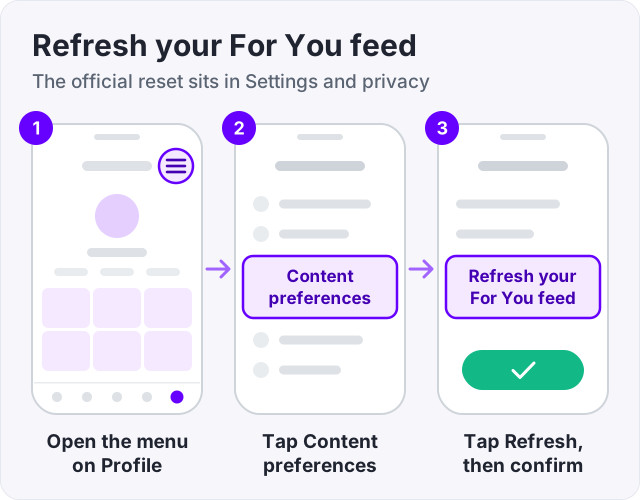
This path only works in select regions (TikTok Help).
Once you refresh, it cannot be undone (TikTok Help). Go back to the For You feed. It now shows some popular videos. TikTok says it is like seeing the feed as if you just signed up (TikTok Newsroom). From here it learns from you again.
| Item | After a refresh |
|---|---|
| For You feed recommendations | Reset, starting with popular videos |
| Following feed | Not affected |
| Your profile | Not affected |
| Inbox | Not affected |
| Ads | Not affected |
| Accounts you follow | Kept |
| Settings you chose, such as keyword filters | Kept |
| Undo | Not possible |
Sources for the table: TikTok Help, Refresh your For You feed, and the TikTok Newsroom post that announced it.
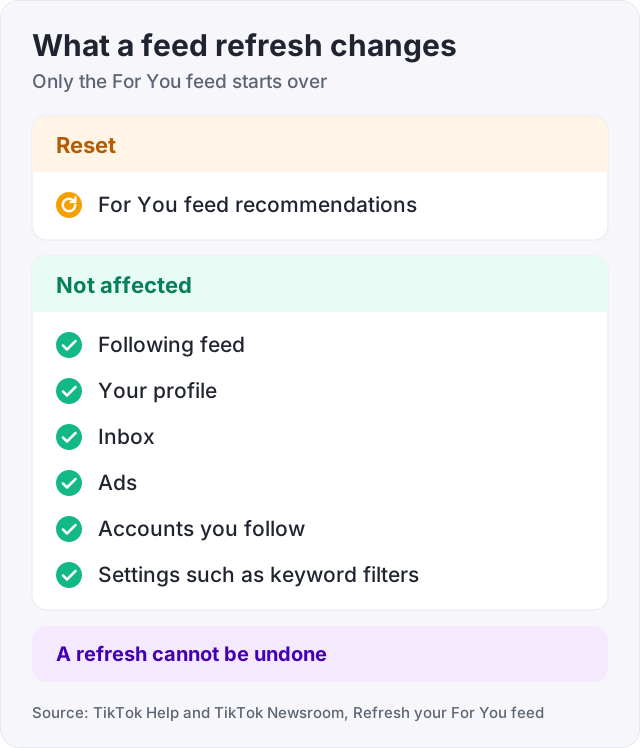
Your liked videos live on your profile, so a refresh does not touch them. Nothing is deleted. Only the mix of videos in For You starts over.
One thing to know. The feed does not stay blank for long. It starts to learn from the first video you like or comment on. So the useful part is not the reset itself. It is what you do in the hour after.
Refresh your For You feed is the fullest reset TikTok offers. But two things carry over from before.
First, your settings stay. A refresh does not override settings you already chose, such as keyword filters (TikTok Newsroom). Second, the accounts you follow stay, so their videos still fill your Following feed.
For a truly clean start, do three more things after the refresh:
In some regions, such as the EU, you can also turn off personalized feeds. Then the For You feed becomes a Popular feed of videos from your region and around the world (TikTok Help).
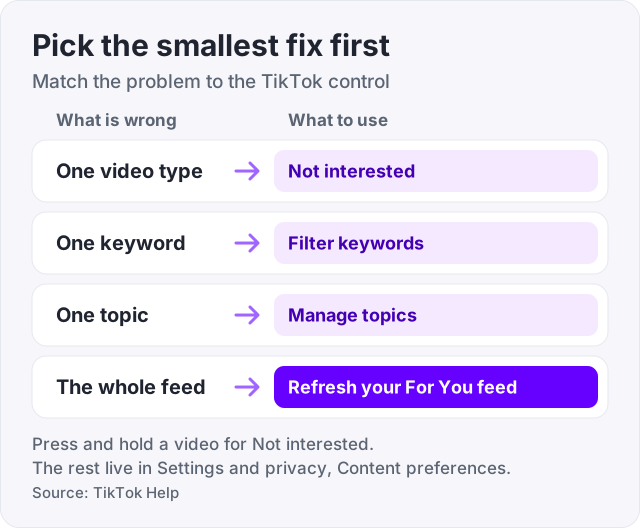
A full refresh is a big step. If most of your feed is fine and one kind of video keeps showing up, use these smaller tools instead.
Not interested. Press and hold a video and tap Not interested. TikTok will show you fewer posts like it (TikTok Help). It can also skip future videos from one creator or with one sound (TikTok Newsroom).
Filter keywords. Go to Settings and privacy, then Content preferences, then Filter keywords. Tap Add keyword, type a word or hashtag, pick the feeds, and tap Save. You can add up to 100 keywords. Turn on Smart filter to also catch similar words (TikTok Help).
Manage topics. In Content preferences, tap Manage topics. Move the slider for each topic, such as sports or food, then tap Save. This only changes the For You feed. TikTok says it may take some time to show up (TikTok Help).
Like what you want more of. TikTok says liking a video helps it suggest similar ones (TikTok Help).
| Control | Where | Best for |
|---|---|---|
| Not interested | Press and hold a video | One video type, creator or sound |
| Filter keywords | Settings and privacy, Content preferences | A word or hashtag you never want to see |
| Manage topics | Settings and privacy, Content preferences | More or less of a whole topic |
| Refresh your For You feed | Settings and privacy, Content preferences | A feed that has gone completely wrong |
TikTok’s help page lists what shapes the For You feed. The biggest part is what you do. That means the videos you like, share, comment on, watch in full or skip. TikTok says these actions, including watch time, usually count more than your device or language settings (TikTok Help).
TikTok has also said that finishing a longer video is a strong sign of interest. Following accounts and exploring hashtags and sounds help shape the feed too (TikTok Newsroom).
So, in the first hour after a refresh, be deliberate. Search is a fast way in. Type a topic you want, open the results, and watch a few videos to the end.
Do this for a few sessions and the feed settles. It will never be perfect. TikTok mixes in videos outside your interests on purpose, to help you find new things. It also tries not to show you videos you have already seen (TikTok Help).
Tip: do not hate-watch after a refresh. Watching a video to the end is one of the signals the feed learns from. If you do not like it, skip it.
There is no button that resets a whole TikTok account. What you can do depends on what you want to fix.
If you delete your old account, TikTok deactivates it for 30 days, then erases it for good. After those 30 days, you can use the same email for a new account (TikTok Help). For most people, a feed refresh is enough. A new account starts with no followers and no videos.
Many people search for a way to reset the TikTok algorithm because their videos stopped getting views. A feed refresh will not help with that. It only changes what you see as a viewer. TikTok says your profile is not affected (TikTok Help).
On the creator side, there is nothing to reset. TikTok says follower count and past hit videos are not direct factors in its recommendation system (TikTok Newsroom). So past results do not directly decide how your next video is shown. TikTok ranks each video mostly on how viewers interact with it (TikTok Help).
There is one real exception. If you keep posting videos that are not suitable for the For You feed, TikTok can stop recommending the account. You will see an Ineligible for recommendation notice on your profile and in your inbox, and you can appeal from there (TikTok Help).
If that is not you, the fix is in the next video, not in a setting. Our guide on how to go viral on TikTok explains what the first seconds have to do. If views are the problem, start with how to get more views on TikTok. It also helps to know what counts as a view on TikTok.
Watch out: a brand new video with 0 views may still be under review. TikTok says new uploads and videos under review may not be recommended yet (TikTok Newsroom). A refresh of your own feed will not change that.
We sell TikTok followers, 100 for $3.95, and TikTok views, 1,000 for $4.95. Neither has anything to do with your feed as a viewer. A fresh feed also says nothing about your account as a creator.
What bought followers and views do: make a profile look established when strangers arrive. What they do not do: change how TikTok ranks your videos. That still runs on how viewers interact with each one. If your videos are not getting views, fix the video first. If the profile looks empty once people arrive, that is the part we can help with. Orders need only a public username, never a password.
The refresh is free and keeps your follows. The trick is to treat the hour after it like the first hour of a new account, because to the feed, that is what it is. The same idea on Instagram is in our guide on how to reset the Instagram algorithm.
In the TikTok app, tap Profile, then the Menu button, then Settings and privacy. Tap Content preferences, then Refresh your For You feed, and follow the steps on the screen (TikTok Help). In some regions you can also start from a video. Press and hold it or tap Share, then tap Why this video, then Adjust your For You.
Use the Refresh your For You feed button. It sits in Settings and privacy, under Content preferences. After you confirm, TikTok shows you some popular videos. What you like and comment on next helps it rebuild your recommendations (TikTok Help).
No. TikTok says a refresh only affects the For You feed. Your Following feed, profile, inbox and ads are not affected (TikTok Help). The accounts you follow stay, and so do settings you already chose, such as keyword filters (TikTok Newsroom). Your liked videos sit on your profile, so they stay too.
No. The TikTok help page says that once you refresh the feed, it cannot be undone. If you refresh by mistake, go back to liking, sharing and finishing the videos you enjoy. The For You feed learns from those signals again, the same way it did the first time.
First, update the TikTok app. TikTok says it tests some features with a small number of users, so a feature may not reach you yet (TikTok Help). The path that starts from a video, through Why this video, only works in select regions. Try the Settings and privacy path instead.
TikTok does not give a time. After a refresh it shows you popular videos, and your new likes and comments start to reshape the feed (TikTok Help). It keeps learning for as long as you use the app. So the first few sessions matter most. Finish what you like and skip what you do not.
No. A refresh only changes what you see in your own For You feed. TikTok says follower count and past hit videos are not direct factors in its recommendation system (TikTok Newsroom). So there is nothing to reset. TikTok ranks each video mostly on how viewers interact with it (TikTok Help).
The facts in this guide come from the places below. We check them again each time the guide is updated.
The services and free tools this guide talks about, with the prices you actually pay.
More TikTok guides from the same team.
Algorithm & timing
How to go viral on TikTok, per TikTok itself: how the For You feed tests each video, what you control in the first 3 seconds, and what viral really means.
Views
Every TikTok video gets a small test audience first. Here is what makes that group watch on, why views sit at 0 or stay low, and what to do after posting.
Algorithm & timing
How to reset the Instagram algorithm with the built-in button under Content preferences: what the reset clears, what it keeps, and what to do next.