

Algorithm & timing
How to reset your TikTok feed, FYP and algorithm
How to reset TikTok feed recommendations with Refresh your For You feed: the exact taps, what it keeps, and how to retrain your FYP after.
TikTok · Algorithm & timing
What does FYP mean? It stands for For You page, the main TikTok feed. See how it picks videos, what #fyp really does, and why some videos never get there.
FYP means For You page. It is TikTok’s main feed, the one you see first when you open the app. TikTok fills it with videos it thinks you will enjoy, based on what you watch and do (TikTok Help).
TikTok’s own pages call it the For You feed, or FYF for short. People shortened it to FYP, and the hashtag #fyp soon followed.
So what does FYP mean in practice? Below is how the feed picks videos and what #fyp does and does not do. You will also see why some videos never reach For You, and how it differs from the Following and Friends feeds.
FYP stands for For You page. Dictionary.com says people have used the short form since at least 2018. It spread fast when TikTok took off in the summer of 2019.
TikTok’s Help Center calls the same thing the For You feed. Its Community Guidelines shorten that to FYF. All of these names point to one feed.
| Term | What it means | Who uses it |
|---|---|---|
| FYP | For You page | People, in captions, comments and texts |
| For You feed | The same feed | TikTok Help |
| FYF | For You feed | TikTok Community Guidelines |
| #fyp | A hashtag people add, hoping to reach For You | Creators and some viewers |
In a text or a comment, FYP still means the For You page. “This was on my FYP” means TikTok showed the video to that person without them looking for it.
Dictionary.com says the short form is typically only used on TikTok, because the For You page is a TikTok feature. Some viewers also comment with #fyp under a video, hoping to help it spread (Dictionary.com). TikTok’s help pages do not say a comment like that does anything special.
It is the first feed you see when you open TikTok (TikTok Help). The more you use the app, the more that feed reflects what you like.
Some other feeds, such as LIVE and the optional STEM feed, sit at the top of the screen (TikTok Help). There is no single For You page that everyone shares. TikTok says feeds like For You stay unique to each person, even when some people see the same video.
TikTok ranks videos by how likely you are to enjoy each one. It looks at three groups of signals. For most people, what they do in the app counts the most (TikTok Help).
| Signal group | Examples TikTok gives | How much it counts |
|---|---|---|
| Your actions | Videos you like, share, comment on, and watch in full or skip. Followers you follow back | The most, for most people |
| Video details | Sounds, hashtags, the number of views, and the country where it was posted | Less than your actions |
| Your settings | Device settings, language, location, time zone and device type | Less than your actions |
TikTok has added more detail over the years. In 2020 it said that finishing a longer video is a strong sign of interest. It also said follower count and past hit videos are not direct factors (TikTok Newsroom).
The feed also mixes things up on purpose. TikTok shows videos from new creators to help you find new interests. It usually does not show you videos you have already seen (TikTok Help).
It learns from people like you, too. Say you and another person liked the same three videos. TikTok may then show you other videos that person liked (TikTok Help).
New accounts start in a simple way. TikTok may ask you to pick interests, such as pets or travel. If you skip that step, it starts with recent videos that are popular with others (TikTok Help).
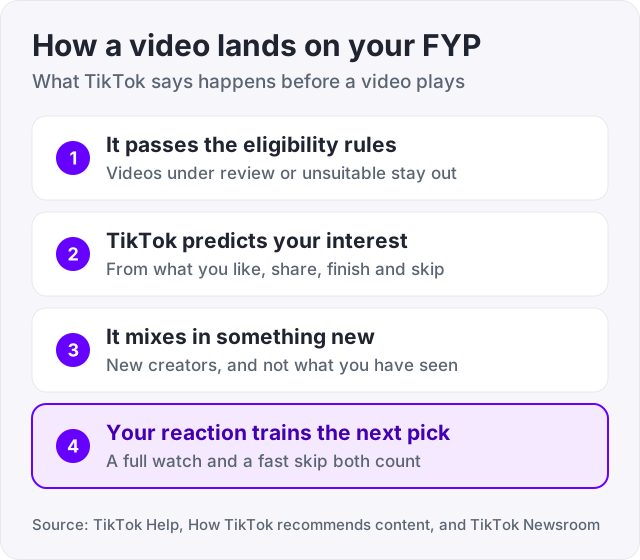
TikTok will tell you. Press and hold a post, then tap Why this post (TikTok Help). Some versions of the app call it Why this video.
The reasons TikTok gives are short and plain. Its help page lists examples like these:
From the same screen you can tap Adjust your For You to steer the feed. If you just refreshed your feed, expect popular videos for a while. TikTok uses them to learn your taste again (TikTok Help).
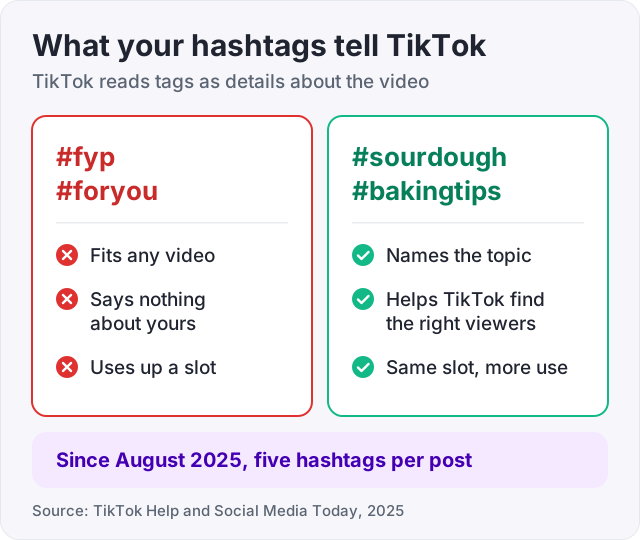
No. Adding #fyp does not put a video on the For You page. TikTok has never said the tag does anything special, and it tells TikTok nothing about what the video shows.
Here is why. TikTok does read hashtags. It lists them as video details, next to sounds (TikTok Help). But a hashtag only helps when it says what the video is about. Tags like #fyp, #foryou and #foryoupage fit any video, so they describe none.
There is a cost as well. Social Media Today reported in August 2025 that TikTok had started limiting posts to five hashtags. A #fyp tag uses one of those five slots.
The habit is old. Dictionary.com wrote in 2020 that creators add #fyp, #foryou and #foryoupage hoping to land on more feeds. TikTok has never backed that up. For tags that describe your video, try our free TikTok hashtag generator. It builds niche and topic tags from a short description of the video.
Tip: spend your five hashtags on words a stranger would type into search. A tag like #sourdoughstarter tells TikTok what the video is about. #fyp does not.
TikTok keeps some videos out of For You, even when they are allowed on the app. Its rule is that the feed must suit a broad audience, from teenagers to great grandparents (TikTok Community Guidelines).
TikTok spreads the details across its Community Guidelines, in sections marked FYF Ineligible. The current version was released on August 25, 2026. Here are examples from it, plus two older rules from TikTok’s newsroom.
| What keeps a video off For You | Where TikTok says it |
|---|---|
| Reused or unoriginal clips with nothing new added | Integrity and Authenticity |
| Posts that push people to give gifts or inflate likes or follows | Integrity and Authenticity |
| Misinformation that may cause moderate harm, or unverified claims about a crisis | Integrity and Authenticity |
| Lower severity degrading behavior | Safety and Civility |
| Activities that may lead to moderate physical harm | Mental and Behavioral Health |
| Sexually suggestive behavior involving adults | Sensitive and Mature Themes |
| Videos just uploaded or still under review | TikTok Newsroom, 2020 |
| Duplicated content and spam | TikTok Newsroom, 2020 |
An ineligible video is not deleted. People can still find it through search or on your profile (TikTok Community Guidelines). And TikTok says low views on their own do not mean a video broke a rule.
To check a post, turn on analytics in TikTok Studio first. Then open the post and tap More insights or the More options button, then Analytics. If the post is ineligible, a notice shows there. You can read the reason and tap Appeal (TikTok Help).
If you keep posting videos that do not fit, the whole account can become ineligible for recommendation. TikTok then puts a notice on your profile and in your inbox. You can appeal from either one (TikTok Help).
Watch out: deleting and posting the same video again will not fix this. TikTok said in 2020 that it does not recommend duplicated content (TikTok Newsroom).
There is no switch to flip. TikTok picks from a large pool of eligible videos and ranks them for each viewer (TikTok Help). You control two things. Your video has to be eligible, and people have to want to keep watching it.
Here is what TikTok’s own pages point to:
Our guide on how to go viral on TikTok covers the first few seconds of a video in more depth.
Tap Profile, the Menu ☰ button, then Settings and privacy. Tap Content preferences, then Refresh your For You feed, and follow the steps (TikTok Help). A refresh cannot be undone, and only the For You feed changes.
Smaller fixes are often better. Tap Not interested on one video, add a word to Filter keywords, or use Manage topics for a whole topic. Our guide on how to reset the TikTok algorithm walks through each one and lists what a refresh keeps.
The For You page shows videos from anyone, picked for you. The Following feed shows creators you follow. The Friends tab shows friends, accounts you follow, and in some regions people you may know (TikTok Help).
| Feed | What is in it | Good to know |
|---|---|---|
| For You | Videos from anyone that TikTok thinks you will enjoy | Shaped most by what you like, share, comment on, finish and skip |
| Following | Posts from creators you follow | Shaped by visits to their profiles and what you watch and like |
| Friends | Followers you follow back, accounts you follow, and suggested accounts in some regions | Some people see Discover in its place |
| LIVE | LIVE videos | Shaped by what you watch, like and comment on, and Gifts sent |
| STEM | Science, tech, engineering and math videos checked by outside partners | Optional. Turn it on in Content preferences |
| Nearby | Local posts about food, travel and events | Only for people 18 and older, and not in every region |
Sources for the table: TikTok Help pages on recommendations, the Friends Tab, the STEM feed and the Nearby feed.
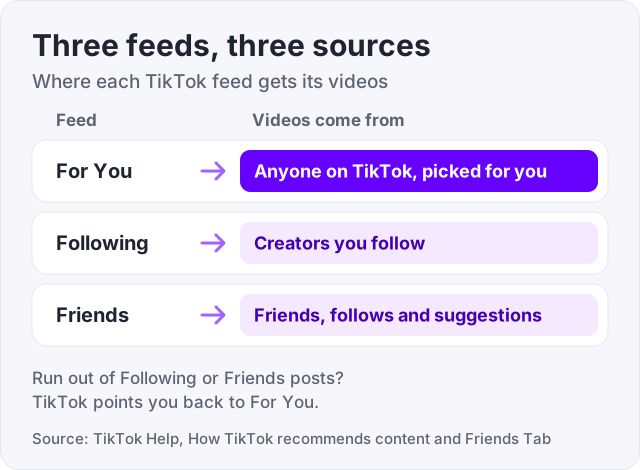
Two more details trip people up. If you run out of posts in Following or Friends, TikTok points you back to For You. And in the EU and Kazakhstan you can turn off personalized feeds. For You then becomes a Popular feed of videos from your region and around the world (TikTok Help).
Bought views raise the public count on a video. They do not put a video on the For You page by themselves.
We sell TikTok views, 1,000 for $4.95, so here is the honest version. TikTok does list the number of views as one video detail. But it says viewers’ actions, such as time spent watching, usually count for more (TikTok Help). Views from a promotion are not people who found your video on their own, so do not expect them to lift watch time. TikTok’s rules also say it removes inflated likes, followers and views it finds (TikTok Community Guidelines).
What a view count can do is make a profile look active when strangers arrive from a real hit. The For You feed decides the rest. For how the public number is counted, see what counts as a view on TikTok. If your views are stuck low, start with how to get more views on TikTok.
FYP is short for For You page, the main TikTok feed. In a text or a comment it still means that feed. If a friend says a video was on their FYP, TikTok showed it to them without them searching for it. Dictionary.com says the short form is typically only used on TikTok, because the For You page is a TikTok feature.
FYF stands for For You feed. It is TikTok's own name for the same feed people call the FYP. TikTok's Community Guidelines use FYF all the way through, for example in the sections that list content as FYF Ineligible. So FYP, FYF and For You feed all point to one thing.
It is the first feed you see when you open the TikTok app (TikTok Help). The more you use TikTok, the more it reflects your interests. Some other feeds, such as LIVE and the optional STEM feed, sit at the top of the screen. Every person's For You feed is different, even when some people see the same video.
Usually to help a video spread. Dictionary.com notes that some viewers comment with #fyp and similar tags hoping to boost a video. TikTok has never said a comment with those letters does anything special. A comment is still a sign of interest from the person who wrote it, the same as any other comment.
TikTok calls it the For You feed, and its Community Guidelines shorten that to FYF. Many people just say For You. TikTok uses that short name in its own menus too, in options such as Why this video, Adjust your For You and Refresh your For You feed.
There is no switch. TikTok picks For You videos by predicting who will enjoy them. It says finishing a longer video is a strong sign of interest, and follower count is not a direct factor (TikTok Newsroom). Post original videos that suit a broad audience, open on the point, and give a new upload time to clear review.
No. TikTok reads hashtags as content information, but #fyp fits every video, so it describes none. TikTok has never said the tag helps. Social Media Today reported in August 2025 that TikTok had started limiting posts to five hashtags, so #fyp also takes a slot you could give to a tag that says what the video is about.
Only in some regions. TikTok Help says that in the EU and Kazakhstan you can turn off personalized feeds. The For You feed then becomes a Popular feed of videos from your region and around the world. Elsewhere you cannot turn it off, but you can refresh it or steer it with Not interested, Filter keywords and Manage topics.
The facts in this guide come from the places below. We check them again each time the guide is updated.
The services and free tools this guide talks about, with the prices you actually pay.
More TikTok guides from the same team.
Algorithm & timing
How to reset TikTok feed recommendations with Refresh your For You feed: the exact taps, what it keeps, and how to retrain your FYP after.
Algorithm & timing
How to go viral on TikTok, per TikTok itself: how the For You feed tests each video, what you control in the first 3 seconds, and what viral really means.
Views
TikTok counts a view the moment a video starts playing, loops included. Qualified views, the number that pays, follow a stricter rule. Here are both.