
Algorithm & timing
Instagram shadowban: how to check and how to fix it
Instagram does not use the word shadowban. What people mean is a post not eligible for recommendation. Here is the built-in check, the causes, and the fix.
Instagram · Algorithm & timing
How to reset the Instagram algorithm with the built-in button under Content preferences: what the reset clears, what it keeps, and what to do next.
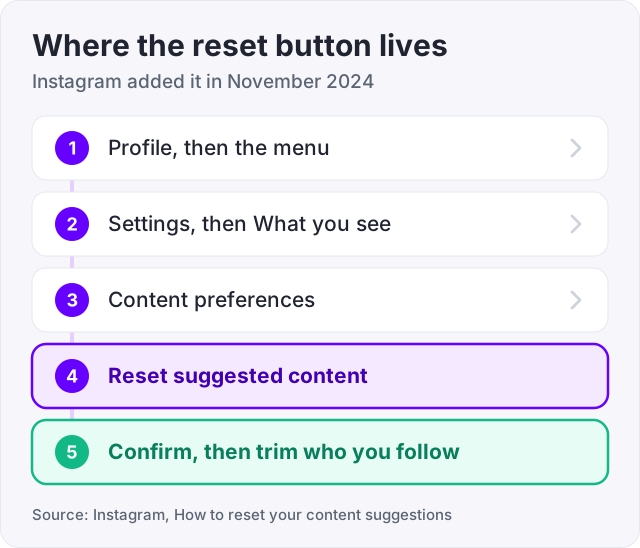
Instagram has a real reset button. Open Settings, tap What you see, tap Content preferences, then tap Reset suggested content. Instagram added it in November 2024 (Meta Newsroom).
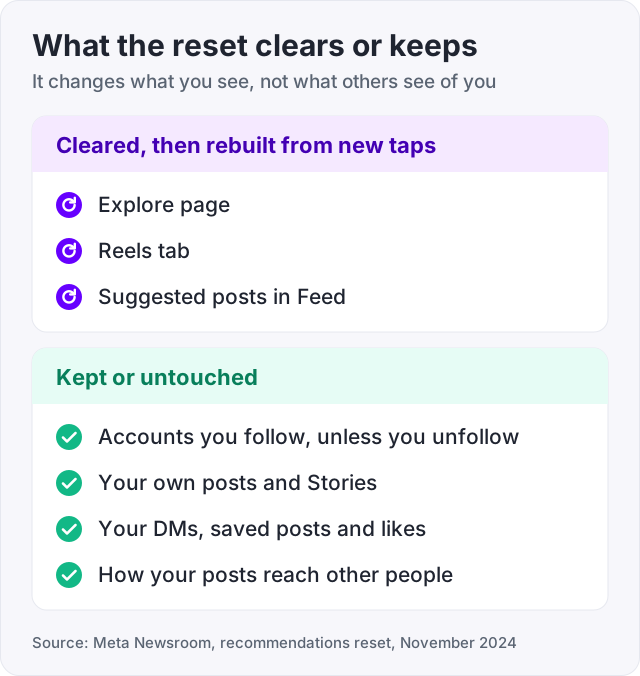
The reset clears your recommendations in Explore, Reels and Feed. From that moment Instagram starts learning again from whatever you tap, like, save and watch next. It does not unfollow anyone and it does not touch your own posts.
Here is how to do it, what it clears, the lighter fixes if you do not want a full reset, and what a reset will not do.
These steps come from Instagram’s own announcement (Instagram, How to reset your content suggestions).
The reset is available to everyone, including teen accounts. Once it runs, your Explore page and Reels tab will look generic for a day or two. That is normal. They rebuild from your new taps.
Tip: do the unfollow step. The accounts you follow are the one part of Feed the reset does not clear, and they still shape what Instagram thinks you like.
The word “reset” makes people nervous. Here is exactly what changes.
| Part of Instagram | After the reset |
|---|---|
| Explore page | Cleared, rebuilds from new activity |
| Reels tab | Cleared, rebuilds from new activity |
| Suggested posts in Feed | Cleared, rebuilds from new activity |
| Accounts you follow | Kept, unless you unfollow them in the reset flow |
| Your own posts and Stories | Untouched |
| Your DMs, saved posts, likes | Untouched |
| How your posts reach other people | Unchanged |
That last row matters. The reset changes what you see. It does nothing to what other people see of you. If your reach dropped, this is the wrong tool. Our guide on the Instagram shadowban covers the right one.
There is no single Instagram algorithm. Instagram has said so in plain words (Instagram ranking explained). Feed, Stories, Explore and Reels each have their own ranking, tuned to how people use that part of the app.
Explore and Reels are mostly posts from accounts you do not follow. Instagram picks them by looking at what you have interacted with before. The signals it names are:
So when Explore fills up with something you do not want, it is because you tapped on it. One late-night scroll of a topic can shape a week of suggestions. The reset wipes that history and lets you start over.
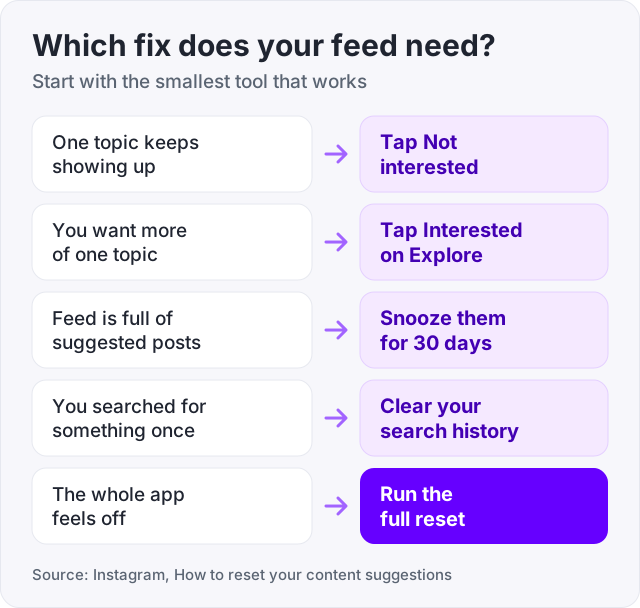
A full reset is blunt. Instagram also gives you smaller tools, and they are enough for most people (Instagram, How to reset your content suggestions).
Not interested. Tap the three dots on any post or Reel and choose Not interested. Instagram shows you less like it. Do this five or six times in a row on a topic and it fades fast.
Interested. On Explore, the three dots also offer Interested. Use it on the posts you want more of.
Snooze suggested posts. In Feed you can snooze suggested posts for 30 days. Your Feed goes back to only accounts you follow for a month.
Hide words. In Settings you can hide posts and comments that contain words you choose.
Clear search history. Go to Settings, then Your activity, then Recent searches, and clear it. Searches feed suggestions too.
If you only want Explore to stop showing one topic, start with Not interested. If the whole app feels off, run the full reset.
The reset is the easy part. The next few days decide what you get. Instagram is watching every tap, so be deliberate.
By the end of the week, Explore should look like the person you meant to be.
The reset is about your view. If you want your own posts to show up in other people’s Explore and Reels, the rules are different, and they come from Instagram’s help page on Explore.
Our guide on how to get more views on Instagram Reels goes deeper on the Reels side of this.
It will not fix your reach. Your reach is decided by how people react to each post, not by your own suggestion history.
It will not clear an Account Status flag. If a post broke the Recommendation Guidelines, you have to remove it or request a review. The reset does not know or care.
It will not make Instagram show you only accounts you follow forever. Suggested posts come back. Snooze them for 30 days if you want a break, then snooze again.
And it will not put your posts on anyone else’s Explore page. Nobody can buy that. Instagram picks Explore posts by behaviour, one viewer at a time.
We sell Instagram Reels views from $2.95 and Instagram likes from $2.95, so here is the honest line. Bought views and likes change how a post looks to the human who lands on it. A Reel with 5,000 views reads as worth a tap. A Reel with 12 does not.
They do not change the ranking. Instagram decides who sees a post next by how those viewers react, and a bought view is not a reaction. Use them to make a post look alive, then let real reactions do the rest, or do not use them at all.
The algorithm is a record of your own taps. Change the taps and it follows.
Use the built-in reset. Open your profile, tap the menu, go to Settings, then What you see, then Content preferences, then Reset suggested content. Instagram clears your Explore, Reels and Feed suggestions and starts again from what you interact with next (Meta Newsroom, November 2024). Explore looks generic for a day or two, then adjusts to your new taps.
Two options. The quick one is to tap the three dots on any post you do not want and choose Not interested. Instagram shows less like it. The full one is the reset in Settings under What you see. After either, tap and save posts you actually want more of, because the next few days of taps decide what Explore becomes.
There is no single algorithm. Feed, Stories, Explore and Reels each have their own ranking (Instagram ranking explained). Explore and Reels mostly show accounts you do not follow, picked from what you have interacted with before. The signals are your activity, details about the post, details about who posted it, and your history with that person.
Open Explore and look at the first two rows. That is a mirror of what you have liked, saved, watched and searched lately. If it looks wrong, the taps that shaped it were yours, or a shared device did them. The fix is the reset plus a few days of deliberate taps on what you actually want.
Make your account public, follow the Recommendation Guidelines, and check Account Status to confirm your posts are eligible to be recommended (Instagram Help on Explore). Then post on one clear topic with keywords in the caption. Shares, saves and watch time are the reactions that push a post to people who do not follow you.
The facts in this guide come from the places below. We check them again each time the guide is updated.
The services and free tools this guide talks about, with the prices you actually pay.
More Instagram guides from the same team.
Algorithm & timing
Instagram does not use the word shadowban. What people mean is a post not eligible for recommendation. Here is the built-in check, the causes, and the fix.

Views
Instagram shows Reels mostly to people who do not follow you and ranks them on watch time and shares. Here is what counts as a view and what moves the number.

Algorithm & timing
How to reset TikTok feed recommendations with Refresh your For You feed: the exact taps, what it keeps, and how to retrain your FYP after.