

Followers
How to make your Instagram public, and why growth needs it
How to make your Instagram public in the app and on the web, the teen rule that can block the switch, and why every growth method needs a public account.
Instagram · Followers
A public Instagram account cannot hide its followers list. Here are the four things you can actually do, with steps, and what each one costs you in growth.
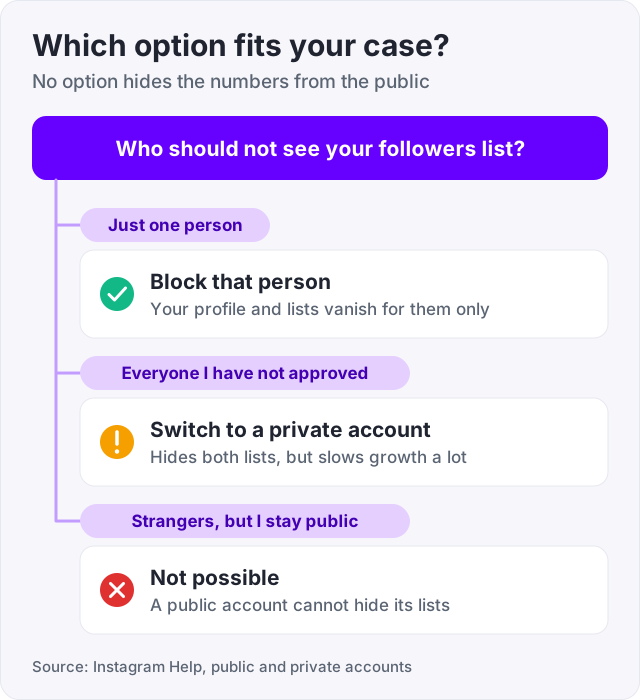
A public Instagram account cannot hide its followers list, its following list, or the numbers on the profile. Instagram has no setting for it (Instagram Help, “Differences between public and private accounts”). Any app or video that says otherwise is wrong, or wants your login.
What you can do is narrower, and it comes with trade-offs. You can make the account private, which hides both lists from everyone you have not approved. You can remove a single follower, block a person, or restrict them.
This guide walks through each of those four options with steps, then explains what going private does to your growth. Because that is where most people get caught out.
| Option | Hides your lists from | Hides the numbers | Slows your growth |
|---|---|---|---|
| Private account | Everyone you have not approved | No | Yes, a lot |
| Remove a follower | That one person, until they follow again | No | No |
| Block a person | That one person, completely | Yes, for them only | No |
| Restrict a person | Nobody | No | No |
Two things are true for all four. None of them hides the numbers from the general public, and none of them changes what your existing approved followers can see.
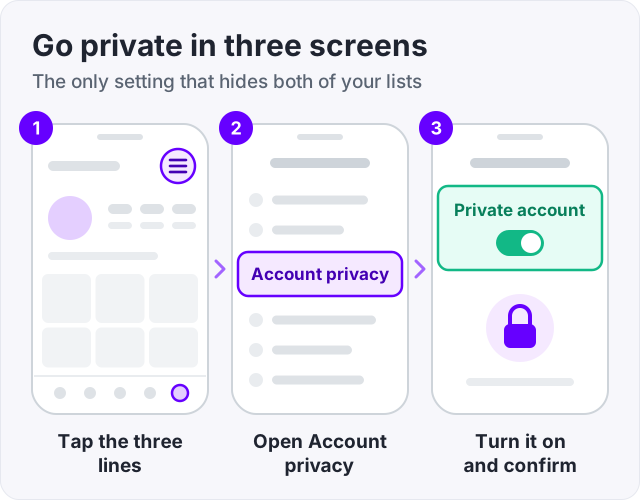
This is the only setting that hides your followers and following lists (Instagram Help, “Make your Instagram account private”). Once you switch, only approved followers can open either list.
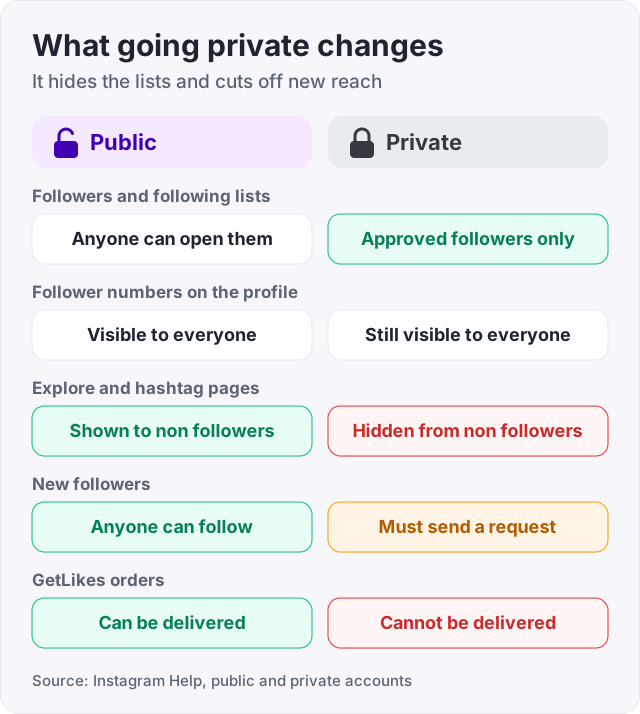
Existing followers keep their access when you go private (Instagram Help). Anyone new has to send a follow request and wait for you to accept it.
The follower and following numbers on your profile stay visible to everyone. Instagram shows counts in full below 10,000 and shortens them above that, so 15,200 shows as 15.2K. Going private does not change either number.
If you are under 18, you are probably private already. Instagram moved accounts for teens to private by default when it introduced Teen Accounts in 2024 (Instagram announcement).
The trade-off: a private account is hidden from people who do not follow you, which is exactly the group you need for growth. Your posts do not show on hashtag pages or in Explore for non-followers (Instagram Help). New people cannot follow you without a request, and most people who see a locked profile just move on.
If the problem is one person, you do not need to lock the whole account. Instagram lets you remove any follower, and it does not tell them.
They stop following you and can no longer see your posts if your account is private. On a public account they can still see everything as a visitor, and they can follow you again. Instagram does not send them a notification when you remove them.
Blocking hides everything from that one person. Your profile, your posts, your Stories, and your followers and following lists all vanish from their view (Instagram Help, “Controlling your visibility”).
Nobody else is affected. Your other followers and visitors see the profile exactly as before.
Restrict is the gentle version. It limits what a person can do on your account without hiding your lists at all (Instagram Help, “Controlling your visibility”).
It limits what that person can do with comments and messages on your account (Instagram Help). Your followers and following lists stay exactly as visible as before.
Use this for someone who is annoying but not worth a block. It does nothing for the “hide my followers” problem.
Watch out: no app can hide your followers list on a public account, because Instagram does not expose a setting for it. Apps that claim to do this ask for your password so they can log in as you. That is the most common way Instagram accounts get stolen.
Threads is a separate app from Meta, and it has its own public or private switch. Changing your Instagram account to private does not change your Threads profile, and the other way round (Instagram Help). If you use both, set each one on its own.
People search this phrase because they want two things at once. A public profile that strangers can find, and a followers list strangers cannot open. Instagram does not offer that combination (Instagram Help, “Differences between public and private accounts”).
The reason is simple. Instagram treats the lists as part of the public profile. If anyone can see your posts, anyone can see who follows you. The only in-between is blocking people one at a time.
So the real question is which matters more. If you want privacy, go private and accept slower growth. If you want growth, stay public and accept that the list is open. Our guide on how to make your Instagram public covers the switch back, and the teen-account rule that sometimes blocks it.
This is the part most “hide followers” guides skip. Instagram recommends posts in Reels and Explore to people who do not follow you yet. A private account is not shown to those people (Instagram Help). That cuts off the main way new followers find an account.
It also blocks delivery services, including ours. Followers, likes and views cannot be delivered to a private account, because the delivery accounts cannot follow or see it without approval. Every order at GetLikes needs a public username, and that is all it needs. We never ask for a password.
If your count is dropping and you are wondering whether to hide it, read why you are losing followers on Instagram first. The cause is usually fixable, and hiding the list fixes nothing.
Most people who search for this are not hiding from one person. They are self-conscious about a low count. The number is public on every profile, so hiding it is off the table. The alternative is to change it.
We sell Instagram followers, 100 for $3.95 and 1,000 for $15.95, delivered over time so the growth looks natural. Here is the honest part. Bought followers are a look, not an audience. They make a new profile look established, and they do not like, comment or buy. Real growth still comes from posting.
The account must be public to receive them. And if you already have a count that looks off, our guide on how to check for fake Instagram followers shows what a bad list looks like from the outside. You can also watch your count without logging in using our free Instagram follower counter.
Tip: before you go private, write down your follower count. Check it again in a month. If it has stalled while it used to grow, that is the cost of the switch, and you can reverse it in the same menu.
No. A public account shows its followers list, its following list, and both numbers to anyone, logged in or not. Instagram Help describes this as the difference between public and private accounts, and there is no switch in between. The only way to hide the lists is to make the account private, which hides them from everyone you have not approved.
Only by going private. Instagram has no friends list setting like Facebook has. Your followers and following lists are visible to everyone on a public account and to approved followers on a private one. If one person is the problem, you can block them, and they will see nothing at all on your profile.
They are private, or the video is misleading. Instagram Help lists exactly one way to hide your lists, and that is the Private account switch under Settings and privacy. Apps and tutorials that promise to hide the list on a public account either do nothing or want your login, which is how accounts get taken over.
Their account is private and you are not an approved follower yet, or they blocked you. On a private account, only approved followers can open the lists, according to Instagram Help. If you sent a follow request and it has not been accepted, the lists stay closed. The numbers on their profile still show either way.
You cannot. The follower and following numbers show on every profile, public or private, according to Instagram Help. Instagram writes counts in full below 10,000 and shortens them above that, so 12,400 shows as 12.4K. If the number bothers you, the choices are to grow it, or to stop looking at it.
Yes, for anyone who is not an approved follower. Once you switch to private, only the people you have accepted can open your following list. People who already followed you before the switch keep their access. Anyone new has to send a request and wait for you to approve it.
The facts in this guide come from the places below. We check them again each time the guide is updated.
The services and free tools this guide talks about, with the prices you actually pay.
More Instagram guides from the same team.
Followers
How to make your Instagram public in the app and on the web, the teen rule that can block the switch, and why every growth method needs a public account.
Followers
Losing Instagram followers is normal, and most of it is not about you. Here are the seven real causes, how to tell which one it is, and what fixes each.
Buying safely
You do not need an app or a password to spot fake Instagram followers. Here are the signs, a five-minute manual check, and how to remove ghost followers.