

Likes & engagement
How to get more likes on Instagram
Most posts get likes from 2 to 4 percent of followers. Here is what a good number looks like, what makes Instagram show a post to more people, and what fails.
Instagram · Likes & engagement
Hide the like count on your posts and Reels in two taps, and learn what Instagram does and does not let you hide about the posts you liked yourself.
To hide the like count on an Instagram post you already shared, open the post, tap the three dots, and tap Hide like count. Visitors then see “Liked by name and others” instead of a number. You still see the full count yourself (Instagram Help).
To hide which posts you liked, there is less to do than you think. Instagram keeps no public list of your likes. The only place your name appears is under a post, and only to people who also follow that account.
This guide covers both meanings, step by step, and then answers the question most people really have. Does hiding likes change how many people see your post? No, and we explain why.
People type “how to hide likes on Instagram” for two different reasons. Sort out which one you mean before you change any setting.
| What you want | Where the setting lives | What others see afterwards |
|---|---|---|
| Hide the like count on your own posts and Reels | The three dots on each post | “Liked by name and others”, no number |
| Hide like counts on posts in your feed | Settings and privacy, What you see | No numbers on other people’s posts, for you only |
| Hide which posts you liked | No public list exists | Your name under a post, only to shared followers |
Instagram rolled out the option to hide like counts to everyone in May 2021, in an update it called “Giving people more control” (Instagram announcement). Before that, the count showed on every post whether you liked it or not.
This is the most common request. It takes about five seconds (Instagram Help, “Hide or unhide like counts”).
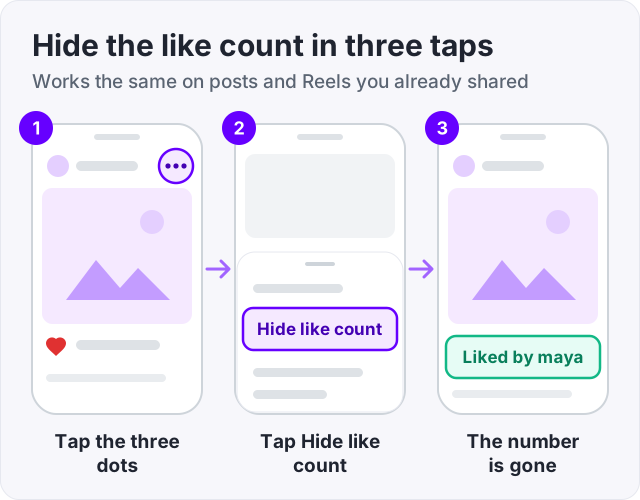
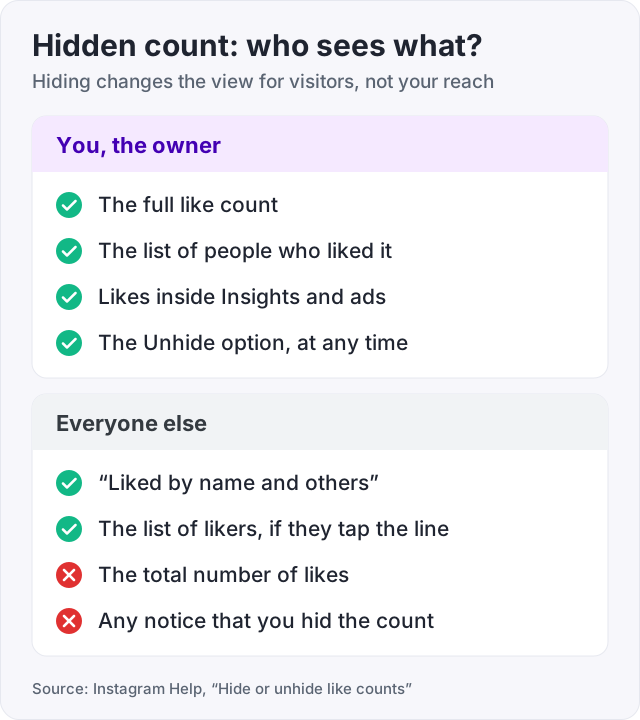
The number vanishes for everyone else at once. You still see it when you open the post yourself, and the names of people who liked it are still there for anyone who taps the “Liked by” line.
The same steps work on a Reel. Open the Reel from your profile grid, tap the three dots, and tap Hide like count. On Reels the toggle also hides the view count from visitors.
Set this before sharing if you want the count hidden from the start (Instagram Help).
This setting applies only to that one post. Instagram does not offer a switch that hides the count on every future post you make. You set it each time.
You can reverse the choice at any time and as often as you want (Instagram Help).
The number returns for everyone right away. Your followers do not get a notification either way.
This one confuses people because it lives in a different menu and changes nothing about your own posts. It hides counts on other people’s posts in your feed, and only on your screen (Instagram Help).
From then on you see “Liked by name and others” on every post, unless the poster left the count visible on purpose. The counts still exist. You just stop seeing them.
Here is the honest version. Instagram has no page where another person can browse every post you liked. Your own list, under Your activity and then Likes, is private to you (Instagram Help, “Manage who can see your likes on content”).
What people can see is smaller than most fear. If a friend follows the same account you do, they may see “Liked by your name” under that account’s post. That is the whole footprint.
Instagram Help has a page called “Manage who can see your likes on content” that covers the controls for likes on posts, Reels and comments. It also notes that the Reels “liked by” line, Notes and Threads each have their own settings. Check that page for the current layout, because Instagram moves these menus often.
If you want a like to leave no trace at all, there is one sure way. Unlike the post. Once you do, your name drops off the “Liked by” line for everyone.
Watch out: apps and websites that promise to make your likes fully private, or to show you who looked at your likes, need your password to do anything. Instagram offers neither feature. Giving your login to a third party is how accounts get stolen.
No. This is the part of the question that matters most, and Instagram has answered it. In its 2023 post on how ranking works, Instagram lists likes as one of the signals its systems use. The signal is the like itself, not the number shown under the post.
So when you hide the count, two things stay the same. Instagram still counts every like your post gets. And the ranking system still uses those likes to decide who sees the post next. What changes is only what a visitor sees when they scroll past.
There is one real effect, and it is about people, not the algorithm. A big visible number is social proof. A stranger who lands on a post with 800 likes treats it differently from one that says “Liked by amir and others”. Hide the count and that nudge is gone. Whether that matters depends on why you post.
If you run a business or creator account, hiding likes changes nothing in your reporting. Instagram Help (“About like counts for businesses”) states that hidden like counts still appear in Insights and in ads reporting. Your team, and anyone you run ads with, keeps the full data.
The same applies to the ranking signals. Instagram treats a like on a hidden-count post exactly like a like on any other post.
We sell Instagram likes from $2.95, and automatic likes from $79.95 a month for 50 likes on every new post for 30 days. Here is how that squares with hiding counts.
Bought likes still count in Insights and in the ranking signals even when the count is hidden. What they lose is the social proof effect. The whole point of a bigger number is that a visitor sees it. If you hide the count, nobody sees it, so buy likes for proof only if you plan to leave counts visible. Our guide on how to get more likes on Instagram covers the free ways to raise the number first.
If you want to test the effect before paying, our free Instagram likes trial gives 50 likes on one post, once per person, with no card and no password.
For the full picture on what stays visible on your profile, including views, see who can see your Instagram views.
Tip: if you hide the count on a post that is doing well, you can unhide it later. Nothing is lost. Many creators hide counts on personal posts and leave them visible on posts they want to show off.
There is no list of posts you liked that other people can open. Your activity list under Settings is private to you. The only place your like shows is under a post, as "Liked by your name and others", and only to people who follow that account too. Instagram Help has a page called "Manage who can see your likes on content" for the controls that exist.
Instagram does not publish a full liked-Reels list to friends. A friend may see "Liked by your name" under a Reel if they also follow the poster. The Reels "liked by" line has its own setting, described in Instagram Help under "Manage who can see your likes on content". If you want a like to vanish completely, unlike the Reel.
You can hide the number, but not the names. When you tap Hide like count on a post, visitors see "Liked by name and others" instead of a total. Anyone can still tap that line and scroll the list of people who liked it. Instagram has no setting that hides the list of likers on a post.
There is no single switch for your own posts. You hide the count one post at a time, or on the sharing screen before each new post goes up. The one global switch is under Settings and privacy, then What you see, then Like and share counts. That switch hides counts on other people's posts in your feed, not on yours.
Open the post, tap the three dots in the top right corner, and tap Unhide like count. The number comes back right away for everyone. You can hide and unhide as often as you like, and Instagram does not tell your followers when you do either one.
No. Instagram has said its ranking systems use likes as a signal whether or not the number is shown. Hiding the count changes what visitors see, not what the ranking counts. Your own view in Insights still shows the full number as well, so nothing about the post's performance is lost.
The facts in this guide come from the places below. We check them again each time the guide is updated.
The services and free tools this guide talks about, with the prices you actually pay.
More Instagram guides from the same team.
Likes & engagement
Most posts get likes from 2 to 4 percent of followers. Here is what a good number looks like, what makes Instagram show a post to more people, and what fails.

Likes & engagement
Instagram auto likes send a set number of likes to every new post for 30 days. Here is how the plan works, what it does not do, and what to check first.

Views
Can you see who viewed your Instagram post, Reel or profile? Names show for Stories and Live only. The rest shows counts. Who sees what, format by format.