

Followers
How to get more subscribers on YouTube (and how to see them)
What makes a viewer press subscribe, where to see your subscribers in YouTube Studio, why that list is short, and what buying subscribers will not do.
YouTube · Followers
YouTube monetization requirements in 2026: ads need 1,000 subscribers and 4,000 watch hours, fan funding needs 500. The exact rules and how to get there.
YouTube monetization requirements come in two levels, and people mix them up all the time.
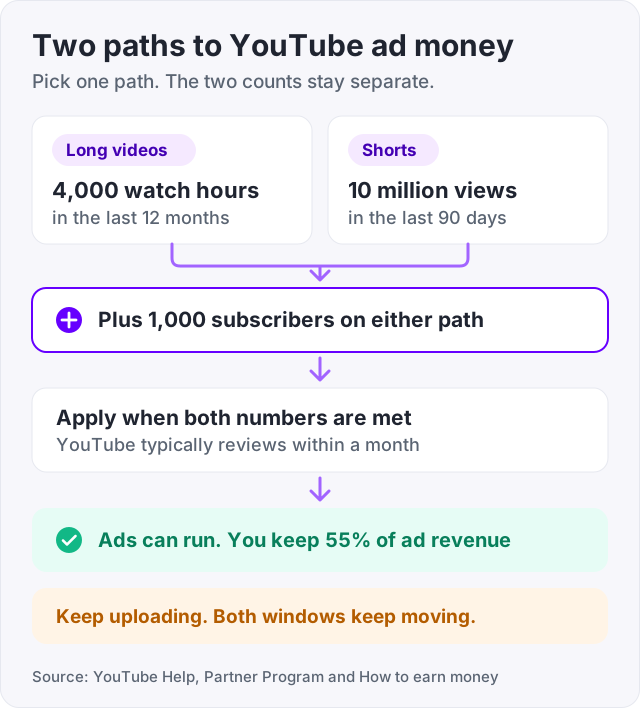
The level that pays you for ads needs 1,000 subscribers (YouTube Help). On top of that you need 4,000 public watch hours in the last 12 months, or 10 million public Shorts views in the last 90 days.
The lower level needs 500 subscribers. It opens fan funding tools like channel memberships and Super Chat, but it does not pay a share of ad money. Google’s search summary lists the 500 number first, so many people think that is where ads start. It is not.
YouTube calls the lower tier “expanded access”. The higher tier is full access to the YouTube Partner Program. Here are the exact numbers from YouTube’s help page on Partner Program eligibility.
| Requirement | Expanded access (fan funding) | Full access (ads and everything) |
|---|---|---|
| Subscribers | 500 | 1,000 |
| Public watch hours, last 12 months | 3,000 | 4,000 |
| Or public Shorts views, last 90 days | 3 million | 10 million |
| What it opens | Memberships, Super Chat, Super Thanks, shopping | Ad revenue, plus every fan funding tool |
You only need one of the two watch thresholds, not both. A channel with 1,000 subscribers and 4,000 watch hours is in. So is a channel with 1,000 subscribers and 10 million Shorts views (YouTube Help).
The expanded access tier has one extra rule. You need 3 valid public uploads in the last 90 days (YouTube Help).
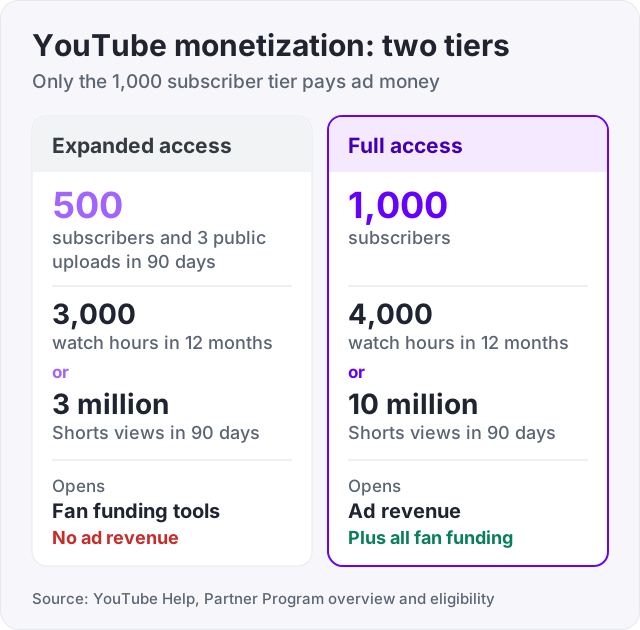
Search for “youtube monetization requirements” and Google’s AI summary puts 500 subscribers and 3 uploads at the top. That is the expanded access tier. It is real, and it is useful, but it is not ad money.
The confusion comes from the word “monetization”. YouTube uses it for both tiers. Fan funding is monetization. Ads are monetization. Only the 1,000-subscriber tier pays you when someone watches an ad on your video (YouTube Help).
So the question “how many subscribers do you need to make money on YouTube” has two honest answers. 500 gets you tools that let fans pay you directly. 1,000 gets you paid by advertisers.
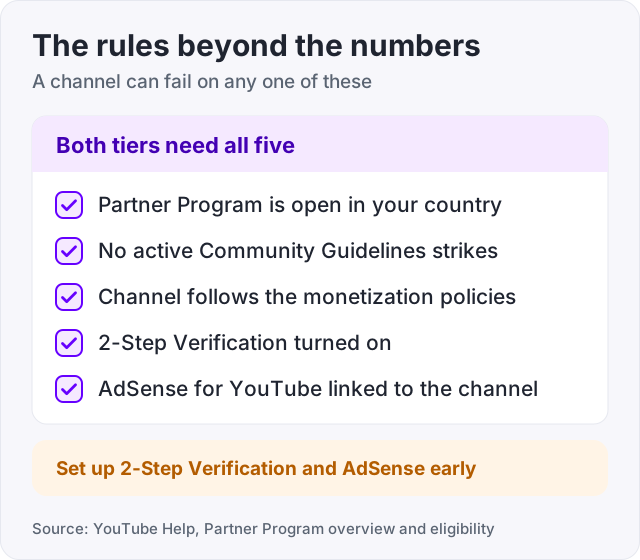
The subscriber and watch numbers get all the attention. YouTube’s help page lists more, and a channel can fail on any one of them.
None of these take long. Do the 2-Step Verification and AdSense steps early, so they are not the thing holding you up on the day you cross 1,000.
Watch hours are the harder half for most channels. Here is what YouTube counts.
The 4,000 hours must be public watch hours from the last 12 months (YouTube Help). Only public videos count. The window moves with you, so hours from 13 months ago drop off as new ones come in.
Watch time from Shorts viewed in the Shorts feed does not count toward the 4,000 hours (YouTube Help). Shorts have their own path, the 10 million views in 90 days.
YouTube also checks that watch time comes from real people, not programs. Its help page on engagement metrics says counts can be adjusted when it finds views that are not legitimate. The hours it uses for eligibility are the ones that pass that check.
One more thing changed on August 24, 2026. From that date the public view count is counted the moment a video starts to play, on every format (YouTube Help). But eligibility still uses “qualified views”, and earnings use “engaged views”. So the number under your video and the number YouTube checks for the Partner Program are not the same. Our guide on what counts as a view on YouTube explains each one.
Most channels reach 1,000 subscribers before they reach 4,000 watch hours. So plan around the hours, and let the subscribers come with them.
For the subscriber side, our guide on how to get more subscribers on YouTube covers what makes a viewer press the button.
Tip: use our free YouTube tag generator to build tags around what your video is about. Tags help search find the video, and search traffic tends to arrive with a question it wants answered, which means longer watch time.
Shorts have their own numbers on both tiers. Full access needs 1,000 subscribers and 10 million public Shorts views in the last 90 days. Expanded access needs 500 subscribers, 3 public uploads in 90 days and 3 million Shorts views (YouTube Help).
Shorts also pay in a different way. Ad money from the Shorts feed goes into a Creator Pool. That pool is split by each creator’s share of Shorts views, and creators keep 45 percent of their share (YouTube Help, Shorts monetization policies). Long videos pay creators 55 percent of the ad revenue on their videos (YouTube Help).
Once you meet the numbers, you apply. YouTube says it typically reviews a channel within a month. It checks that your content follows the monetization policies and that your engagement is real.
If you pass, ads can run on your videos and you keep 55 percent of that ad revenue (YouTube Help). How much that is in dollars depends on your topic and where your viewers live. Our guide on how much YouTube pays per 1,000 views has the real ranges.
Watch out: the 12-month and 90-day windows keep moving after you apply. If you stop uploading while you wait, your watch hours can fall under the line before the review is done.
We sell YouTube subscribers, 100 for $34.95, and we want to be plain about what they are for. They count in your visible subscriber number. A channel with 40 subscribers looks empty to a new viewer, and a bigger number can change how that viewer reads the channel. That is the job they do.
They do not bring watch hours, and watch hours are the harder half. They do not make a video hold attention. And YouTube looks for inauthentic engagement when it reviews a channel for the Partner Program, so bought subscribers are a look, not a shortcut to monetization.
Our YouTube views work differently. 1,000 views cost $12.95 and are delivered through YouTube’s own ad system, so real people are shown your video as an ad and choose to watch. YouTube’s help notes that ad-served views can count as views, while earnings are based on engaged views. So they raise the public count, but they do not turn into ad money on their own.
Tick all six and the review is a wait, not a gamble.
Partly. At 500 subscribers, with 3 public uploads in 90 days and 3,000 watch hours or 3 million Shorts views, YouTube lets you turn on fan funding (YouTube Help). That means channel memberships, Super Chat, Super Thanks and shopping. Ad revenue is not part of this tier. For ads you need 1,000 subscribers and 4,000 watch hours or 10 million Shorts views.
There are two answers. With 500 subscribers you can earn from fans directly through memberships, Super Chat, Super Thanks and shopping. With 1,000 subscribers, plus the watch hour or Shorts view threshold, you can earn a share of ad revenue (YouTube Help). Most people mean ads when they say "make money", so 1,000 is the number to aim for.
YouTube does not set a plain view target for long videos. It sets 4,000 public watch hours in the last 12 months (YouTube Help). For Shorts the target is a view count: 10 million public Shorts views in the last 90 days for the ads tier, or 3 million for the fan funding tier. You need one of these, not both.
For full monetization you need 1,000 subscribers and 10 million public Shorts views in the last 90 days (YouTube Help). For the lower fan funding tier you need 500 subscribers, 3 public uploads in 90 days and 3 million Shorts views. Shorts ad money goes into a Creator Pool, and creators keep 45 percent of their share (YouTube Help, Shorts monetization policies).
The Partner Program rules are about the channel, not the length of one video (YouTube Help). Once your channel is accepted, your videos can earn under the same policies as any other. What matters before that is reaching the subscriber and watch hour numbers. Short long-form videos add watch hours more slowly, because each view is short.
YouTube says it typically reviews a channel within a month of applying (YouTube Help). During that time it checks that the channel follows its monetization policies and that the engagement is real. If you are turned down, you can fix the problem and apply again. Keep uploading while you wait, because the watch hour window keeps moving.
The facts in this guide come from the places below. We check them again each time the guide is updated.
The services and free tools this guide talks about, with the prices you actually pay.
More YouTube guides from the same team.
Followers
What makes a viewer press subscribe, where to see your subscribers in YouTube Studio, why that list is short, and what buying subscribers will not do.

Views
YouTube does not pay per view. It pays a 55 percent share of ad revenue. Most creators earn $1 to $30 per 1,000 views. Here is why, and what Shorts pay.

Views
From August 24, 2026 a YouTube view counts the moment a video starts to play. Here is how own views, replays, frozen counts and engaged views work.