
Followers
YouTube monetization requirements: the exact numbers for 2026
YouTube monetization requirements in 2026: ads need 1,000 subscribers and 4,000 watch hours, fan funding needs 500. The exact rules and how to get there.
YouTube · Followers
What makes a viewer press subscribe, where to see your subscribers in YouTube Studio, why that list is short, and what buying subscribers will not do.

People subscribe for one reason. They liked this video and they want the next one to be like it. Everything that grows a subscriber count comes back to that.
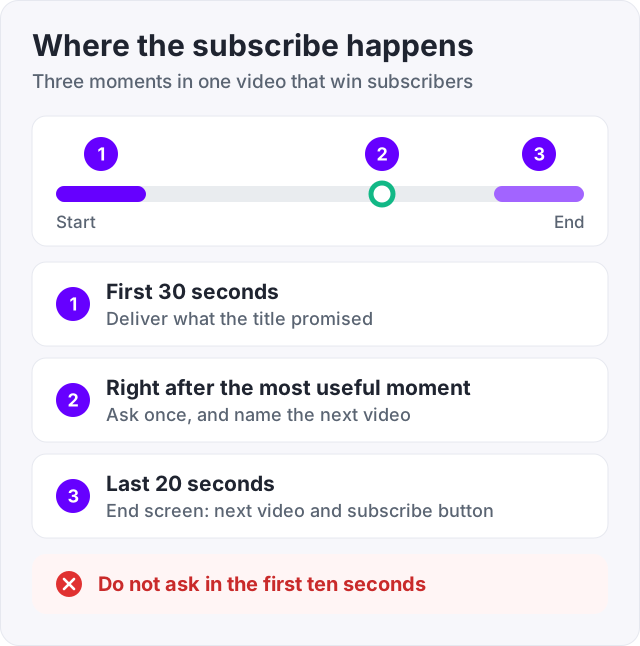
So the work is simple to describe and hard to do. Pick one topic. Make the first 30 seconds deliver what the title promised. Ask for the subscribe at the moment you were useful. Then do it again next week.
This guide covers what moves the number and how to see your subscribers in YouTube Studio. It also explains why that list is shorter than your count, and what buying subscribers does and does not do.
YouTube’s own page on how recommendations work says the system follows viewers, not channels. It looks at what each person clicked, how long they watched and how satisfied they said they were. Subscriber count is not what gets a video shown.
That tells you where subscribers come from. A video gets recommended because people watched it. Some of those people then decide the channel is worth coming back to. The subscribe is a bet on your next video, so the viewer needs to be able to guess what that will be.
Three things make that guess easy.
This is the most searched question about subscribers, and the answer is in YouTube Studio.
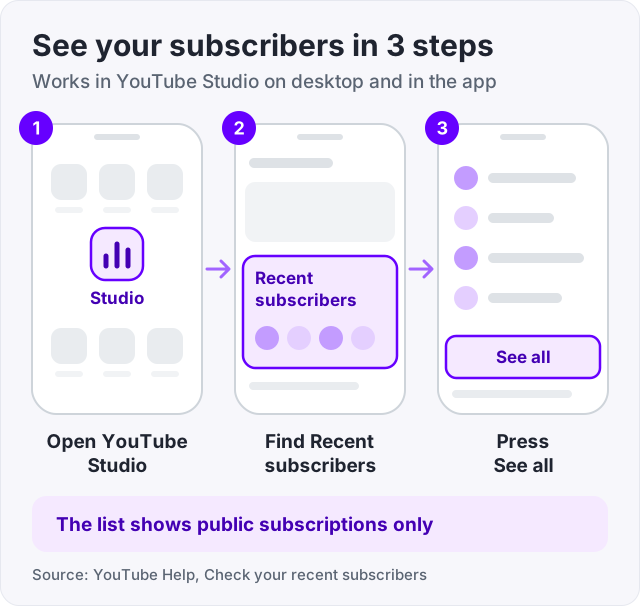
You can also open Analytics, then the Audience tab, to see subscriber numbers over time.
The list only shows people who keep their subscriptions public (YouTube Help). Most people leave subscriptions private, so they are counted but not named. A channel with 800 subscribers might see 60 names. That is normal, and nothing is missing.
The count on your channel page is also rounded. 1,234 subscribers shows as 1.2K. YouTube Studio shows the exact number, so use Studio when you want to know where you stand.
One more thing. YouTube treats subscriptions as an engagement metric and checks that they come from real people (YouTube Help, How engagement metrics are counted). When it finds spam subscriptions it removes them, so a small drop in the count now and then is YouTube cleaning up, not viewers leaving.
These come from YouTube’s own guidance on recommendations and from what creators on TubeBuddy, vidIQ and r/NewTubers keep agreeing on.
Our guide on how to get more views on YouTube goes deeper on titles, thumbnails and the first 30 seconds, because views come first and subscribers follow.
Tip: our free YouTube tag generator builds tags from your video’s topic. Tags help search find the video, and viewers who arrive from search came looking for exactly what you made.
1,000 is the number most people chase, because that is where ad revenue starts. Here is what the YouTube Partner Program needs (YouTube Help).
| Tier | Subscribers | Plus one of these | What it opens |
|---|---|---|---|
| Fan funding | 500, with 3 public uploads in 90 days | 3,000 watch hours in 12 months, or 3 million Shorts views in 90 days | Memberships, Super Chat, Super Thanks, shopping |
| Ads | 1,000 | 4,000 watch hours in 12 months, or 10 million Shorts views in 90 days | Ad revenue, plus everything above |
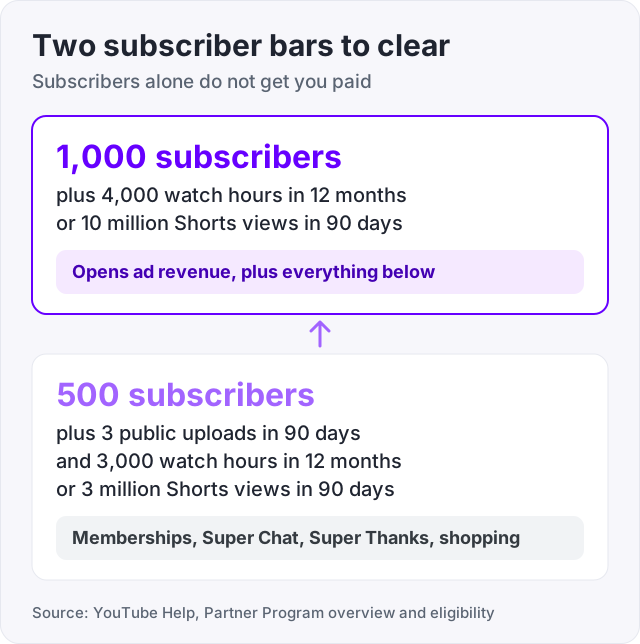
Notice the second column. Subscribers alone do not get you paid. You also need the watch hours, and for most channels the hours are the slower half. Our guide on the YouTube monetization requirements has the full list of rules.
YouTube does not publish an average, and anyone who gives you an exact number is guessing. It ranges from weeks to years.
Two things decide where you land. How many videos you publish, and how well the first 30 seconds of each one hold people. A channel that posts twice a week on one topic compounds. A channel that posts once a month about whatever comes to mind does not.
Subscribing to strangers so they subscribe back. Those accounts never watch, so they add nothing to watch time, and YouTube removes subscriptions it judges to be spam (YouTube Help).
Asking in the first ten seconds. The viewer has no reason yet.
Changing topics to chase a trend. Every subscriber you have signed up for the old topic. Trend videos bring viewers who leave when the trend does.
Waiting for one video to go big. YouTube’s recommendation page says it matches each viewer with videos they are likely to enjoy. A library of steady videos gives it more to work with than one hit.
Watch out: if your count drops with no change in your videos, check whether YouTube ran a check on spam subscriptions before you change anything. Its engagement metrics page says counts can be adjusted after the fact.
We sell YouTube subscribers at 100 for $34.95, with larger packs from 250 up. Orders need only your channel link, never a password. Delivery is spread out, and if the count drops below what you paid for we refill it for free.
Here is what they do. They move a channel past the “nobody here yet” look. A new viewer who lands on a channel with 12 subscribers reads it one way. The same viewer on a channel with 500 reads it another way.
Here is what they do not do. They do not bring watch hours, and the Partner Program needs those as well. They do not watch your videos, so they do not help a video get recommended. And YouTube’s review for the Partner Program looks for inauthentic engagement, so bought subscribers are a look, not a shortcut to monetization. Buy them for the look, and grow the rest the way this guide describes.
Do that for three months. The count will tell you whether the topic is working before you spend money on anything.
There is no official shortcut. The channels that get there fastest publish often, stay on one topic, and make the first 30 seconds deliver on the title. Shorts help because they reach people who have never seen you. Ask for the subscribe after a useful moment, and use end screens to send viewers to a second video. Fast still means months for most channels.
Open YouTube Studio. On the Dashboard there is a Recent subscribers card, and See all opens the full list (YouTube Help). You can also open Analytics, then Audience. Only people who keep their subscriptions public appear by name. Most people keep them private, so the list is much shorter than your total count. The count itself is exact in Studio.
YouTube publishes no average, and the honest answer is that it varies from weeks to years. The two things that decide it are how many videos you publish and how well the first 30 seconds hold people. A channel that posts twice a week in one clear topic gets there far sooner than one that posts once a month about anything.
The free path is the one in this guide. One topic, a schedule, a strong first 30 seconds, a subscribe ask after the value, end screens and playlists. Sites that promise free subscribers in exchange for subscribing to others produce accounts that never watch, and YouTube removes spam subscriptions in its checks (YouTube Help). So the free way is the slow way, and it is the one that lasts.
1,000 subscribers, plus 4,000 public watch hours in 12 months or 10 million public Shorts views in 90 days, gets you ad revenue (YouTube Help). 500 subscribers, with 3 uploads in 90 days and 3,000 watch hours or 3 million Shorts views, opens fan funding tools like memberships and Super Chat. The lower tier does not pay for ads.
YouTube only lists subscribers who set their subscriptions to public (YouTube Help). Everyone else is counted but not named. The channel page also rounds the total, so 1,234 shows as 1.2K. YouTube Studio shows the exact figure. If the count itself drops, YouTube may have removed subscriptions it judged to be spam.
The facts in this guide come from the places below. We check them again each time the guide is updated.
The services and free tools this guide talks about, with the prices you actually pay.
More YouTube guides from the same team.
Followers
YouTube monetization requirements in 2026: ads need 1,000 subscribers and 4,000 watch hours, fan funding needs 500. The exact rules and how to get there.

Views
YouTube recommends videos people click and keep watching. Here is what moves views, how Shorts fit in, and what bought views do and do not do.

Views
YouTube does not pay per view. It pays a 55 percent share of ad revenue. Most creators earn $1 to $30 per 1,000 views. Here is why, and what Shorts pay.