

Views
How to get more views on YouTube: what moves the number
YouTube recommends videos people click and keep watching. Here is what moves views, how Shorts fit in, and what bought views do and do not do.
YouTube · Views
From August 24, 2026 a YouTube view counts the moment a video starts to play. Here is how own views, replays, frozen counts and engaged views work.

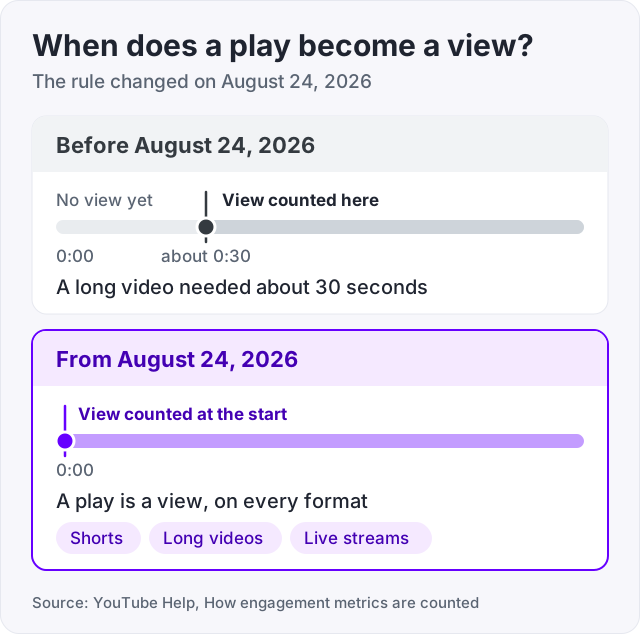
From August 24, 2026 a YouTube view is counted the moment a video starts to play. YouTube’s help page on engagement metrics says this applies to every format: Shorts, long videos and live streams.
Before that date, a view on a long video needed about 30 seconds of watching. That old rule is gone. A play is a view now.
But the public number is not the only number. YouTube pays on engaged views and decides Partner Program eligibility on qualified views. Those are stricter counts, and they can be much smaller than the number under your video. This guide explains each one, plus own views, replays and frozen counts.
YouTube’s help page puts it in one sentence. Beginning August 24, 2026, views are counted the moment a video starts to play across all formats, including Shorts, long-form videos and live streams.
Two things follow from that.
First, view counts on long videos look bigger than they used to. A person who clicks and leaves after five seconds now counts. Before the change they did not, because a long-form view needed about 30 seconds.
Second, the public count is now a plain measure of plays. It says how many times the video started. It does not say how many people stayed. For that, open the retention graph in YouTube Studio.
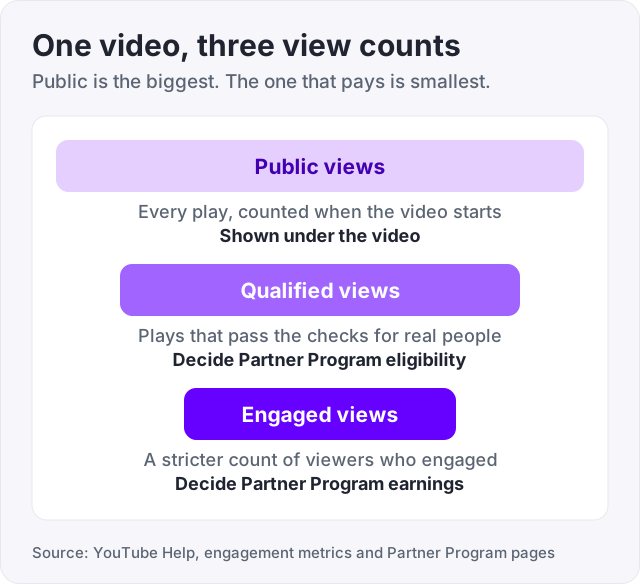
YouTube now uses three different counts, and the same video has a different number in each.
| Count | What it measures | Where YouTube uses it |
|---|---|---|
| Public views | Every play, counted when the video starts | The number shown under the video |
| Qualified views | Plays that pass YouTube’s checks for real people | Partner Program eligibility, such as 10 million Shorts views in 90 days |
| Engaged views | A stricter count of viewers who engaged with the video | Earnings in the Partner Program |
YouTube’s help page says Partner Program earnings are based on engaged views and engaged watch hours. Eligibility is based on qualified views (YouTube Help, YouTube Partner Program eligibility).
So the number under your video is the biggest of the three. The number that pays is the smallest. If you are working toward monetization, our guide on the YouTube monetization requirements explains which count applies to which rule.
YouTube’s help page says it verifies that views come from real people and not programs. It also says this takes time. Metrics may take a few hours to appear after publishing, and counts can be adjusted or removed later.
That is why a count can move in both directions. It rises as plays come in. It can fall when YouTube decides some of those plays were not legitimate. A small drop a few days after a spike is usually this, not a bug.
Tip: judge a video by average view duration in YouTube Studio, not by the public count. The count says how many people started. The duration says how many stayed, and that is what YouTube’s recommendations look at.
Yes. Playing your own video counts like any other play (YouTube Help). Watching your upload once to check the audio and the thumbnail is fine and normal.
What does not work is watching it on repeat. Repeated plays from one account are filtered out as invalid over time. Refreshing the page to push the number up is exactly the pattern YouTube’s systems are built to catch, and its help page says invalid views are removed.
A replay can count, because a view is counted when the video starts to play. But the same filter applies. Ten replays from one account do not stay as ten views.
Replays from many different people are different. Each one is a real person choosing to watch again, and those count. A video that people come back to is doing well, and YouTube’s checks are not built to punish that.
For years YouTube videos stopped at 301 views for a while. That freeze ended in 2015 (Digital Trends). There is no fixed number where counts stop today.
What you see now is a lag. YouTube verifies views continuously, and the public count can fall behind the real number. This is most visible on a video that suddenly gets a lot of traffic, because there is more to check. YouTube’s community guide on low views and frozen counts covers the same pattern.
Here is how the timing works in YouTube Studio.
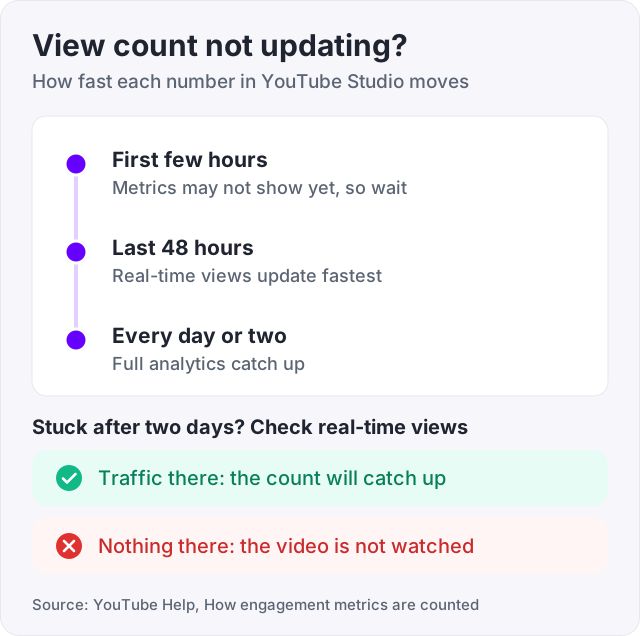
So if the number has not moved in a few hours, wait. If it has not moved in two days and the video is getting traffic in real-time analytics, the count will catch up. If real-time shows nothing, the video is not being watched, and that is a different problem. Our guide on how to get more views on YouTube covers that one.
Embedded views count. A video played through an embed on a blog or a forum counts as a view, the same as a play on YouTube.
Autoplay views may not count. On some surfaces a video that starts on its own may not be counted as a view. YouTube has not fully documented which surfaces, so treat this as a maybe rather than a rule.
Ad-served views count. When a video is shown to someone as an ad and they choose to watch it, that is a real person and a real play. YouTube’s help notes that these views can count as views. They are still not the same as engaged views, so they do not turn into earnings by themselves.
Views from programs get removed. Bots, click farms and view-refreshing scripts are what the verification step exists for. Counts from those sources go up and then come back down.
Watch out: a cheap seller who promises 10,000 views by tomorrow is describing bot traffic. Those views are the kind YouTube’s help page says it removes, and a video that spikes and drops looks worse than one that never spiked.
We sell YouTube views at 1,000 for $12.95. They are delivered through YouTube’s own ad system, so each one is a real person who was shown your video as an ad and chose to play it. Under the rules above, that is a view. It counts in the public number and it stays counted, because it passed through YouTube’s own systems.
Here is what those views are not. They are not engaged views, so they do not add up to ad revenue. They do not come with the retention of a viewer who searched for the video. And they do not make YouTube recommend the video, because that depends on how long people watch.
So they do one job. They give a new video or a new channel a public number that does not look empty. Our guide on how much YouTube pays per 1,000 views shows in plain maths why they can never pay for themselves in ad money. We would rather say that here than have you find out later.
The public count is a headline. The numbers that matter to YouTube, and to your earnings, are the ones behind it.
Yes. Playing your own video counts like any other play (YouTube Help). But YouTube checks that views come from real people and removes ones it judges invalid, and repeated plays from one account get filtered out over time. Refreshing the page to push the number up gets caught. Watching your upload once to check it is fine. Doing it fifty times adds nothing.
A replay can count, because from August 24, 2026 a view is counted when a video starts to play (YouTube Help). But YouTube filters out repeated plays from one account over time, so ten replays from you do not become ten views for long. Replays from many different people count, since each is a real person choosing to watch again.
YouTube says metrics can take a few hours to appear after you publish, and that it takes time to work out which views are legitimate. The public count can lag behind the real number, especially when a video suddenly gets a lot of traffic. Full analytics in YouTube Studio update roughly every day or two, with real-time views for the last 48 hours. Give it a day before you worry.
The famous freeze at 301 views ended in 2015 (Digital Trends). Today there is no fixed number where counts stop. What you may see is a pause while YouTube verifies views. Its help page says counts can be adjusted or removed after the fact. If the count froze after a spike, wait a day or two. If it froze on a video with no traffic, it is simply not getting views.
The public view count now counts a play the moment it starts (YouTube Help). Engaged views are a stricter count that YouTube uses to work out earnings in the Partner Program. Qualified views are the count it uses to decide whether a channel is eligible to join. So a video can show a big public number and a smaller number for pay and eligibility.
Yes. A video played through an embed on another site counts as a view, the same as one played on YouTube. Autoplay views on some surfaces may not count, and YouTube has not fully documented which ones. The same checks apply everywhere: views must come from real people, and YouTube removes ones that do not (YouTube Help).
The facts in this guide come from the places below. We check them again each time the guide is updated.
The services and free tools this guide talks about, with the prices you actually pay.
More YouTube guides from the same team.
Views
YouTube recommends videos people click and keep watching. Here is what moves views, how Shorts fit in, and what bought views do and do not do.

Views
YouTube does not pay per view. It pays a 55 percent share of ad revenue. Most creators earn $1 to $30 per 1,000 views. Here is why, and what Shorts pay.

Followers
YouTube monetization requirements in 2026: ads need 1,000 subscribers and 4,000 watch hours, fan funding needs 500. The exact rules and how to get there.