

Followers
How to get more followers on TikTok
TikTok does not rank videos by follower count, so a new account can grow fast. Here is what moves followers, the 1,000 and 10,000 milestones, and what fails.
TikTok · Followers
Why can't I follow people on TikTok? Usually a rate limit, a lost connection, or a block. Here are the causes in order, how to check each, and the fix for each.
Why can’t you follow people on TikTok? There is a short list of reasons, and one of them covers most cases. You followed too many accounts too fast, and TikTok put a temporary limit on your account. The message says “Following too frequently” or “Limit reached, you are unable to follow more people at this time.”
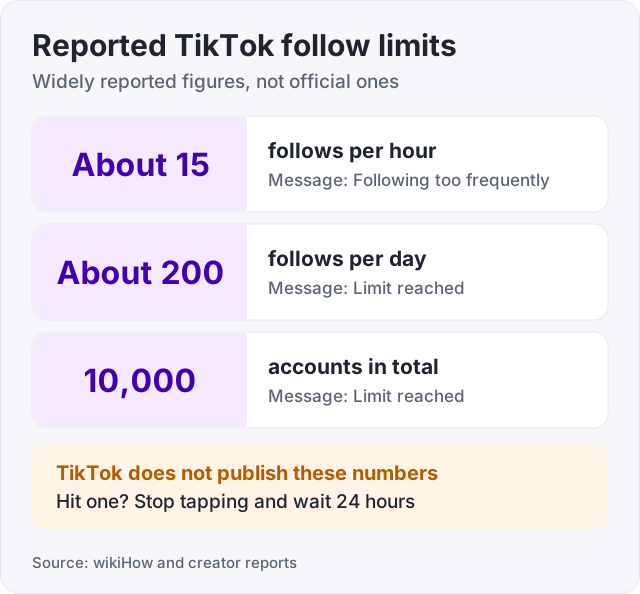
TikTok does not publish the numbers behind that limit. Its help page on followers and following describes how following works but gives no daily cap. The limits people report are about 200 follows a day, about 15 in an hour, and 10,000 accounts followed in total (wikiHow and creator reports). Treat those as widely reported, not official.
If you did not go on a follow spree, the cause is something else. A weak connection, an old app version, a block, a deleted account, an age setting, or a restriction on your own account. Below are all of them, in order of how often we see them, each with a way to check and a fix.
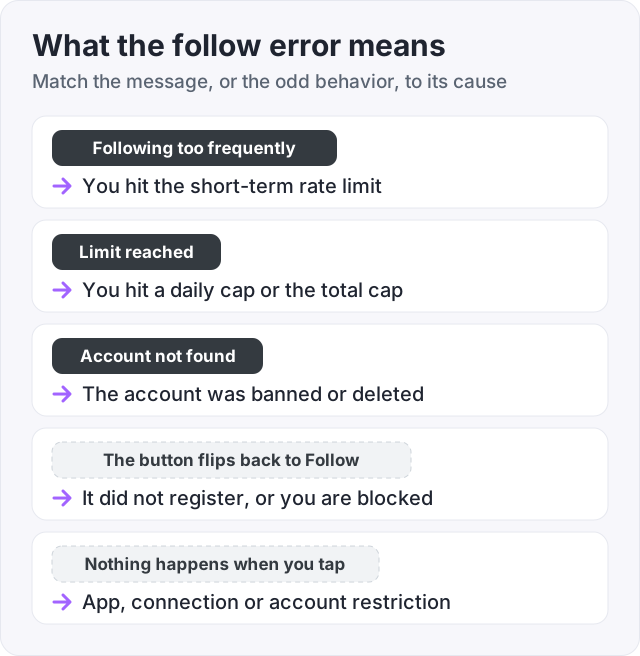
TikTok watches how fast you follow and in what pattern. Fifty follows in five minutes looks like a bot, and TikTok treats it like one. The limit is temporary.
The numbers are not published by TikTok. Here is what is widely reported by wikiHow and by creator advice pages on TikTok itself.
| Limit | Widely reported figure | Published by TikTok? |
|---|---|---|
| Follows per hour | About 15 | No |
| Follows per day | About 200 | No |
| Total accounts followed | 10,000 | No |
How to check: you saw “Following too frequently” or “Limit reached”, and you followed a lot of accounts in the last hour or day.
The fix: stop. Do nothing for 24 hours. Do not keep tapping, because every attempt looks like more bot activity. After a day, follow a handful of accounts and see if it works.
New accounts hit the limit faster (wikiHow). TikTok has less history to judge a new account by, so it is stricter about speed. Following 30 people in your first hour can be enough to trip it.
How to check: the account is days or weeks old, and the block came after a burst of follows.
The fix: wait 24 hours, then slow down. Follow a few accounts per hour, spread through the day. Post a video or two so the account looks like a person, not a script.
Sometimes the tap goes through on your screen but not on TikTok’s servers. The button shows Following, then flips back to Follow when the app refreshes. People call this “TikTok automatically unfollowing”. Almost always, the follow never registered.
How to check: the button reverts a few seconds or minutes later, and you are on patchy wifi or mobile data.
The fix: close the app fully, connect to stable wifi, open it again and try once more. If you also see the rate-limit message, this is cause 1, not a glitch.
An old version of the app can misbehave, and a Follow button that does nothing is one of the ways it shows.
How to check: open the App Store or Google Play and look for an update on TikTok.
The fix: update, then log out and back in. If the button still fails, clear the cache. Go to Settings and privacy, then Free up space, then Clear cache. This removes temporary files, not your videos or drafts.
When someone blocks you, you cannot follow them, and TikTok does not tell you why.
How to check: search their username while logged in. If the profile shows no videos, or you cannot find it at all, but a friend can see it fine, you are blocked.
The fix: there is none. A block is their choice.
“Account not found” means the account no longer exists. It was removed by TikTok for breaking the rules, or the owner deleted it. TikTok’s help page on content violations and bans explains that accounts with repeated or serious violations are removed.
How to check: you see “account not found” when you open the profile, and their videos are gone from your feed.
The fix: none. If the person comes back, it will be a new account.
Accounts can restrict who is allowed to follow them, and TikTok applies extra limits to users under 16. If you are under 16 and the other account has restricted who can follow, the button will not work for you.
How to check: your account birthday is under 16, and the problem only happens with some accounts.
The fix: none, beyond waiting until you are older. Do not change your birthday to get around it.
If your account broke a Community Guideline, TikTok can put a temporary restriction on some features (TikTok Help, content violations and bans). Following can be one of them.
How to check: open Inbox, then System notifications, and look for a message about a violation. Then look for Account status in Settings and privacy. It lists any active restriction and how long it lasts.
The fix: wait it out. If you think the strike was a mistake, appeal from the notification. If the account still feels stuck once the restriction ends, our guide on how to reset the TikTok algorithm covers the next steps.
TikTok does not say. The widely reported answer for a rate limit is 24 hours (wikiHow). Most people find the button works again by the next day, as long as they stop tapping it. A restriction for a violation shows its own end date in Account status.
Many people run into the limit because they are following hundreds of accounts hoping for follow-backs. Two things make that a poor plan.
The limits above stop you at a couple of hundred a day. And TikTok’s help page on how it recommends content says follower count is not a ranking signal for the For You feed. Following people does not get your videos shown to more people. Only the videos themselves do that.
Our guide on how to get more followers on TikTok covers the method that does work: post often, hook in the first second, and answer comments. If your goal is the LIVE button, see how many followers you need to go live on TikTok.
One thing people ask us: does buying followers trigger this limit? No. Buying followers adds accounts that follow you. It does not use your account’s follow actions at all, so it cannot trip the rate limit.
At GetLikes, TikTok followers start at 100 for $3.95, and orders need only your public username. What you get is a look. A profile that shows 500 followers instead of 12 reads as active to a stranger. What you do not get is fans. Bought followers do not watch, like or comment. They also break TikTok’s terms, and TikTok can remove them. We refill for free if the count drops below what you paid for.
Watch out: never use an app or bot that follows people for you. That is exactly the pattern TikTok’s limit is built to catch, and it puts your whole account at risk.
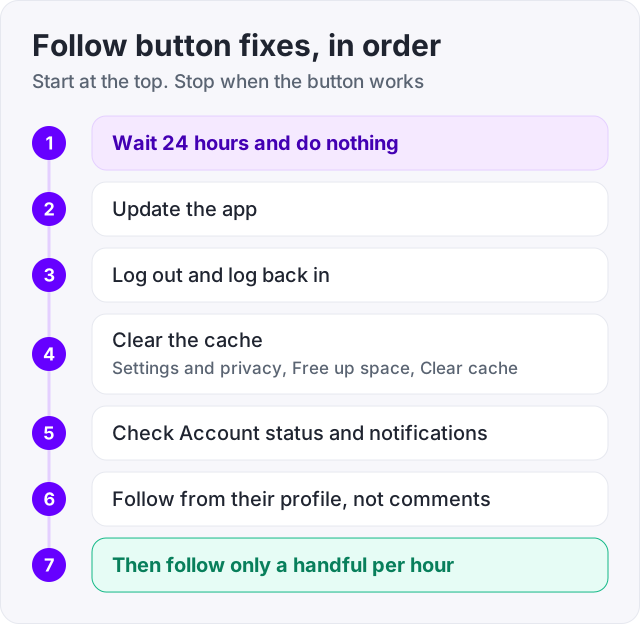
Start by waiting 24 hours without tapping Follow, because the most common "glitch" is a rate limit. Then update the app, log out and back in, and clear the cache under Settings and privacy, Free up space, Clear cache. Check Account status for a restriction. Try following from the profile page instead of the comments list. When it works again, keep to a few follows an hour.
TikTok does not say. The widely reported wait for a rate limit is 24 hours (wikiHow). Most people find the Follow button works again the next day, as long as they stop tapping it in the meantime. A restriction for a Community Guidelines issue is different. It shows its own end date in Account status, and it can last longer.
In order of likelihood: you hit the follow limit, your account is new and hit it faster, your connection dropped so the follow never registered, your app is out of date, the other account blocked you, the account was deleted, or your account has a temporary restriction. Read the message on screen first. "Following too frequently" means wait.
It almost never does. What usually happens is that the follow never registered. You tapped Follow, the button changed, and then the app refreshed and showed the real state, which was still unfollowed. A rate limit or a weak connection causes it. Close the app, get on stable wifi, wait a while, and try again from the profile page.
The account no longer exists. It was either removed by TikTok for breaking the rules, or the owner deleted it. TikTok Help explains that accounts with repeated or serious violations are banned. You cannot follow an account that is gone, and there is no fix on your side. If the person returns, it will be under a new username.
Yes, but TikTok does not publish the numbers. Its help page on followers and following explains how following works without giving a cap. The figures widely reported by creators and wikiHow are about 200 follows a day, roughly 15 in an hour, and a hard cap of 10,000 accounts followed in total. Treat them as reported, not official.
The facts in this guide come from the places below. We check them again each time the guide is updated.
The services and free tools this guide talks about, with the prices you actually pay.
More TikTok guides from the same team.
Followers
TikTok does not rank videos by follower count, so a new account can grow fast. Here is what moves followers, the 1,000 and 10,000 milestones, and what fails.

Algorithm & timing
How to reset TikTok feed recommendations with Refresh your For You feed: the exact taps, what it keeps, and how to retrain your FYP after.
Followers
How many followers do you need to go live on TikTok? TikTok publishes an age rule, not a number. Creators report 1,000. What is official, and how to get there.