

Followers
How to get more followers on TikTok
TikTok does not rank videos by follower count, so a new account can grow fast. Here is what moves followers, the 1,000 and 10,000 milestones, and what fails.
TikTok · Followers
How many followers do you need to go live on TikTok? 1,000, and you must be 18 or older, per TikTok Help. It may vary by region. How to check and get there.

How many followers do you need to go live on TikTok? You need 1,000 followers, and you must be 18 or older, per TikTok Help. TikTok says the follower rule may vary by region. To send or receive Gifts during a LIVE, you must be 18 or older too, or 19 in South Korea.
Below 1,000, the LIVE option usually does not appear when you tap the plus button. There is no form to apply and no setting to switch it on. The option shows up once your account qualifies.
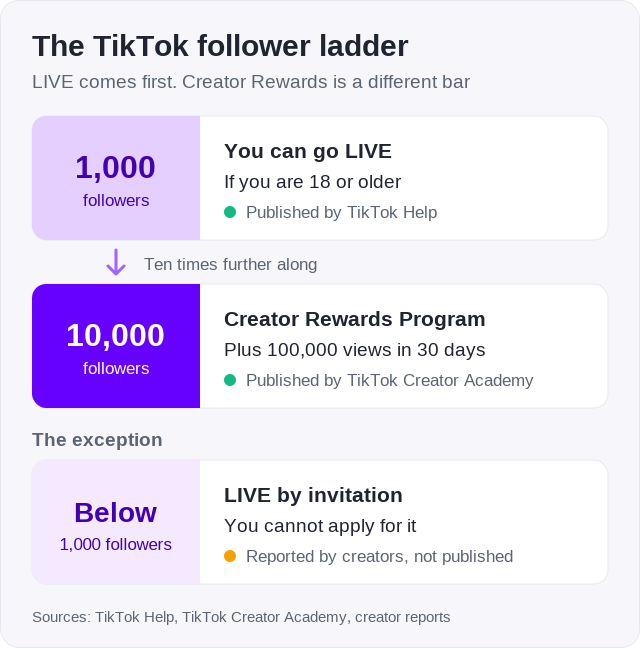
There are exceptions. Creators report that TikTok has invited some smaller accounts to go LIVE early. You cannot apply for that. It is an invitation, and TikTok does not publish how it picks accounts.
You need 1,000 followers to go LIVE on TikTok, and you must be 18 or older (TikTok Help). TikTok adds that the follower number may vary across regions. Here is the full list from TikTok Help’s page on what TikTok LIVE is:
TikTok’s page on LIVE age rules adds one more step. TikTok may ask you to confirm your age before you go LIVE. If it cannot confirm that you are 18 or older, you cannot go LIVE. LIVE and Gifts are also not available in every country (TikTok Help).
The follower number, the age rules and the Gift rules are all official. They are on TikTok’s help pages. Only two things people repeat come from creator reports: a follower rule for guests, and early invitations.
| Requirement | Status | Source |
|---|---|---|
| 1,000 followers to go LIVE | Published, may vary by region | TikTok Help |
| 18 or older to go LIVE | Published | TikTok Help |
| 18 or older for Gifts, 19 in South Korea | Published | TikTok Help |
| Age check before you go LIVE | Published, TikTok may ask | TikTok Help |
| Good standing to turn on LIVE Gifts | Published | TikTok Help |
| Follower rule to join as a guest | Not published, reports disagree | Creator reports |
| Invitations below 1,000 followers | Reported, not published | Creator reports |
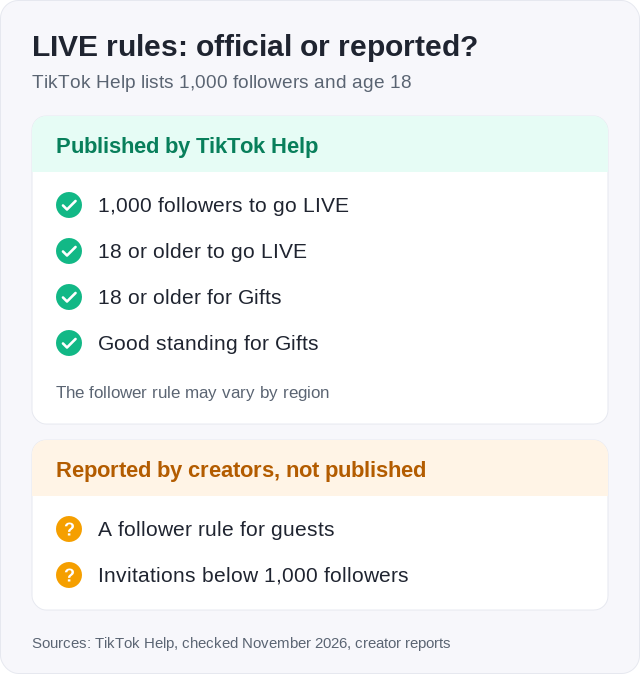
Treat 1,000 followers as the target. Treat an invitation as a lucky break, not a plan.
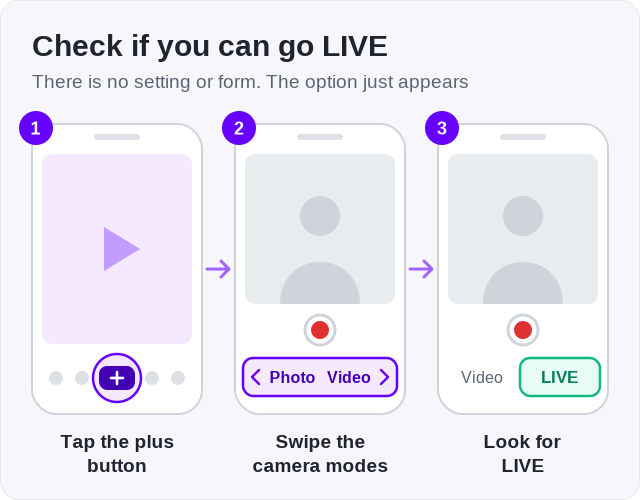
If LIVE is there, you have access. If it is not, you do not have it yet. There is no setting to turn it on and no form to fill in. The option arrives on its own when your account qualifies.
Tip: check again the day you pass 1,000 followers, and after each app update. Also confirm your birthday is set correctly. If TikTok confirms you are under 18, you will not get LIVE at any follower count (TikTok Help).
Usually not. TikTok Help lists 1,000 followers to go LIVE, and 100 or 500 is below it. The plus button will show Photo and Video but not LIVE.
The exception is an invitation. Creators report that TikTok has invited some small accounts to go LIVE early. If that happens, the LIVE option appears. You cannot request it, and TikTok does not publish who gets one.
Joining someone else’s LIVE as a guest is a grey area. TikTok Help explains how to ask to join a LIVE, but it lists no follower rule for guests. Creator reports disagree, so do not plan around it.
Most people searching this are somewhere between 100 and 900 followers. The gap closes fastest with videos, not tricks.
Our guide on how to get more followers on TikTok goes through the full method. The short version:
Do not run follow-for-follow sprees. They hit TikTok’s follow limits fast, and we explain why in why can’t I follow people on TikTok.
Here is the direct answer, because we sell followers and people ask us this a lot.
At GetLikes, TikTok followers start at 100 for $3.95. Our guide on how to buy followers on TikTok shows each order step and our delivery times. They count toward the follower number shown on your profile, and that is the number TikTok Help names. So yes, if you are at 900 and buy 100, your profile will show 1,000.
What we do not know: whether TikTok checks anything beyond the count before it turns LIVE on. TikTok Help gives the number and the age rule, but not how it checks them. The number can also vary by region. We cannot promise LIVE will appear.
What we do know: bought followers break TikTok’s terms. TikTok can remove them. When it does, your count drops back, and the LIVE option can go with it. We refill for free if your count falls below what you paid for, but a refill is not a fix for a rule you are bending.
Our advice, plainly: buy a small amount to close a small gap. Do not buy 1,000 followers for a profile with three videos. That profile will look strange to anyone who visits, and it will not have the real audience that makes a LIVE worth doing. Keep posting so real followers arrive, and use the bought count as a bridge, not a foundation.
Watch out: never give your password to any seller. An order needs only your public username. A seller who asks you to log in is a seller who wants your account.
Once LIVE is on, the LIVE features come with it. TikTok Help lists effects, multi-guest hosting, moderation tools and LIVE Gifts. Gifts are the part most people are after, because they are how viewers send value during a stream.
To turn on LIVE Gifts, you must be 18 or older, or 19 in South Korea. You must also live where Gifts are available and keep your account in good standing (TikTok Help). To see what each gift costs, use our TikTok coins calculator.
The Creator Rewards Program is separate. It needs 10,000 followers and 100,000 video views in the last 30 days (TikTok Creator Academy). Going LIVE does not count toward that, and reaching 1,000 followers does not get you in. That is a different bar, ten times further along.
Do that for two months and most accounts cross the line the normal way. The LIVE button shows up, and you have an audience worth streaming to.
Usually not. TikTok Help lists 1,000 followers to go LIVE, and 100 is well below it. The rule may vary by region. Creators report that TikTok has invited some small accounts to go LIVE early, but you cannot apply for that. If it happens, the LIVE option simply appears.
Not by the published rule. TikTok Help lists 1,000 followers, so at 500 the LIVE option normally does not show when you tap the plus button. Creators report that a few accounts get LIVE early by invitation, but there is no way to request it. The practical answer is to keep posting until you pass 1,000.
Only if TikTok invites you. TikTok Help lists 1,000 followers and age 18 or older to go LIVE, and 15 is nowhere near it. Creators report LIVE invitations for some very small accounts, but you cannot ask for one. The rules you can act on are the follower number and the age rule.
Sometimes, but not by choice. TikTok Help lists 1,000 followers and says the rule may vary by region. Creators report that some smaller accounts get LIVE early by invitation. There is no form or setting to trigger that. TikTok Help lists no separate follower rule for joining someone else's LIVE as a guest, and creator reports disagree on it.
TikTok Help lists three. You must be 18 or older to go LIVE and have 1,000 followers, which may vary by region. To send or receive Gifts, you must be 18 or older, or 19 in South Korea. TikTok may ask you to confirm your age first, and LIVE is not available in every country.
You need to be 18 or older, or 19 in South Korea, and able to go LIVE (TikTok Help). Your account must be in good standing, and you must live where LIVE Gifts is available. The Creator Rewards Program is a separate thing with its own bar of 10,000 followers and 100,000 views in 30 days (TikTok Creator Academy).
The facts in this guide come from the places below. We check them again each time the guide is updated.
The services and free tools this guide talks about, with the prices you actually pay.
More TikTok guides from the same team.
Followers
TikTok does not rank videos by follower count, so a new account can grow fast. Here is what moves followers, the 1,000 and 10,000 milestones, and what fails.
Followers
Why can't I follow people on TikTok? Usually a rate limit, a lost connection, or a block. Here are the causes in order, how to check each, and the fix for each.

Algorithm & timing
The best time to post on TikTok is Tuesday to Thursday, 2 to 6 p.m. per Sprout Social, or evenings per Buffer. Both tables, why they clash, and your own data.