

Followers
How to get more followers on TikTok
TikTok does not rank videos by follower count, so a new account can grow fast. Here is what moves followers, the 1,000 and 10,000 milestones, and what fails.
TikTok · Followers
TikTok shows who viewed your profile only when Profile view history is on for both of you. Here is how to turn it on and off, and why it may not show up.

Yes, TikTok can show you who viewed your profile. The setting is called Profile view history, and TikTok’s help page explains how it works. It is off until you turn it on.
There are two catches. First, it works both ways. You only see people who also have it on, and they see you too (TikTok Help). Second, the list only covers the last 30 days.
There are also limits on who gets it. TikTok Help says you must be 16 or older, and your account must have fewer than 5,000 followers. If the feature is missing, one of those two rules is almost always why.
When the setting is on, TikTok lists the accounts that viewed your profile in the past 30 days (TikTok Help). You see their username and can tap through to their page.
It does not show everything. TikTok’s help page is clear about what stays hidden.
| It shows | It does not show |
|---|---|
| Accounts that viewed your profile in the last 30 days | Views older than 30 days |
| Only people who also have the setting on | People who have the setting off |
| That a person visited | How many times they visited |
| Profile visits | Who watched your videos or your Story |
The last row matters. Video views are a plain count with no names. Profile views are different. Someone has to tap your name or photo and land on your page to appear in the list.
TikTok Help gives two routes. Both take under a minute.
From your profile:
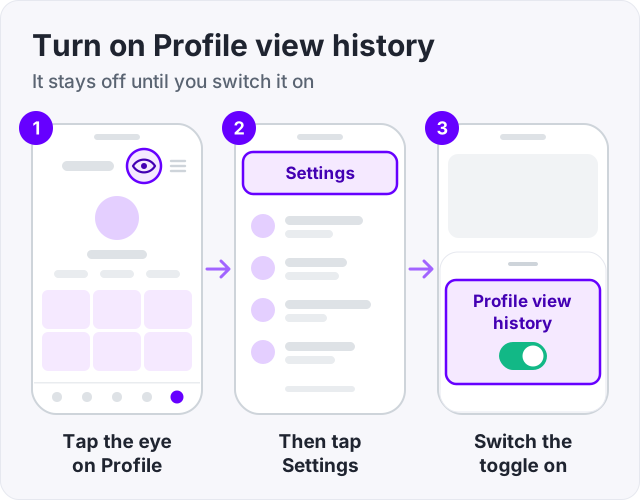
From your inbox:
Once it is on, the eye icon on your profile opens the list. TechCrunch covered the feature in 2023 and walked through the same setting.
Use the same path. Tap Profile, the eye icon, then Settings, and switch Profile view history off (TikTok Help).
When you turn it off, two things happen at once. You stop seeing who viewed you. And other people stop seeing that you viewed them (TikTok Help).
One thing does not happen. Turning it off does not erase the past. If you viewed someone while the setting was on, you were already shown in their list. The switch stops new records. It does not delete old ones.
Tip: if you want to look at a profile without being seen, turn the setting off first, then visit. Turn it back on after if you want your own list back.
Only if both of you have Profile view history on. This is the two-way rule, and it is the part most people miss.
Here is how it plays out (TikTok Help):
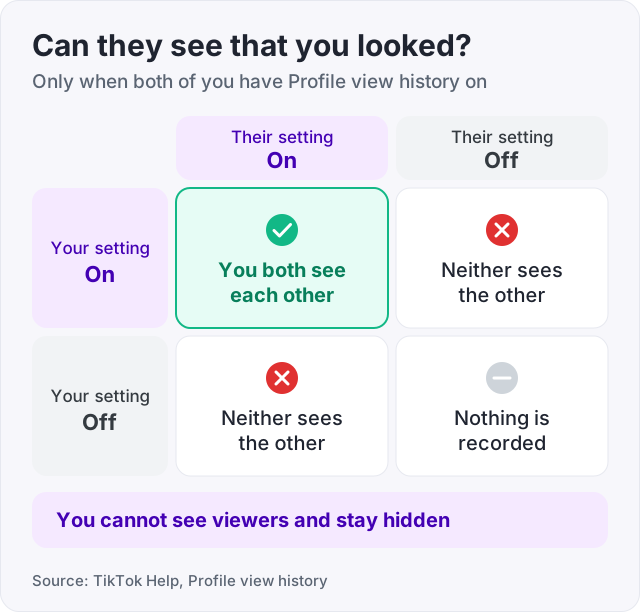
So there is no way to spy. You cannot see viewers while staying hidden yourself. TikTok built it as a trade. You show yourself in order to be shown others.
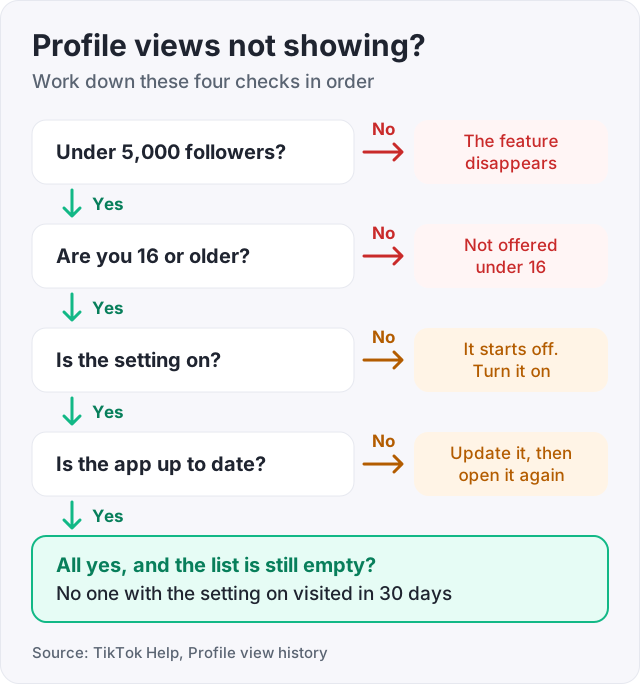
If the eye icon is missing, or the list is empty, work down this list. The first two cover most cases.
You have 5,000 or more followers. TikTok Help says Profile view history is only available to accounts with fewer than 5,000 followers. Above that, the feature disappears. There is no setting to bring it back. This is the most common reason people search “profile views tiktok not showing”.
You are under 16. The feature is only offered to users 16 and older (TikTok Help). If your account has a younger birthday, you will not see the option.
The setting is off. It starts off for everyone. Follow the steps above and check the toggle.
The other person has it off. You only see viewers who also turned it on. If a friend swears they visited and does not show up, their setting is probably off.
The visit is older than 30 days. The list is a rolling 30-day window. Older visits drop off and do not come back.
Your app is out of date. An old version of the app can hide newer settings. Update TikTok from the App Store or Google Play and open it again.
The person viewed a video, not your profile. Watching your video does not count as a profile visit. They have to open your page.
Say you are under 5,000 followers, over 16, updated, and the setting is on. If the list is still empty, nobody with the setting on has visited in the last 30 days. That is the honest answer.
These two get mixed up all the time.
Video views are the number under each video. They are anonymous. TikTok never tells you who watched a video from the For You feed, and nothing you turn on changes that.
Profile views are visits to your page. Profile view history is the only way to see names, with the limits above.
There is a third setting, called Post view history (TikTok Help). It shows which of your mutual followers viewed your videos. It works the same way as profile views. Both sides need it on, and your account needs fewer than 5,000 followers. It only covers people you follow who also follow you back, so it is not a full list of viewers.
Search for who viewed your profile and you will find sites that promise to show you. They cannot. TikTok does not give that data to anyone outside the app. The only source is the setting described above.
Some of these sites show public profiles without logging in. That is harmless, but it is not what they promise. Others ask you to log in with your TikTok account. Do not.
Watch out: never type your TikTok password into a site that promises to reveal viewers. There is no such list to fetch, so the only thing the site gains is your login.
Profile views usually jump after one video does well. People watch it, get curious, and tap your name. Then they decide in a second or two whether to follow.
A profile with 40 followers and three videos rarely wins that moment. Most visitors leave. The video did its job and the profile did not.
Two fixes help. Post enough that the grid looks alive, and write a bio that says what you post. Our guide on how to get more followers on TikTok covers both. If the videos themselves are the weak spot, start with how to get more views on TikTok.
Some people also buy a starting count. At GetLikes, TikTok followers start at 100 for $3.95, and orders start within minutes. That makes a new profile read as active to a visitor. It does not make those followers watch or comment. It also breaks TikTok’s terms, so TikTok may remove some of them. We refill for free if the count drops below what you paid for.
One more honest note. The profile views feature switches off at 5,000 followers (TikTok Help). Grow past that, bought or earned, and you lose the list. Most people take that trade.
If you would rather keep your follower list private while you grow, see our guide on how to hide followers on TikTok.
If you want to watch your follower count move after a good video, our free TikTok counter shows it live for any public account.
Only if both of you have Profile view history turned on. TikTok Help describes it as a two-way setting. If your setting is off, nobody sees that you visited, and you see nobody who visited you. If your setting is on, people who also have it on will see your name in their list for 30 days.
Turn on Profile view history. Tap Profile, tap the eye icon at the top, tap Settings, and switch it on. From then on you see accounts that viewed your profile in the last 30 days, as long as they have the setting on too (TikTok Help). It does not show how many times a person looked, and it does not show who watched your videos.
When it is off, you stop seeing viewers and other people stop seeing you (TikTok Help). Turning it off does not erase the past. If you viewed someone while it was on, you already appeared in their list. When you turn it back on, the list starts filling again from that point.
Switch Profile view history off before you visit. Tap Profile, the eye icon, then Settings, and turn the toggle off. With it off, TikTok does not record your visit for the other person (TikTok Help). The trade is that you lose your own viewer list while it is off.
The most common reason is that you have 5,000 or more followers. TikTok Help says the feature is only available below that number. The next reasons are that you are under 16, the setting is off, the other person has it off, or the visit is older than 30 days. An out-of-date app can also hide the icon.
Not by name for everyone. The view count under a video is anonymous. There is a separate setting called Post view history that shows which of your mutual followers viewed your videos, and it has the same rules: both sides on, and fewer than 5,000 followers (TikTok Help). It does not cover strangers who watched from the For You feed.
The facts in this guide come from the places below. We check them again each time the guide is updated.
The services and free tools this guide talks about, with the prices you actually pay.
More TikTok guides from the same team.
Followers
TikTok does not rank videos by follower count, so a new account can grow fast. Here is what moves followers, the 1,000 and 10,000 milestones, and what fails.

Followers
Can you hide followers on TikTok? Yes, with a private account. Here is how to hide followers on TikTok, hide your following list, and what stays visible.
Views
Every TikTok video gets a small test audience first. Here is what makes that group watch on, why views sit at 0 or stay low, and what to do after posting.