

Followers
How to get more followers on TikTok
TikTok does not rank videos by follower count, so a new account can grow fast. Here is what moves followers, the 1,000 and 10,000 milestones, and what fails.
TikTok · Followers
Can you hide followers on TikTok? Yes, with a private account. Here is how to hide followers on TikTok, hide your following list, and what stays visible.

Yes, you can hide your followers on TikTok, but only by making your account private. Tap Profile, tap the Menu button, then Settings and privacy, then Privacy, and turn on Private account (TikTok Help).
On a public account you can still hide your following list. That is the list of people you follow. In the same Privacy menu, tap Following list and choose Only you.
That is the short answer to how to hide followers on TikTok. Below are the steps for each setting, what stays visible, and what going private costs you.
Yes, but there is only one switch for it. TikTok’s Help Center says that on a public account, anyone can see your followers and following lists. On a private account, only people you approve can see them (TikTok Help, Choosing between a private or public account).
TikTok’s Help Center lists no setting that hides just your followers list while you stay public. Some posts online say there is one. We could not find it in TikTok’s own help pages. If your app shows a followers list option, you can use it. If it does not, going private is the way.
Here is what you can and cannot hide.
| What you want to hide | Can you? | How |
|---|---|---|
| Your followers list | Yes, with a private account | Privacy, Private account |
| Who you follow (following list) | Yes, even on a public account | Privacy, Following list, Only you |
| Your follower count | No | No setting for it |
| Your following count | No | No setting for it |
| Videos you liked | Yes | Privacy, Liked videos, Only you |
| One specific follower | Yes, remove them | Followers, More actions, Remove this follower |
| Your whole profile from one person | Yes, block them | Their profile, Share button, Block |
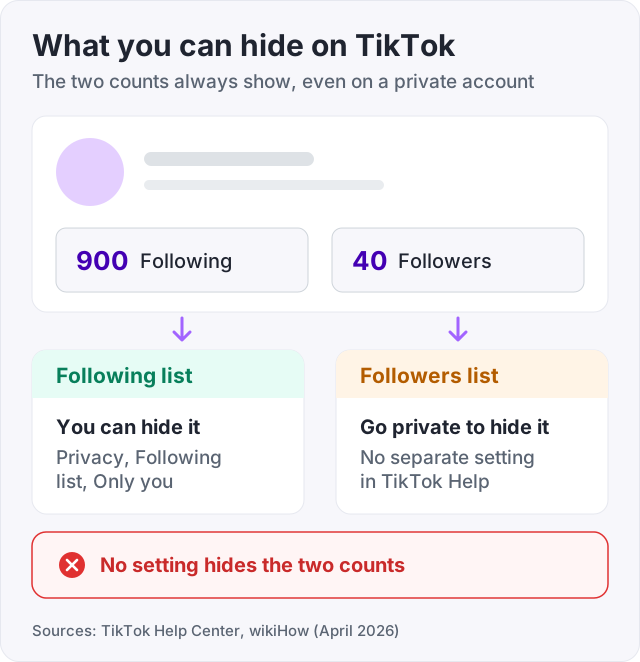
The counts are the part people get wrong. There is no setting for your follower count or your following count. Going private hides the names on your lists, not the numbers.
This hides your followers list and your following list from anyone you have not approved. These are TikTok’s own steps (TikTok Help).
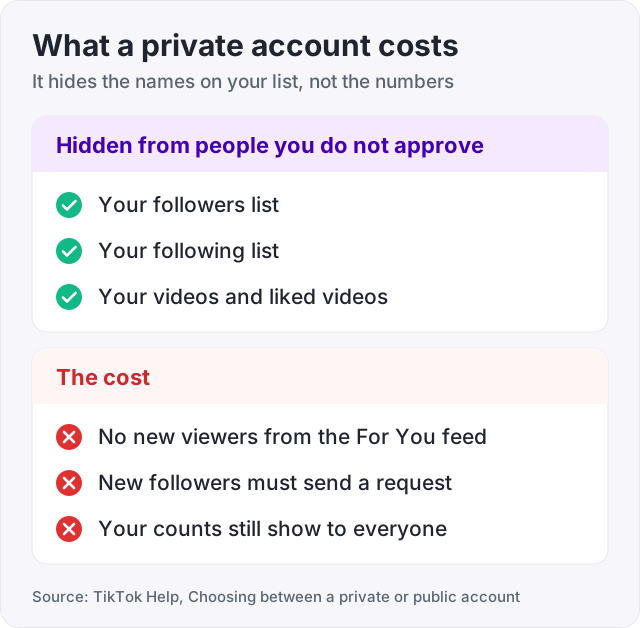
Once you are private, you approve who can follow you. You also approve who can watch your videos, LIVE videos, bio and likes. And only those people can see your followers and following lists.
People who already follow you stay on the list, and they can still see it (wikiHow). So if the person you want to hide from already follows you, remove them first. The steps are further down.
TikTok sets new accounts for ages 13 to 17 to private by default (TikTok Help, Teen privacy and safety settings).
Watch out: your name, username and profile photo always show, even on a private account (TikTok Help). Your follower count shows too. Going private hides the list, not the number.
This is the setting most people want. It hides who you follow but keeps your account public, so your videos can still reach new people.
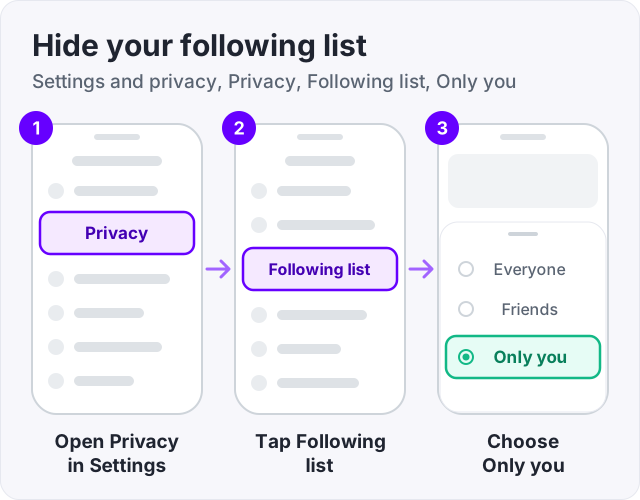
The other options are Everyone and Friends. On TikTok, friends are followers you follow back (TikTok Help). Pick Friends if you want them to still see the list.
Older versions of the app call the last option Only me. TikTok’s Help Center has no page for this setting, so these steps follow wikiHow’s April 2026 guide. If you do not see Following list, update the app and look again.
Your following count stays on your profile. People can see the number, but not the names.
Not one at a time. The Following list setting covers the whole list. You cannot hide one account you follow and show the rest. If one follow is the problem, unfollow that account, or set the whole list to Only you.
Friends on TikTok are followers you follow back (TikTok Help). So they show up in both of your lists.
To hide who you follow, set Following list to Only you. That covers your friends on the following side. To hide both lists from strangers, go private. There is no separate switch just for friends.
Private is not free. It changes who can see your videos.
On a private account, only people you approve can watch your videos (TikTok Help). So strangers who scroll the For You feed cannot watch them. Growth from the feed stops.
Other things change too. People cannot Duet, Stitch, make stickers from or download your posts. They cannot add your posts to their Stories either (TikTok Help). Every new follower has to send a request and wait for you.
That matters if you want more followers. For a personal account that only friends watch, the trade is fine. For an account trying to grow, it is a wall.
If you want the list hidden but the growth on, the Following list setting is the better tool. It hides the part most people care about and leaves the account public. Our guide on how to get more followers on TikTok covers what a public account needs to grow.
No. TikTok’s help pages list settings for your account, your liked videos and your posts. None of them hides your follower count or your following count. That is true on a public or a private account.
What you can change is the number itself. Say the count looks small, or you follow 900 people and 40 follow you back. The fix is the ratio, not a toggle. More on that below.
If one person is the reason you want to hide your followers, remove them instead of hiding the whole list. TikTok gives two ways (TikTok Help, Removing followers).
From your followers list:
From their profile:
A removed follower can follow you again. On a private account, they would have to send a request first (wikiHow). To stop them for good, block them. Open their profile, tap the Share button, tap Block, then tap Block again to confirm (TikTok Help, Blocking someone).
Blocked people are not told. After a block, you cannot see each other’s posts, find each other in search, or send each other messages.
There are a few normal reasons.
None of these means a follower list is fake. If you only want to track a count over time, our free TikTok counter shows the live follower number for any public account.
It does not hide your counts. Anyone can still see that you follow 900 people and have 40 followers.
Hiding the following list does not cut your reach. It only changes who can see the list. Going private is the step that stops strangers from watching.
It does not make a follow-for-follow account look organic. People hide their following list because they follow far more people than follow them back. Hiding the list stops visitors from seeing who, but the ratio is still on the profile.
Most people who look up how to hide followers on TikTok want the profile to look balanced. The Following list setting hides one half of the picture. The other half is a follower count that matches.
We sell TikTok followers, 100 for $3.95. They raise the follower count so the ratio reads like a normal account. They do not watch your videos, and they do not turn a private account public.
Two honest notes. Your account must be public to receive them, because a private account has to approve every follower. And a private account cannot reach strangers on the For You feed, so buying followers and then going private wastes the order.
If you want to know who is looking at your profile rather than who follows it, our guide on TikTok profile views explains that setting.
Yes, but only with a private account. Tap Profile, the Menu button, Settings and privacy, then Privacy, and turn on Private account. Then only people you approve can see your followers and following lists (TikTok Help). Your follower count still shows, and strangers can no longer watch your videos.
TikTok's Help Center lists no way to do that. It says anyone can see the followers list of a public account. What you can hide on a public account is your following list. Go to Settings and privacy, Privacy, Following list, and choose Only you. If your app ever shows a followers list option, you can use it.
Not one at a time. The Following list setting hides the whole list or none of it. Choose Only you to hide everyone you follow, or Friends to show the list only to followers you follow back. If one account is the problem, unfollow it.
Friends on TikTok are followers you follow back (TikTok Help), so they show up in both of your lists. Set Following list to Only you to hide who you follow. To hide both lists from strangers, switch to a private account.
Most often the account is private, so only approved followers can see its lists (TikTok Help). They may also have blocked you, or the list did not load. For a loading problem, TikTok suggests switching between Wi-Fi and mobile data and refreshing the list a few times.
No. TikTok has no setting for the follower count or the following count, on a public or a private account. A private account hides the names on your lists, not the numbers. What you can change is the number itself, by growing the account or fixing a lopsided ratio.
The facts in this guide come from the places below. We check them again each time the guide is updated.
The services and free tools this guide talks about, with the prices you actually pay.
More TikTok guides from the same team.
Followers
TikTok does not rank videos by follower count, so a new account can grow fast. Here is what moves followers, the 1,000 and 10,000 milestones, and what fails.

Followers
TikTok shows who viewed your profile only when Profile view history is on for both of you. Here is how to turn it on and off, and why it may not show up.
Followers
Why can't I follow people on TikTok? Usually a rate limit, a lost connection, or a block. Here are the causes in order, how to check each, and the fix for each.