
Account help
Why are my Instagram Stories blurry? Causes and fixes
Why are my Instagram Stories blurry? Here are the usual causes, five fixes in order, the settings on iPhone and Android, and the right size.
Instagram · Account help
Instagram post size for 2026: 1080 x 1440 for 3:4, 1080 x 1350 for 4:5, square, horizontal, Reels and Stories, plus how each shape crops on your grid.

The best Instagram post size in 2026 is 1080 x 1440 pixels, a 3:4 portrait. It is the tallest photo Instagram supports (Instagram Help). It is also the only feed shape that fills a profile grid tile with nothing cut off.
Every Instagram photo post is 1,080 pixels wide. Only the height changes. Squares, 4:5 portraits and horizontal photos all still work. But since the profile grid switched to tall tiles, each of them loses a strip on its sides when people visit your profile.
This guide puts every size in one table. Then it shows exactly how much each shape loses on the grid, and covers the 1,080 pixel rule, carousels, Reels, Stories and sharp uploads.
Make every photo post 1,080 pixels wide, and pick the height by shape. Here is every current size in one place.
| What you post | Size in pixels | Shape | Good to know |
|---|---|---|---|
| Feed photo, tall portrait | 1080 x 1440 | 3:4 | Best choice. Fills a grid tile |
| Feed photo, portrait | 1080 x 1350 | 4:5 | Loses about 34 px on each side of the grid tile |
| Feed photo, square | 1080 x 1080 | 1:1 | Loses 135 px on each side of the grid tile |
| Feed photo, horizontal | 1080 x 566 | 1.91:1 | Widest allowed. The grid hides about 61% of it |
| Profile grid tile | 1080 x 1440 to fill it | 3:4 | Shown smaller, but this size fills it with no crop |
| Carousel | Same as feed photos | 1.91:1 to 3:4 | Up to 20 slides. One shape for all slides |
| Reel | 1080 x 1920 | 9:16 | At least 720 px and 30 frames per second |
| Reel cover | 1080 x 1920 | 9:16 | The grid shows the middle 1080 x 1440 |
| Story | 1080 x 1920 | 9:16 | Keep text in the middle 1080 x 1610 |
| Profile picture | 320 x 320 or more | 1:1 | Shown as a circle, about 110 x 110 on a phone |
Instagram Help gives the width rule, the range of photo shapes, the carousel limit and the Reel rules. Instagram does not publish the grid tile, the Story safe area or the profile picture size. Those come from the 2026 size guides by Hootsuite, Sprout Social and Buffer, which agree with each other.
The height range is the fact to remember. At 1,080 pixels wide, Instagram accepts a height between 566 and 1,440 pixels (Instagram Help). A photo outside that range gets cropped to fit.
Instagram has no size in inches. Phones show pixels, so set your design app to pixels and type 1080 x 1440.
For most photos, the best size is 1080 x 1440 pixels. It matches the 3:4 shape most phone cameras shoot in. It takes up more of the feed than any other photo shape. And it shows in full on your grid.
Instagram added 3:4 photos in late May 2025. Adam Mosseri, the head of Instagram, said it is the format almost every phone camera uses by default. He said a 3:4 photo now appears just as you shot it. 9to5Mac reported that this works in single posts and in carousels.
There is one case where 4:5 is the safer pick. Scheduling tools that post for you go through Meta’s API. It still only accepts photos from 4:5 to 1.91:1 (Meta for Developers). So if a tool posts for you, plan on 1080 x 1350.
Use 1080 x 1080 when you want a square in the feed, such as a quote card. Use 1080 x 566 for wide group shots, but know it will show small.
The profile grid shows every post as a 3:4 tile. A 3:4 photo fills it. Any wider photo loses a strip on its left and right sides, never its top and bottom.
Instagram switched the grid from squares to tall rectangles in January 2025. Mosseri said most uploads are now vertical, and square crops cut too much of them (The Verge). He did not give a ratio. The big 2026 size guides from Hootsuite, Sprout Social and Buffer all measure the tiles at 3:4.
Here is what each shape keeps, in pixels.
| Your post | Grid shows | Hidden on the grid |
|---|---|---|
| 3:4, 1080 x 1440 | All of it | Nothing |
| 4:5, 1080 x 1350 | Middle 1012 x 1350 | About 34 px on each side, 6% of the width |
| 1:1, 1080 x 1080 | Middle 810 x 1080 | 135 px on each side, 25% of the width |
| 1.91:1, 1080 x 566 | Middle 425 x 566 | About 61% of the width |
| Reel, 1080 x 1920 | Middle 1080 x 1440 | 240 px at the top and 240 px at the bottom |
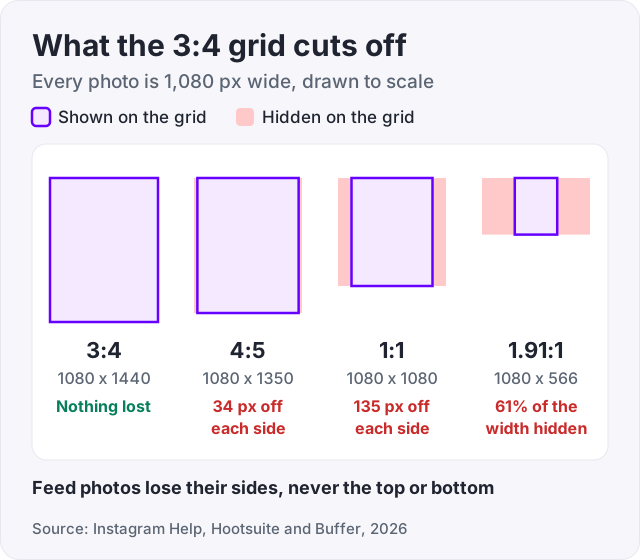
The math is simple. A grid tile is 3 parts wide for every 4 parts tall. Multiply your photo’s height by 3, then divide by 4. That is the width the tile can show. For a 4:5 photo, 1,350 times 3 divided by 4 is about 1,012 pixels. The other 68 pixels are split between the two sides.
Some blogs say squares lose their top and bottom on the grid. That is backwards. A square is wider than a 3:4 tile, so the sides go.
If you plan a puzzle grid across several posts, cut every tile at 1080 x 1440 so no part of the picture is lost. Our free Instagram grid maker cuts the tiles at that size and numbers them in posting order.
Two newer tools help. You can change which part of a post shows on the grid after you post it (Social Media Today, March 2026). And since June 2026, Instagram has been rolling out Reorder grid. Tap and hold a post, choose Reorder grid, and drag it to a new spot. Changes save at once, and everyone who visits sees them (Social Media Today).
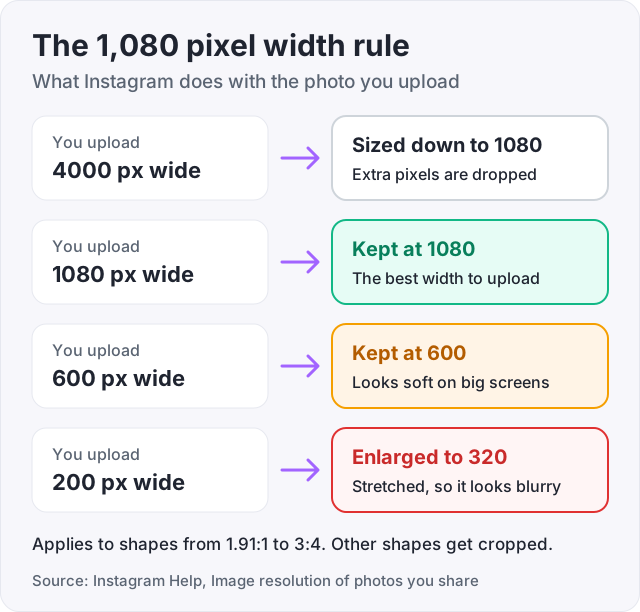
Instagram shows photos at up to 1,080 pixels wide. If you upload a wider photo, Instagram sizes it down to 1,080. If it is narrower than 320 pixels, Instagram enlarges it to 320 (Instagram Help).
Between 320 and 1,080 pixels wide, Instagram keeps the photo at its own size, as long as the shape is supported. So a photo 600 pixels wide stays 600 pixels wide. A phone then has to stretch it to fill the screen, and a stretched photo looks soft.
| You upload | Instagram keeps |
|---|---|
| 4,000 px wide | Sized down to 1,080 px |
| 1,080 px wide | 1,080 px, the best width |
| 600 px wide | 600 px, soft on big screens |
| 200 px wide | Enlarged to 320 px, blurry |
What this means for you:
Instagram does not publish a file size limit for photos posted in the app. Tools that post through Meta’s API are stricter. They need JPEG files of up to 8 MB, in a shape from 4:5 to 1.91:1 (Meta for Developers).
Carousel slides use the same sizes as single photos, so 1080 x 1440 is still the best pick. A carousel holds up to 20 photos and videos (Instagram Help).
The shape you choose applies to every slide. Instagram Help says you cannot pick a different shape for each photo or video. In practice, the first slide sets the crop for the rest (Buffer).
Two more rules from Instagram Help:
By default, you cannot mix shapes in one carousel. There are two ways around it.
If neither works, post the photos one by one. A single post can have any shape from 1.91:1 to 3:4.
Reels and Stories are both 1080 x 1920 pixels, a 9:16 shape that fills a phone screen. A profile picture should be a square of at least 320 x 320 pixels.
Reels. Instagram Help allows Reels from 1.91:1 to 9:16, at least 720 pixels and 30 frames per second. The 1080 x 1920 size is what the big guides recommend (Hootsuite). You can record and edit Reels up to 20 minutes long. But Reels over 3 minutes will not be recommended to new audiences (Instagram Help). If you want reach beyond your followers, keep it to 3 minutes or less.
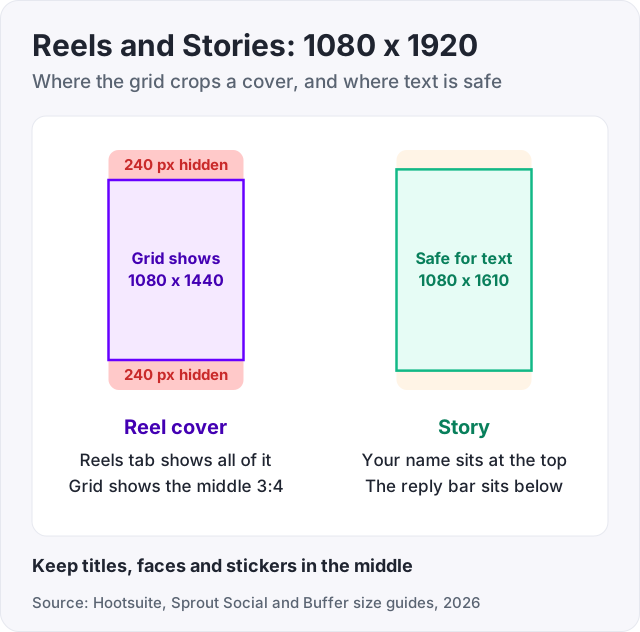
Reel covers. Make the cover 1080 x 1920 too. The Reels tab shows all of it, but the grid shows only the middle 3:4 part (Buffer). That is the middle 1080 x 1440, which leaves 240 pixels off the top and the bottom. Keep your title and face inside it. Instagram Help still lists 420 x 654 for covers. That looks out of date, since Meta’s own developer pages recommend a full 9:16 cover.
Stories. Use 1080 x 1920. Keep text and stickers inside the middle 1080 x 1610 area (Hootsuite, Sprout Social). Your name sits at the top and the reply bar at the bottom, and both cover the edges.
Profile picture. Upload at least 320 x 320 pixels. It shows as a circle, about 110 x 110 pixels on a phone, so keep your face in the middle. Instagram does not publish these numbers. They come from third-party size guides.
Upload at 1,080 pixels wide, in a supported shape, with Upload at highest quality turned on. Those three steps stop most blurry posts.
To turn the setting on, go to your profile, tap Menu, then Media quality, then Upload at highest quality (Instagram Help). Uploads may take a little longer with it on. Then:
If your Stories still look soft, our guide on why Instagram Stories look blurry walks through every fix, including Data Saver.
The right size makes a post look the way you meant it to. It does not make people like it. The photo and the timing do that, and our guide on the best time to post on Instagram covers the timing.
We sell Instagram likes from $2.95 and Instagram followers from $3.95. The honest use is a first impression. A tidy 3:4 grid with some likes on each post looks active to a new visitor. Bought likes and followers will not comment, save your posts or buy what you sell. They do not bring reach on their own either.
For likes that come from real people, see how to get more likes on Instagram.
An Instagram post is 1,080 pixels wide, and the height can be anything from 566 to 1,440 pixels (Instagram Help). That gives four common sizes: 1080 x 1080 square, 1080 x 1350 portrait (4:5), 1080 x 1440 tall portrait (3:4) and 1080 x 566 horizontal. For most photos, 1080 x 1440 is the best pick.
The newest size is 1080 x 1440 pixels, a 3:4 shape. Instagram added it in late May 2025. Adam Mosseri, the head of Instagram, said it is the shape almost every phone camera uses by default. Since January 2025 the profile grid also shows tall tiles instead of squares, and the big size guides measure those tiles at 3:4.
The profile grid shows each post as a 3:4 tile. Instagram has not published the ratio, but Hootsuite, Sprout Social and Buffer all measure it at 3:4. To fill a tile with nothing cut off, post at 1080 x 1440 pixels. Wider posts lose a strip on each side of the grid, though they still show in full in the feed.
A horizontal post is 1080 x 566 pixels, a 1.91:1 shape. That is the widest shape Instagram allows (Instagram Help). It shows small in the feed. On the profile grid only the middle 425 x 566 pixels show, which hides about 61% of the width. Keep the subject in the center.
In a carousel, the shape you pick applies to every photo, and you cannot choose a shape per slide (Instagram Help). To mix shapes, place each photo on a 1080 x 1440 canvas with a plain border in an editing app. Some accounts also see an option to keep each photo's own shape. Check the crop screen before you post.
Make Stories 1080 x 1920 pixels, a 9:16 shape that fills a phone screen. Keep text and stickers inside the middle 1080 x 1610 area, so your name at the top and the reply bar at the bottom do not cover them (Hootsuite, Sprout Social). Instagram does not publish a Story size of its own.
Make the cover 1080 x 1920 pixels, the same 9:16 shape as the Reel. The Reels tab shows all of it, but the profile grid shows only the middle 1080 x 1440. So keep your title and face inside that middle part. Instagram Help still lists 420 x 654 for covers, which looks out of date.
Upload a square of at least 320 x 320 pixels. Instagram shows it as a circle, about 110 x 110 pixels on a phone, so keep your face in the middle and away from the corners. Instagram does not publish this size. The numbers come from the Hootsuite, Sprout Social and Buffer size guides.
The facts in this guide come from the places below. We check them again each time the guide is updated.
The services and free tools this guide talks about, with the prices you actually pay.
More Instagram guides from the same team.
Account help
Why are my Instagram Stories blurry? Here are the usual causes, five fixes in order, the settings on iPhone and Android, and the right size.

Algorithm & timing
The best time to post on Instagram is midweek afternoons, per Sprout Social 2026 data. Here is the day-by-day table and how to find your own time in Insights.

Likes & engagement
How to get more likes on Instagram: small creators often get 4 to 5 percent of followers per post, brands far less. What is normal, what works and what fails.