

Views
Instagram Story views order: what the viewer list means
Only you can see who viewed your Story, and only for 48 hours. Here is what the viewer list order means, why Instagram will not say, and how highlights work.
Instagram · Account help
Why are my Instagram Stories blurry? Here are the usual causes, five fixes in order, the settings on iPhone and Android, and the right size.

If you are asking “why are my Instagram Stories blurry”, the answer is almost always one of four things. A quality toggle is off, Data Saver is on, your connection was weak, or the file was the wrong shape. Each one has a fix that takes under a minute.
Instagram makes its own copy of everything you upload. It sizes photos down to 1080 pixels wide and crops shapes it does not support (Instagram Help). You cannot switch that off. What you can do is hand Instagram a file that needs as little work as possible, with the right settings on.
This guide gives the causes, the order to try the fixes in, and the exact menu names on iPhone and Android. It also covers old Highlights that turn soft, and what a blurry Story means for your reach.
Start here. Find the row that sounds like your problem, then jump to that fix.
| Cause | How to spot it | The fix |
|---|---|---|
| Upload at highest quality is off | Every Story looks soft, photos and videos alike | Turn the toggle on under Media quality |
| Data Saver is on | Stories look bad on cellular data and fine on Wi-Fi | Turn off Data Saver, or Use less cellular data on iPhone |
| Weak connection | The Story was slow to post, or looks soft only on the go | Post and check on Wi-Fi or a strong signal |
| Wrong size or shape | The Story is cropped, zoomed in or stretched | Make the file 1080 by 1920 pixels, a 9:16 shape |
| Old Story in a Highlight | It was sharp when new and is soft months later | Nothing is broken. Instagram lowers quality on old videos |
| Old app or a weak camera | It is blurry in your camera roll too | Update the app and clean the lens |
If you have no idea which one it is, work down the list below. It starts with the quickest fixes, and all of them are free.
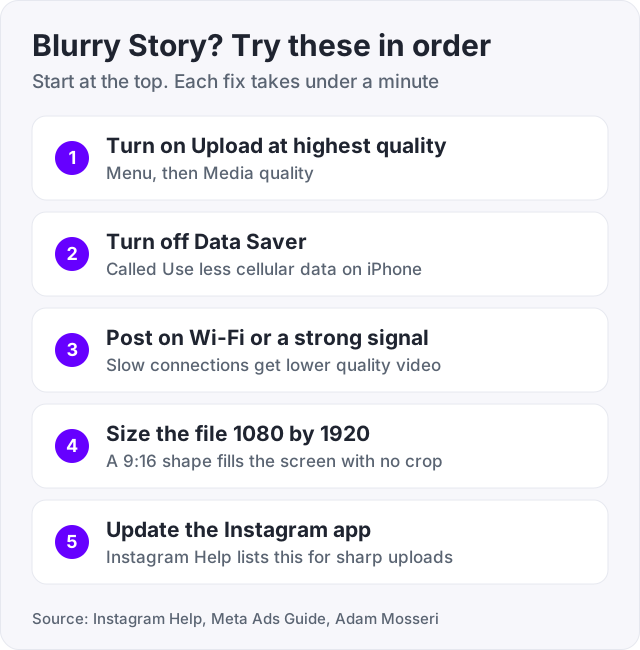
Instagram has a setting that tells the app to always send the best copy it can. Instagram Help describes it on its page about Reel sizes. It has no page about it for Stories. But the toggle sits in the Media quality settings for the whole app, not inside Reels, so turn it on for Stories too. The path is the same on iPhone and Android (Instagram Help).
Instagram’s Android help page for Data Saver calls this entry Data usage and media quality. If you see that name, tap it.
Instagram adds one warning. Uploads at the highest quality may take longer (Instagram Help). That is normal. The file is bigger, so give it a few more seconds before you close the app.
Tip: this toggle only helps Stories you post from now on. It does not repair a Story that is already up. Delete the soft one and post it again if it matters.
Data Saver is the setting people miss, because it has a different name on each phone. Instagram Help says it stops videos from preloading over cellular data. On Android, it also decides when you get to see high resolution media at all.
On iPhone:
On Android:
Android has one more choice. If you want to keep Data Saver on, tap High Resolution Media on the same screen. You will see Never, WiFi Only, and Cellular + WiFi. Pick Cellular + WiFi. With Never, Instagram will not show you high resolution media at all (Instagram Help).
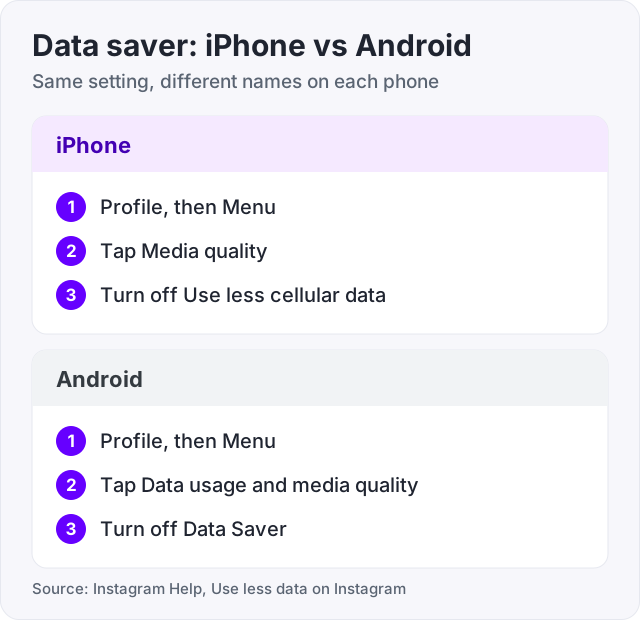
Here is the honest part. Instagram’s help page describes Data Saver as a viewing setting. It does not say the setting changes what you upload. So this fix is mostly about what you see. If your Stories look bad on your own phone, the Story may be fine and your screen may be showing a lighter copy.
Instagram Help also notes that the setting has no effect on Wi-Fi. If Stories look sharp at home and soft on the bus, this is your cause.
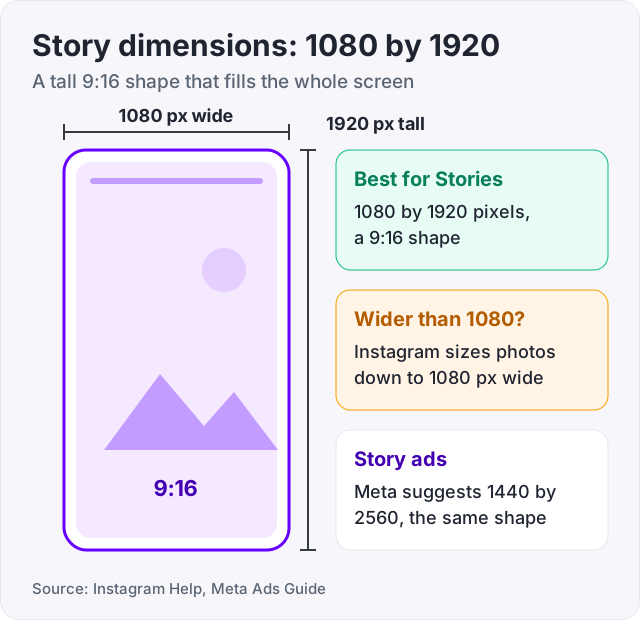
A Story fills a tall phone screen. The shape of that screen is 9:16, which means 9 parts wide for every 16 parts tall. The Meta Ads Guide lists 9:16 as the ratio for Stories.
Instagram Help says photos upload at up to 1080 pixels wide. Share a wider photo and Instagram sizes it down to 1080. A file that is 1080 wide in a 9:16 shape is 1920 tall. That is where the well known Story dimensions of 1080 by 1920 come from.
What goes wrong with other sizes:
For Story ads, the Meta Ads Guide now suggests 1440 by 2560 pixels. That is the same 9:16 shape with more pixels. If you design Stories in an editing app, either size works. Keep the shape and you avoid the crop.
Screenshots are a common trap. A screenshot of a photo is a copy of a copy, and it often has the wrong shape. Upload the original file when you can.
With Upload at highest quality on, your files are bigger and take longer to send (Instagram Help). A weak signal makes that worse. Post from Wi-Fi or a strong signal, and keep the app open until the Story shows as posted.
The connection matters on the viewing side too. Adam Mosseri, the head of Instagram, has said that people on slow connections get a lower quality video so it loads faster (MediaPost). So check your Story on good Wi-Fi before you decide it is broken.
Two more basics come straight from Instagram Help. Its page on photo quality says to download the most recent version of the Instagram app. It also says phones have cameras of varying quality.
If the file is blurry in your camera roll, no setting will save it. Shoot it again in better light. If it is sharp there and soft on Instagram, go back to fixes 1 to 4.
Your followers may see a sharper Story than you do. They may also see a softer one. Each viewer’s phone, settings and signal decide what they get. Run this quick test before you change anything else.
If it is sharp for your friend, the upload is fine and your own settings were the issue. If it is soft for both of you, the file or the upload is the cause. Go back to fixes 1 and 3, then try fix 5.
Your viewer list will not tell you anything about quality. It only shows who watched. Our guide on the Instagram Story views order explains how that list is sorted.
This one surprises people. A Story looked sharp the day you posted it. Months later, the same clip looks soft in your Highlights.
In October 2024, someone asked Adam Mosseri why old Stories look blurry in Highlights. He said Instagram wants to show the highest quality video it can. But when a video has not been watched for a long time, Instagram moves it to a lower quality, because most views come at the start (TechCrunch, Engadget).
He added two things. If the video gets watched a lot again, Instagram renders the higher quality version again. And Instagram leans toward higher quality for creators who drive more views, because that encoding costs more.
So a soft old Highlight is not a bug on your phone. There is no setting that stops it. If a Highlight matters, such as a price list or a how to order clip, post a fresh copy now and then.
Watch out: apps that promise “HD Story uploads” if you log in with your Instagram password cannot change how Instagram stores your videos. Instagram does that on its own servers. Do not hand over your login for it.
Less than you fear. After his comments drew complaints, Mosseri said the quality shift “isn’t huge”. He also said that whether people engage depends far more on the content than on the quality (TechCrunch). He noted that quality matters most to the person who made the video.
That matches what we see. People skip a Story because it is dull, not because it is a touch soft. A Story so blurry that the text cannot be read is a different case. Viewers tap past what they cannot read, so fix that one.
Here is where we fit in, and where we do not. We sell Instagram views for feed videos and Reels, from $2.95. We do not sell Story views, because a Story is gone in 24 hours and the number goes with it. You can try 100 views on one video with our free Instagram views trial.
Buying views will not make a blurry Story sharp. It will not change how Instagram encodes your videos either. Mosseri said those choices are made at an aggregate level, and we have seen nothing that ties a bought view count to better encoding. If quality is your problem, the fixes above are the answer, and all of them are free.
If your real worry is low numbers, our guide on how to get more views on Instagram Reels covers what moves them. To learn who can see the counts on your posts, read who can see your Instagram views.
Tip: put big, bold text in the middle of your Story. The Meta Ads Guide suggests keeping about 14% of the top and 35% of the bottom free of text. Your profile icon and the buttons at the bottom cover those areas.
Work through that list once and most blurry Stories are gone for good. The settings stay on, so you only do it one time.
The usual causes are simple. The Upload at highest quality toggle is off. Data Saver is on. The connection was weak when you posted or when you watched. Or the file was not in the 9:16 Story shape, so Instagram had to crop or resize it. Check the toggle first, because it takes ten seconds and it applies to every upload after that.
Open your profile, tap Menu, tap Media quality, and turn on Upload at highest quality (Instagram Help). Then turn off Data Saver, which iPhone calls Use less cellular data. Post on Wi-Fi or a strong signal. Make the file 1080 by 1920 pixels. Update the app. Then post one test Story and check it on a second phone.
Use 1080 by 1920 pixels, which is a 9:16 shape. Instagram Help says photos wider than 1080 pixels get sized down to 1080. The Meta Ads Guide gives 9:16 as the Story ratio. It now suggests 1440 by 2560 pixels for Story ads, which is the same shape with more pixels. Both sizes fill the screen with no crop.
It can make them look blurry on your own screen. Instagram Help says the setting stops videos from preloading over cellular data. On Android it also lets you limit high resolution media to Wi-Fi, or turn it off. The help page does not say it changes your uploads. So turn it off, then check the Story again before you blame the file.
Instagram makes its own copy of every upload. Photos wider than 1080 pixels are sized down, and files in the wrong shape are cropped (Instagram Help). If Upload at highest quality is off, that copy can be softer still. Your screen may also be showing a lighter version because Data Saver is on or the signal is weak.
Adam Mosseri, the head of Instagram, answered this in October 2024. He said Instagram moves a video to a lower quality when it has not been watched for a long time, because most views come early. If people start watching it again, Instagram renders the higher quality version once more. He also said the quality shift is not huge.
Many users report this, but Instagram has not confirmed it. We found no help page or official post that says music lowers Story quality. If you see it happen, run a fair test. Post the same photo once with music and once without, on the same Wi-Fi, and compare both on a second phone.
The facts in this guide come from the places below. We check them again each time the guide is updated.
The services and free tools this guide talks about, with the prices you actually pay.
More Instagram guides from the same team.
Views
Only you can see who viewed your Story, and only for 48 hours. Here is what the viewer list order means, why Instagram will not say, and how highlights work.
Views
Can you see who viewed your Instagram post, Reel or profile? Names show for Stories and Live only. The rest shows counts. Who sees what, format by format.

Views
Instagram shows Reels mostly to people who do not follow you and ranks them on watch time and shares. Here is what counts as a view and what moves the number.