

Likes & engagement
What is a good engagement rate on Instagram?
A good Instagram engagement rate is 1 to 3 percent for most accounts, and small accounts run higher. Here is the formula, the averages, and why rates drop.
Instagram · Likes & engagement
Most posts get likes from 2 to 4 percent of followers. Here is what a good number looks like, what makes Instagram show a post to more people, and what fails.
Likes come from two places. Your followers, who see the post in their feed. And strangers, who see it on Explore or in Reels. Most of the likes on most posts come from the first group.
So the fastest way to more likes is to make more of your followers see the post, and give them a reason to tap. Instagram ranks feed posts for followers mainly on how likely each person is to like, comment, share or save (Instagram ranking explained, 2023). Post the formats that earn those actions, post when people are online, and reply fast.
Below is what a normal number of likes looks like, and the five changes that move it. Then the reasons a post gets almost none, and what buying likes does and does not do.
Judge likes against your follower count, not against other accounts. Hootsuite’s 2026 report puts the average Instagram engagement rate at roughly 2 to 4 percent, depending on the industry (Hootsuite, 2026). An account with 1,000 followers and 25 likes on a post is at 2.5 percent. That is normal, not a problem.
| Followers | Likes at 2 percent | Likes at 4 percent |
|---|---|---|
| 500 | 10 | 20 |
| 1,000 | 20 | 40 |
| 5,000 | 100 | 200 |
| 10,000 | 200 | 400 |
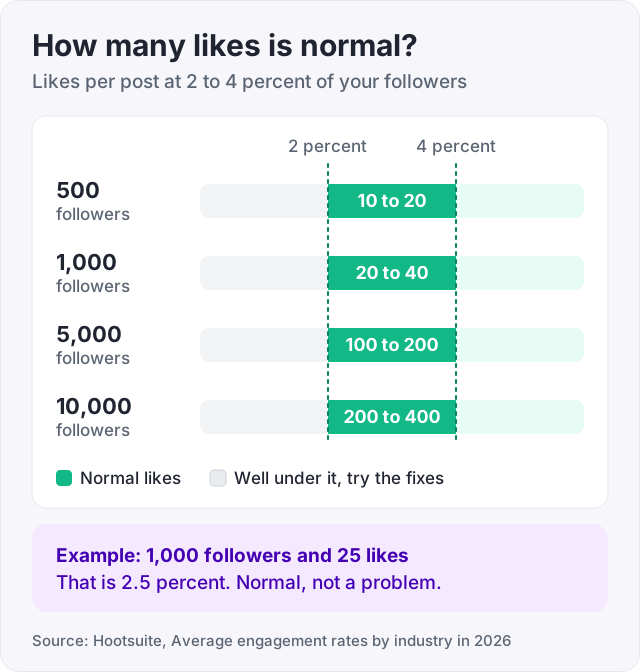
If your posts sit inside that band, your content is fine. Work on reach, which means more followers and more Reels. If they sit well below it, the followers are not looking, and the fixes below are for you. Our guide on the Instagram engagement rate has a calculator and the industry averages.
There is no single algorithm. Feed, Stories, Explore and Reels each rank in their own way (Instagram ranking explained, 2023). For the feed, Instagram looks at each follower’s history with you, and at how likely that person is to like, comment, share or save. The more people react early, the more people the post is shown to.
For Reels, the people watching mostly do not follow you. There Instagram weights watch time and shares most heavily. A Reel that gets finished and sent to friends reaches strangers, and some of them like it.
Two things follow from this. First, the early reaction matters, so timing and the first hour count. Second, likes follow reach. If you want more likes, you usually need more people to see the post.
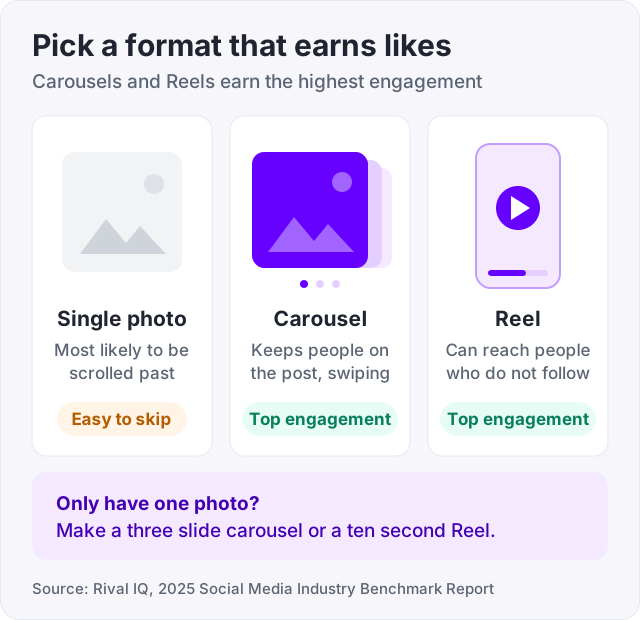
Rival IQ’s 2025 benchmark report found that carousels and Reels earn the highest engagement in most industries (Rival IQ, 2025). A single photo is the format most likely to be scrolled past.
A carousel keeps people on the post while they swipe. A Reel can reach people who do not follow you at all. If you have one photo, turn it into a three-slide carousel with a caption slide, or shoot a ten-second Reel around it.
Likes in the first hour tell Instagram to keep showing the post. So post when people are there to tap. Sprout Social’s 2026 study found these windows get the most engagement on Instagram (Sprout Social, 2026):
Those are averages across many accounts. Your own insights show when your followers are most active. Check there after a month. Our guide on the best time to post on Instagram explains how to read that screen.
A caption that ends with a real question gets more comments, and comments push the post to more people. Keep the question specific. “Which one would you pick, 1 or 2?” works. “Thoughts?” does not.
Asking people to double-tap works too, but use it rarely. If every caption begs for a like, people stop reading captions. If you struggle with captions, our free Instagram caption generator gives you a starting draft.
The top-ranking pages for this search all say the same thing. Reply fast. A reply is a comment, so it doubles the comment count. It also brings the commenter back to the post, and it shows the next person that someone is home.
Set a timer for the hour after you post. Stay in the app and answer. That one habit does more for likes than any hashtag.
Use three to five hashtags that describe the post exactly. “#sourdoughstarter” beats “#food”. Five is also the most Instagram allows now. In December 2025 it cut the limit from 30 hashtags to five per post or Reel (Instagram @creators). The advice that ranks on the first page of Google has moved to a small number of specific tags. Hashtags help Instagram place a post by topic. They do not push a post to strangers on their own. Our free Instagram hashtag generator suggests specific tags for a topic.
Tip: if likes are not showing on a post, check Settings, then What you see, then Like and share counts. Instagram lets anyone hide like counts, on their own posts and on everyone else’s (Instagram, May 2021). Hidden likes still count, and you still see the number in your insights.
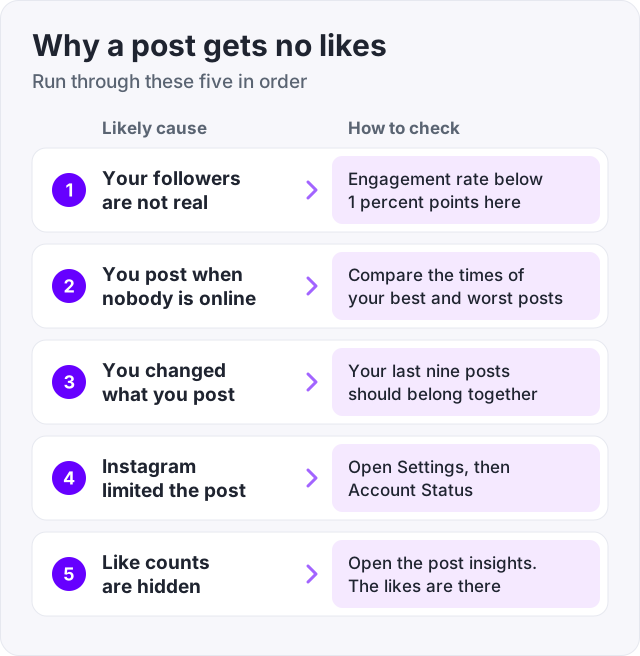
If a post gets almost nothing, run through these in order.
Your followers are not real. If you bought cheap followers, or ran a giveaway, a big share of your list never looks at your posts. A 5,000-follower account with 20 likes is usually this. How to check: look at your engagement rate. Below 1 percent points here.
You post when nobody is online. A post that goes up at 3 a.m. gets its first hour while everyone sleeps. How to check: compare the time on your best posts with your worst.
You changed what you post. People followed you for one thing. When the post is about something else, they scroll past. How to check: your last nine posts should look like they belong together.
Instagram limited the post. Posts that break Instagram’s recommendation guidelines are not shown to people who do not follow you. How to check: open Settings, then Account Status.
Like counts are hidden. The likes are there, just not on the post. How to check: open the post’s insights.
Like-for-like groups. Trading likes with strangers gives you likes from people who will never see your next post. Instagram ranks on how each viewer reacts, and those viewers do not come back.
Piles of generic hashtags. Instagram now stops you at five, and generic ones still place your post in crowded rooms where nobody is looking for you.
Buying followers without likes. More followers with the same likes lowers your engagement rate. The profile looks worse, not better. If you buy followers, buy likes to match, or do not buy at all. Our guide on how to get more followers on Instagram covers the honest way to grow the list.
We sell Instagram likes. They start at $2.95 for 100, they arrive spread over time rather than all at once, and we never ask for your password. Only the post link is needed.
Here is what they do. A new post with 4 likes reads as ignored, and a stranger who lands on it moves on. The same post with 60 likes reads as normal. Bought likes keep the numbers on your profile in proportion, and they give a new post a first push while your real followers arrive.
Here is what they do not do. Bought likes do not bring comments, sales or followers. They do not make Instagram show the post to more people. Ranking is based on how each viewer reacts, and bought likes do not watch, save or share (Instagram ranking explained, 2023). They fix how a post looks. They do not fix what it is.
If you post often, our automatic Instagram likes plan sends a set number of likes to every new post for 30 days, from $79.95 for 50 likes per post. Our guide on what Instagram auto likes are explains how it works. To see delivery before spending anything, there is a free trial of 50 Instagram likes. It needs an email code and a post link, no card. Regular Instagram likes start at $2.95.
Watch out: never give your password to a site that promises free likes. A like can be sent to any public post from the outside. Nobody needs your login for that.
Do that for a month. The posts will not all take off, but the floor rises, and the floor is what people see when they scroll your grid.
Usually one of three things. Your followers are not real or not active, so nobody sees the post. You post when your audience is asleep, so the first hour is empty. Or the post is a single photo about something your followers did not sign up for. Check your engagement rate first. Below 1 percent means the audience is the problem, not the post.
Compare likes to followers. Hootsuite puts the average Instagram engagement rate at 2 to 4 percent in 2026, so 1,000 followers and 25 likes is normal. Small accounts often run higher because a tight group reacts more. If you are inside that band, your content is fine and you need more reach. If you are well below it, your followers are not looking.
At a normal 2 to 4 percent rate, 200 likes on a post means roughly 5,000 to 10,000 real followers. Below that follower count, it takes a Reel that reaches strangers. Post carousels and Reels, post when your followers are active, and reply in the first hour. If you need the number today, bought likes can bring a post to 200, but they will not bring comments.
It is a daily routine people share online, not an Instagram rule. The idea is to spend a few minutes engaging with other accounts in your niche each day: like a handful of posts, leave a few specific comments, send one message. The numbers are not magic. Real comments on bigger accounts in your niche get read by their followers, and some come to see who wrote them.
You can hide the like count on your own posts, and you can hide counts on everyone else's posts from Settings, then What you see, then Like and share counts. Instagram added both options in May 2021. Hiding the count does not stop likes. Instagram still records them, and you still see the real number in your insights.
Two common reasons. Like counts are hidden, either by you on your post or by the viewer for all posts, an option Instagram added in May 2021. Or the likes are simply few because the post reached few people. Open the post's insights. The number there is always the real count, whatever the post shows.
The facts in this guide come from the places below. We check them again each time the guide is updated.
The services and free tools this guide talks about, with the prices you actually pay.
More Instagram guides from the same team.
Likes & engagement
A good Instagram engagement rate is 1 to 3 percent for most accounts, and small accounts run higher. Here is the formula, the averages, and why rates drop.

Likes & engagement
Instagram auto likes send a set number of likes to every new post for 30 days. Here is how the plan works, what it does not do, and what to check first.
Algorithm & timing
The best time to post on Instagram is midweek afternoons, per Sprout Social 2026 data. Here is the day-by-day table and how to find your own time in Insights.