

Followers
How to make your Instagram public, and why growth needs it
How to make your Instagram public in the app and on the web, the teen rule that can block the switch, and why every growth method needs a public account.
Instagram · Account help
How to turn off business account on Instagram in six taps on iPhone, Android or a computer, and what you keep and lose when you switch to a personal account.
Here is how to turn off business account on Instagram. Open your profile, tap Menu, then tap Account type and tools. Tap Account type, then Switch account type, then Switch to personal account. Confirm, and you are done (Instagram Help).
The switch is instant. You stay logged in. Your followers, posts and Reels stay where they are. What goes away is a set of business tools, mainly ads and the link to your Facebook Page.
Instagram calls business and creator accounts “professional accounts”. So “turn off business account”, “turn off professional account” and “switch to personal account” all mean the same move. This guide shows the steps on a phone and on a computer. Then it covers what you lose, what happens to Insights, and how to switch back.
Instagram Help gives one set of steps for both phones. The menus match on iPhone and Android.
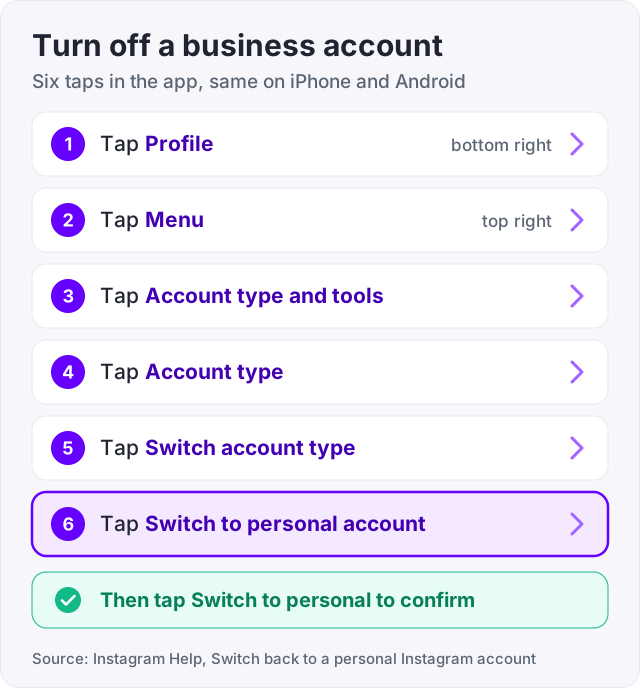
That is all. Instagram Help lists no waiting time and no review step. On a public account, Your dashboard now sits where Professional dashboard used to be (Instagram Help, About Instagram dashboards).
On an iPad, only the first step differs. Your profile picture sits on the left side of the screen, not the bottom right. The rest is the same (Instagram Help).
Tip: take a screenshot of your Insights before you switch if you plan to go private after. Insights only stay with public accounts, and the next sections explain why.
The website uses different menu names. Here the option sits inside the business tools page (Instagram Help).
This route helps when the app hides the option, or when you manage the account from a work laptop.
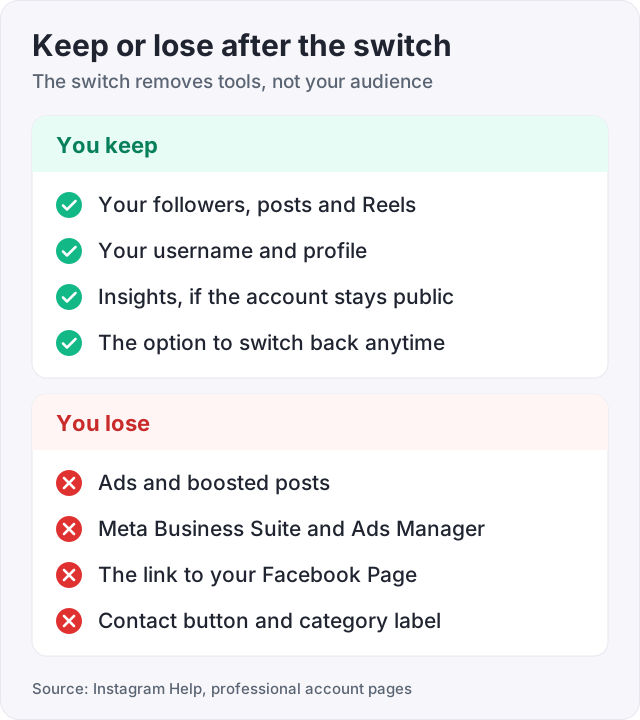
Instagram Help is clear about the cost. You no longer have access to ads, and you may lose some other tools. Any Facebook Page linked to the account is disconnected. A second help page adds that you lose Meta Business Suite and Meta Ads Manager.
Here is the full picture, tool by tool.
| Tool or feature | After you switch to personal | Source |
|---|---|---|
| Ads and boosts | Gone | Instagram Help |
| Meta Business Suite and Meta Ads Manager | Access lost | Instagram Help |
| Linked Facebook Page | Disconnected | Instagram Help |
| Contact button and category label | Professional features, so they go | Instagram Help, About professional accounts |
| Primary and General inbox tabs | Professional features, so they go | Instagram Help, About professional accounts |
| Insights | Kept if the account stays public | Instagram Help |
| Followers, posts, Reels, username | Not on the list of things you lose | Instagram Help |
| Private account option | Gained | Instagram Help |
The Contact button holds your email, phone number and directions. If customers reach you that way, put an email address in your bio before you switch.
Watch out: the switch disconnects your Facebook Page. Instagram Help warns that in some cases an active Meta Verified subscription may be canceled when a subscribed Page and Instagram account are disconnected. If you pay for Meta Verified, check that first.
Many guides say Insights vanish the moment you switch. That is out of date. Instagram Help now says that with a public account “you’ll still have access to Your dashboard and insights”.
Instagram says dashboards are open to every public account. A professional account sees Professional dashboard. A public personal account sees Your dashboard, with reach, engagement and audience numbers (Instagram Help, About Instagram dashboards).
So the account type is not what removes Insights. Going private is. Here are the rules Instagram Help gives.
Instagram notes that dashboard tools can vary by account type, region and eligibility. So your personal dashboard may show less than the professional one did. Ad insights go for sure, because ads go.
If you use Insights to pick posting times, our guide on the best time to post on Instagram shows where to find your most active hours.
A common belief is that business accounts get less reach, and that a personal account fixes it. We could not find any Instagram source that says so.
Instagram’s own post on how ranking works lists the signals it uses. They include your activity, facts about the post, facts about the person who posted, and your history with that person (Instagram, ranking explained). Account type is not named as a signal for Feed, Stories, Explore or Reels.
So do not switch just to chase reach. Nothing official says it will help. What can change reach is what you do next. A private account cannot reach new people at all, since only approved followers see its posts.
If reach is the real worry, work on the posts. Our guide on how to get more followers on Instagram covers what moves the numbers.
Turning the business account off is not the only choice. Instagram lets you change between business and creator with the same Switch account type button (Instagram Help). It says creator accounts suit public figures, artists, influencers and people who make content. Business accounts suit shops, local firms, brands and service providers.
| Your goal | Best move | Why |
|---|---|---|
| You want a private account | Switch to personal, then go private | Professional accounts cannot be private |
| You only want to see your stats | Personal and public is fine | Public personal accounts keep Insights |
| You make content and do not sell | Switch to creator | You keep professional tools |
| You run ads or boost posts | Stay professional | Personal accounts have no ads |
| Customers use your Contact button | Stay professional | The button is a professional feature |
| You share posts to a Facebook Page | Stay professional | The switch disconnects the Page |
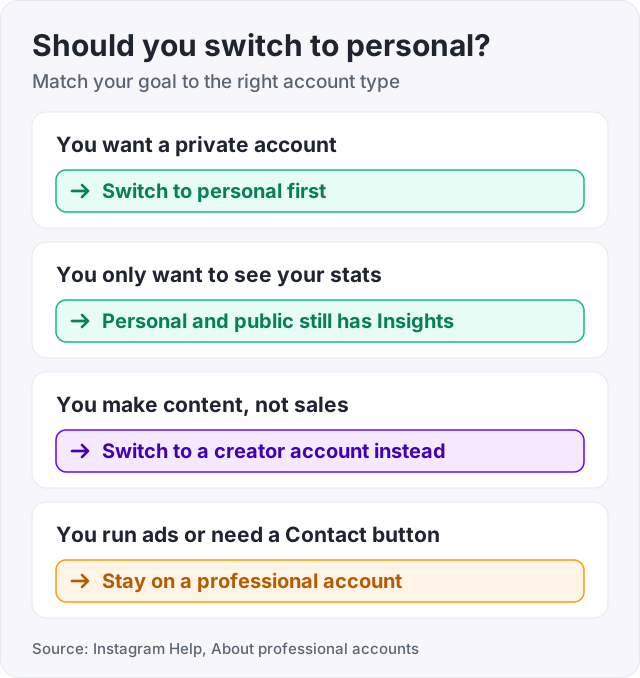
If you are still unsure, try personal for a week. You can switch back at any time, and the move costs nothing.
This is the top reason people turn off a business account. Instagram Help puts it plainly. Business profiles cannot be private. To make one private, you first have to switch back to a personal account.
After the switch, the account is still public. You have to turn privacy on yourself.
From then on, new people must send a follow request. Your current followers stay. Keep in mind that this is the step that removes Insights. It also stops new people from finding your posts. Our guide on how to make your Instagram public explains the trade in detail, in case you change your mind.
Instagram moves these menus often. Try these in order.
Some people search for this because a business closed, and they want the profile gone. That is a different setting. It is called deactivation.
Go to Settings, then Accounts Center, and look for Deactivation or deletion. A deactivated profile hides your photos, comments and likes until you log back in. You can only deactivate once a week (Instagram Help).
Deactivation hides everything. A switch to personal hides nothing. Pick the one that fits.
Instagram Help says you can change account type at any time. To go back, follow these steps.
Two things to know. If your account was private, the switch makes it public again. Every pending follow request is accepted at once (Instagram Help). And your Facebook Page does not link itself again. You have to link it by hand.
We sell Instagram followers, and 100 cost $3.95. So here is how the account type affects an order.
It mostly does not. Delivery needs only your public username, and it works on personal, creator and business accounts alike. The part that matters is public. If you switch to personal and then go private, new followers cannot be added without a request. Keep the account public while an order runs.
The switch itself does not remove any followers, bought or earned. You can watch the count with our Instagram follower counter before and after.
Here is what buying will not fix. It will not bring back ads, the Contact button or your Facebook Page link. It will not make a private account visible. And bought followers do not comment, call or buy. They make a profile look active. They are not customers.
Open your profile and tap Menu in the top right. Tap Account type and tools, then Account type, then Switch account type. Tap Switch to personal account, and tap Switch to personal to confirm. On some phones you need to tap Settings first. The steps are the same on iPhone and Android (Instagram Help). The change is instant and you stay logged in.
Log in at instagram.com. Click More in the bottom left, then click Settings. Pick Business tools and controls, or Creator tools and controls if you have a creator account. Click Switch to personal account, then click Switch back to confirm (Instagram Help). The page reloads and the business tools are gone from the menu.
Instagram Help names four things. You lose access to ads. You lose Meta Business Suite and Meta Ads Manager. Any Facebook Page linked to the account is disconnected. And you may lose some other tools. The Contact button and the category label are professional features too. Your followers, posts and Reels are not on that list.
No. The switch changes which tools you have, not who follows you. Instagram Help lists ads, Meta business tools and the Facebook Page link as the things you lose. Followers, posts, Reels and your username are not on that list. If you then set the account to private, new people must send a follow request first.
Not if the account stays public. Instagram Help says a public personal account still has Your dashboard and insights. You lose them when you go private. If you switch back to public within 90 days, you can get the past insights data back. Insights only cover the past 90 days in any case.
Look for the heading For professionals in the menu, then tap Account type and tools. On some phones you must tap Settings first (Instagram Help). If it is still missing, update the app. You can also use a computer. Log in at instagram.com, click More, then Settings, then Business tools and controls.
Yes. Instagram Help says you can change account type at any time. Open Menu, tap Account type and tools, then Switch to professional account. Pick a category, then pick Business or Creator. If the account was private, it turns public again, and every pending follow request is accepted at once. You will need to link your Facebook Page again.
The facts in this guide come from the places below. We check them again each time the guide is updated.
The services and free tools this guide talks about, with the prices you actually pay.
More Instagram guides from the same team.
Followers
How to make your Instagram public in the app and on the web, the teen rule that can block the switch, and why every growth method needs a public account.
Followers
Instagram followers come from Reels, a searchable name field and a steady rhythm. Here is what moves the number, the steps in order, and what does not work.
Algorithm & timing
The best time to post on Instagram is midweek afternoons, per Sprout Social 2026 data. Here is the day-by-day table and how to find your own time in Insights.