
Followers
How to hide followers on Instagram: what works and what does not
A public Instagram account cannot hide its followers list. Here are the four things you can actually do, with steps, and what each one costs you in growth.
Instagram · Followers
How to make your Instagram public in the app and on the web, the teen rule that can block the switch, and why every growth method needs a public account.

To make your Instagram account public, go to your profile, tap the menu, tap Settings and privacy, then Account privacy. Turn off Private account and tap Switch to public (Instagram Help). It takes about ten seconds and your followers stay put.
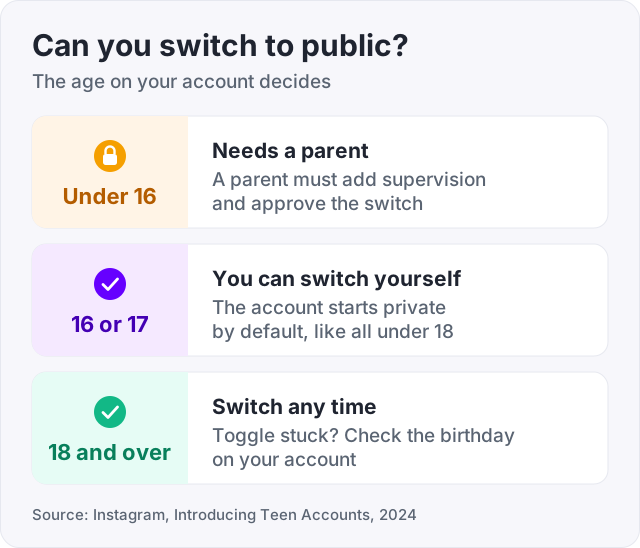
If the toggle will not move, age is the usual reason. Instagram makes accounts for people under 18 private by default, and teens under 16 need a parent’s permission to switch (Instagram announcement, Teen Accounts, 2024).
Below are the exact steps for the app and for the web, and what changes when you go public. We also explain why every way of growing an account, free or paid, needs it to be public first.
The same switch handles both directions. Instagram Help documents it on the page called “Make your Instagram account private”, and turning it off makes you public.
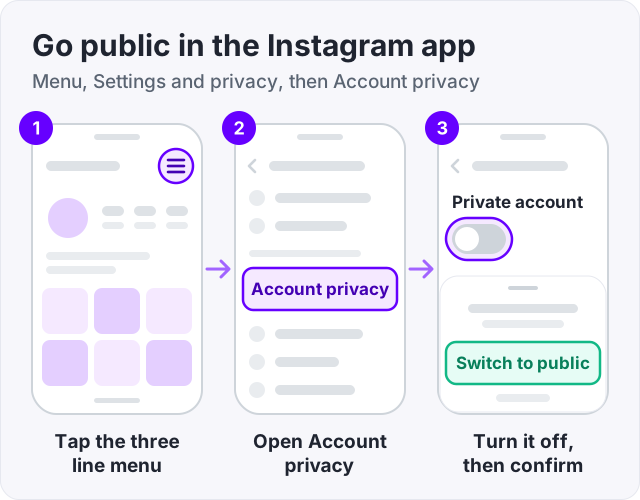
That is it. The change is instant. The steps are the same on iPhone and Android, so if your screen looks different, update the app and try again.
You can do the same thing from a computer (Instagram Help).
Check your profile afterwards. If the lock icon next to your username is gone, you are public. If you cannot find the setting on the web, the app steps above always work, and the switch is the same account setting either way.
This is the most common question in the search results, and the answer is almost always age.
Instagram introduced Teen Accounts in 2024. Every account for someone under 18 is private by default (Instagram announcement). Teens under 16 cannot switch to public on their own. They need a parent’s permission, set up through Instagram’s supervision feature.
So if you are under 16 and the toggle switches straight back, that is why. A parent has to add supervision and approve the change. If you are 16 or 17, you can switch yourself.
If you are an adult and the toggle still will not move, check the birthday on your account. A wrong birthday puts an adult under the teen rules, because Instagram applies them by the age on the account (Instagram announcement).
Instagram Help lists the differences on its page “Differences between public and private accounts”. In short:
| Private account | Public account | |
|---|---|---|
| Who sees your posts | Approved followers only | Anyone |
| Who sees your followers and following | Approved followers only | Anyone |
| Following you | Needs your approval | Instant, no approval |
| Hashtag pages and Explore | Not shown to non-followers | Can appear |
| Your follower count | Visible to everyone | Visible to everyone |
Two things do not change. Your existing followers stay, and your follower and following numbers were visible all along. The numbers show on every profile, private or public.
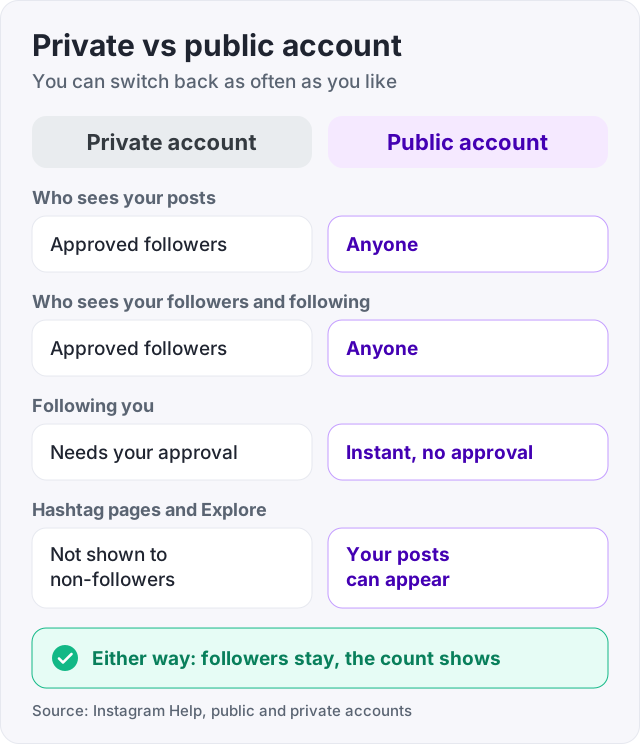
You can switch back and forth as often as you like (Instagram Help). Nothing is deleted either way.
Some people stay private because “public” sounds like giving everything away. It does not.
Being public means anyone can see your posts and your lists. It does not share your location, your direct messages, your email or your phone number. And you keep every control a private account has. You can still block a person, restrict them, limit who can comment, hide your Story from specific people, and approve tags before they appear on your profile.
If you want to keep some things out of view, our guide on how to hide followers on Instagram explains what can and cannot be hidden on a public account.
Tip: if you are nervous about going public, do it and then tighten the comment and tag settings. Under Settings and privacy you can limit comments to people you follow, and require your approval before a tagged post shows on your profile.
Here is the reason most people make the switch. Instagram finds new followers for you by recommending your Reels and posts to people who do not follow you yet. That happens in Reels, in Explore and in the feed.
Instagram’s own post on how ranking works (“Instagram ranking explained”) says these recommendations go to non-followers. A private account is not recommended to people who do not follow it. So on a private account, the biggest source of new followers is simply switched off.
This is also why the account type matters more than the account category. A professional account, creator or business, can be private. But Insights and promotions only earn their keep on a public one. If the goal is growth, keep it simple and go public.
Public alone does not grow an account, though. It opens the door. What you post, and how often, decides who walks through it. Our guide on how to get more followers on Instagram covers what a steady feed looks like once the door is open.
Every order for followers, likes or views needs a public account, ours included. The delivery accounts cannot follow a private profile without approval, and they cannot see a private post to like or view it.
At GetLikes the order form asks for one thing: your username. No password, ever. Instagram followers start at $3.95 for 100, and larger orders are spread out so the growth looks natural. If you want to see how delivery works before paying, the free Instagram followers trial sends 50 followers to a public account, once per person, with no card.
The honest part: bought followers change the number on your profile, not the people who watch your posts. They can make a new public profile look established while real growth catches up. They do not post for you, and they do not make Instagram recommend you. If you are wondering what a bigger number actually gets you, read what 1,000 Instagram followers gets you before you order.
Watch out: a service that says it can deliver to a private account is either going to fail or wants your login so it can switch you to public itself. Never give a password to a seller. Make the account public yourself, then order.
The usual reason is age. Instagram made accounts for people under 18 private by default with Teen Accounts in 2024, and teens under 16 need a parent's permission through supervision to switch to public. If the toggle is greyed out or switches straight back, check the birthday on the account and whether a parent supervises it.
Open your profile, tap the three lines in the top right corner, then Settings and privacy, then Account privacy. Turn off the Private account toggle and tap Switch to public when Instagram asks you to confirm. The change is instant, and your existing followers stay exactly where they are.
The steps are the same on iPhone and Android. Tap your profile picture in the bottom right, tap the menu in the top right, then Settings and privacy, then Account privacy. Turn off Private account and confirm. If you cannot find the menu, update the app first, because Instagram moves these screens between versions.
On a public account anyone can see your posts, your followers and who you follow, and anyone can follow you without approval. Your posts can appear on hashtag pages and in Explore. On a private account only approved followers see your posts and lists, and new people must send a request. Instagram Help lists these as the main differences.
A public account can get followers from people who do not know you yet, and a private one mostly cannot. Instagram does not recommend private accounts to non-followers, so Reels and Explore reach is closed. Being public does not grow an account by itself, though. It only opens the door. What you post decides who walks through it.
It is as safe as you make it. Public means anyone can see your posts and lists. It does not share your location, your messages, or your email. You can still block and restrict people, limit who can comment, hide your Story from specific people, and approve tags before they show on your profile.
The facts in this guide come from the places below. We check them again each time the guide is updated.
The services and free tools this guide talks about, with the prices you actually pay.
More Instagram guides from the same team.
Followers
A public Instagram account cannot hide its followers list. Here are the four things you can actually do, with steps, and what each one costs you in growth.
Followers
Instagram followers come from Reels, a searchable name field and a steady rhythm. Here is what moves the number, the steps in order, and what does not work.
Followers
No Instagram feature switches on at 1,000 followers. Here is what really changes at 1K, what does not, how long it takes to get there, and what it costs.