

Views
Instagram Story views order: what the viewer list means
Only you can see who viewed your Story, and only for 48 hours. Here is what the viewer list order means, why Instagram will not say, and how highlights work.
Instagram · Account help
How to delete highlights on Instagram on iPhone, Android and computer. Remove one story, clear old highlights in bulk, and keep every Story in your archive.

Here is how to delete highlights on Instagram. Go to your profile, tap and hold the highlight, tap Delete Highlight, then tap Delete again (Instagram Help). The circle then leaves your profile.
Your Stories are not deleted when you do this. They stay in your Stories Archive, where only you can see them. So you can delete a highlight without deleting the Story inside it.
The steps are the same on iPhone and Android. This guide also shows how to remove one Story, how to edit highlights, how to clear many at once, and what works on a computer. At the end we cover what deleting does to your views and reach.
Instagram Help gives one set of steps for both phones (“Edit or delete a highlight on Instagram”). You need the Instagram app and you need to be logged in.
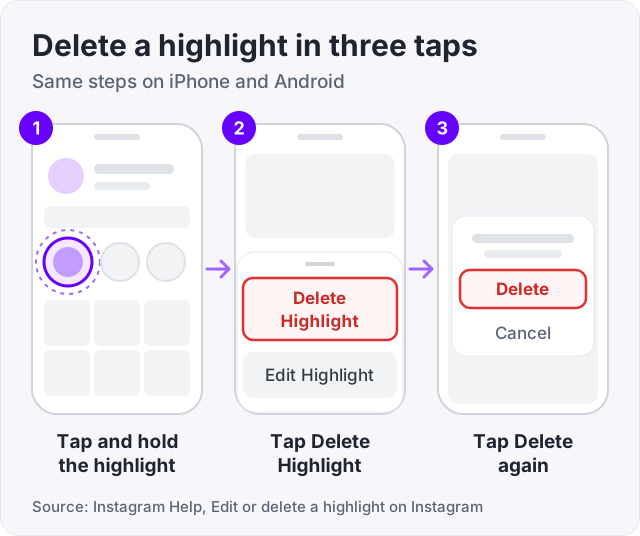
That is all. Instagram asks you to confirm once, and then the highlight is off your profile.
Do not swipe or tap once. A single tap opens the highlight and plays it. You have to hold your finger on the circle until the menu comes up.
Watch out: Instagram Help notes that Stories Archive and Highlights are not available for all accounts. If you see no highlight row at all, your account may not have the feature.
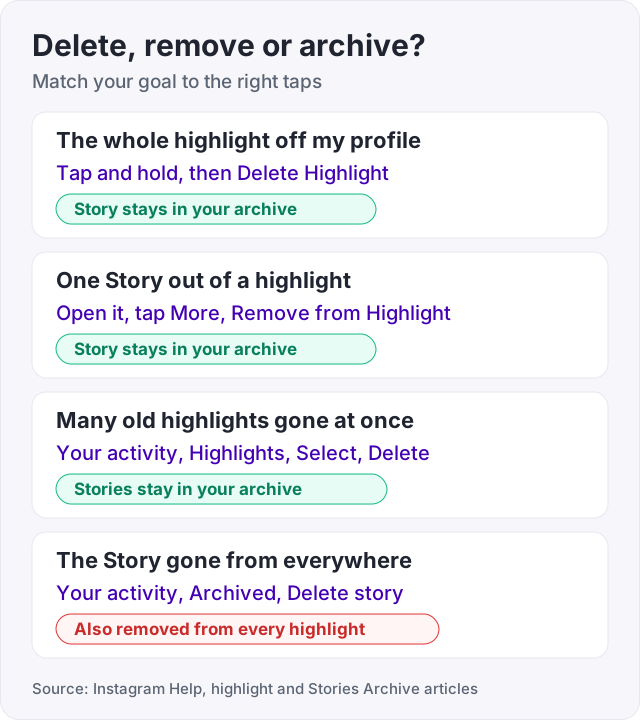
Most people who search for this want one of five things. Pick yours before you tap anything, because only one of them is hard to undo.
| What you want | What to do | What happens to the Story |
|---|---|---|
| The whole highlight off your profile | Tap and hold, Delete Highlight | Stays in your archive |
| One Story out of a highlight | More, Remove from Highlight | Stays in your archive |
| Many old highlights gone | Your activity, Highlights, Select | Stays in your archive |
| A new name or new Stories | Tap and hold, Edit Highlight | Nothing is deleted |
| The Story gone from everywhere | Delete it from Archived | Removed from every highlight too |
Try the soft options first. Editing and removing can be reversed in a minute. Deleting a Story from your archive is the strong option, so save it for last.
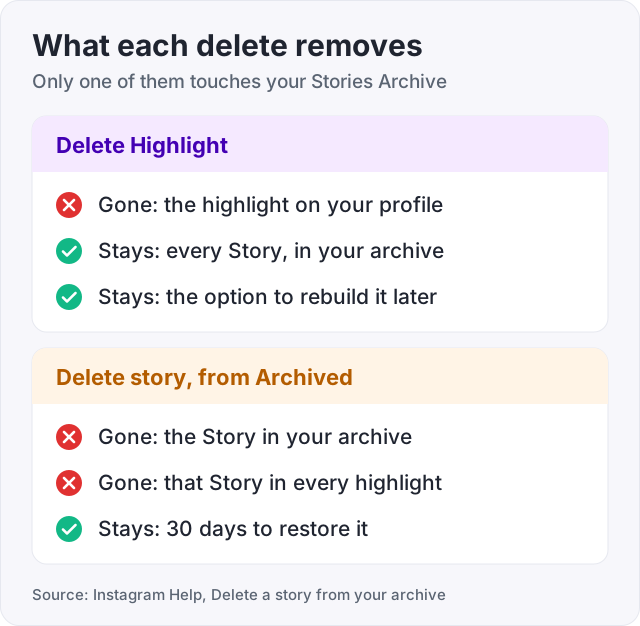
This is the part that worries people, so here it is plainly. A highlight is a folder. The Stories inside it live in your Stories Archive.
Instagram Help says Stories you share are saved to your Stories Archive. It also says Delete Highlight removes the Story “from Stories Highlights”. That is the row on your profile, not the archive. So the Story is still yours after the highlight is gone. You can make a new highlight from the same Stories any time (Kontentino).
It does not work the other way round. Instagram Help is clear on this. When you delete a Story from your archive, it is also removed from other places you shared it, and highlights are the example it gives.
One catch. All of this depends on the archive being on. Instagram Help says that if you turn off Stories Archive, any Story you share from then on is deleted after 24 hours. To check yours, follow these steps.
Maybe the Story itself is the problem, not the highlight. Then delete it from the archive (Instagram Help, “Delete a story from your archive”). This works in the app only, not on a computer.
The Story leaves your archive and every highlight it was in.
You do not have to delete a whole highlight to get rid of one bad slide. Here is how to remove a story from a highlight and keep the rest (Instagram Help).
The highlight stays on your profile with the other Stories in it. The Story you removed stays in your archive.
Editing is the better choice when the highlight is fine but out of date. Instagram Help covers how to edit highlights in the same article as deleting.
You can do this as often as you like. Instagram Help says a highlight stays on your profile until you remove it, even after the original Story has disappeared.
Tip: before you delete an old highlight, open Edit Highlight and look at what is inside. You may only need to swap two or three Stories to make it current again.
If you have years of old highlights, do not hold and delete them one by one. Instagram has a bulk screen for it (Instagram Help, “Delete multiple highlights at once”).
Two filters on that screen help with old highlights. Tap Newest to oldest to change the sort order. Tap All dates to show only highlights from a date range you choose.
This is where other guides get vague, so we checked the computer steps in Instagram Help. The article opens by telling you to log into the app for Android or iPhone. Its computer steps cover only two jobs. One is editing a highlight. The other is deleting a Story from a highlight. There is no Delete Highlight step for computers.
To delete a Story from a highlight on a computer:
To edit on a computer, click Options on the highlight, then click Edit. Type a new name if you want one and click Next. In Selected, click a Story to take it out. Click Next, then click Done.
If you want the whole highlight gone and you only have a laptop, the phone app is the sure way. That is true on a PC, a Mac and a Chromebook, because they all use the same website.
Not with one tap. Instagram has no restore button for a highlight. What you can do depends on what you deleted.
Instagram Help says content in Recently deleted is removed by itself after 30 days. Stories that were never in your archive get up to 24 hours. After that they are gone for good.
Start with who can see a highlight. Instagram Help says the people you allowed to see your Story can also see your highlights. If your account is public, that is everyone.
Now the numbers. Instagram Help says you can see who has seen your Story for up to 48 hours after you post it. The view number includes replays, so it can be higher than the list of names. That clock does not restart when you add the Story to a highlight (ContentStudio). Our guide to the Instagram Story views order explains the viewer list in full.
Do highlight views count toward anything else? Not that Instagram has said. Instagram Help does not list highlight views as part of your post, Reel or profile numbers. We found no official page that ties highlights to how your posts are ranked. So deleting a highlight should not change the reach of your feed posts or Reels.
What you do lose is simple. New visitors see fewer things on your profile. If a highlight answered common questions, like prices or opening hours, expect to get those questions again. Your Story numbers are a separate thing. Instagram Help says you can open insights for a Story for up to two years after it was made (“View insights on your Instagram Stories”).
For more on which view numbers other people can see, read who can see your Instagram views.
We sell Instagram views from $2.95 for 100 views. They go on feed videos and Reels. We do not sell Story views or highlight views, and we would not tell you to buy them anywhere.
Here is why. A Story view count is private. Only you can see it, so a bigger number there impresses nobody. Bought views also cannot bring back a highlight you deleted, and they cannot make people tap the circles on your profile.
What does help highlights is people landing on your profile in the first place. That comes from Reels and posts that travel. If a Reel is good and just needs a first push, views can give it that. If the Reel is weak, views will not fix it. If you also want to tidy what visitors see on your posts, see our guide on how to hide likes on Instagram.
No. Instagram Help says Delete Highlight removes the Story from Stories Highlights, which is the row on your profile. Your Stories are saved to your Stories Archive on their own, so they stay there as long as the archive is turned on. You can open the archive later and build a new highlight from the same Stories. Only you can see the archive.
Open the highlight and move to the Story you want gone. Tap More in the bottom right of that Story. Tap Remove from Highlight, then confirm. On iPhone the last button says Remove, and on Android it says Remove Photo (Instagram Help). The other Stories in the highlight stay where they are, and the removed Story stays in your archive.
Go to your profile and tap Menu in the top right. Below How you use Instagram, tap Your activity. Below Content you shared, tap Highlights. Tap Select in the top right, tap each highlight you want gone, tap Delete at the bottom, and confirm. You can sort from newest to oldest or filter by date first, which helps when you are clearing old highlights (Instagram Help).
Only in part. The computer steps in Instagram Help cover two things. You can edit a highlight, and you can delete a Story from a highlight. Open the highlight, click Options in the top right of the Story, click Delete, then click Delete again. Instagram Help lists no Delete Highlight button for computers. For that, it tells you to use the app on iPhone or Android.
There is no undo button for a highlight. If your Stories Archive was on, the Stories are still in the archive, so you can make a new highlight and add them again. If you deleted the Story itself, check Recently deleted under Your activity. Instagram keeps deleted Stories from the archive there for 30 days before they are gone for good (Instagram Help).
No. Deleting or editing a highlight sends no alert to your followers (Kontentino). The circle is simply gone the next time someone opens your profile. Instagram Help describes no notice for it either. The only way someone would know is if they go looking for that highlight and cannot find it.
Only for a short time. Instagram Help says you can see who has seen your Story for up to 48 hours after you post it. The clock starts when the Story goes up, not when you add it to a highlight (ContentStudio). After that the names are gone. Nobody else can ever see who viewed your Story or your highlights.
The facts in this guide come from the places below. We check them again each time the guide is updated.
The services and free tools this guide talks about, with the prices you actually pay.
More Instagram guides from the same team.
Views
Only you can see who viewed your Story, and only for 48 hours. Here is what the viewer list order means, why Instagram will not say, and how highlights work.
Views
Can you see who viewed your Instagram post, Reel or profile? Names show for Stories and Live only. The rest shows counts. Who sees what, format by format.

Likes & engagement
Hide the like count on your posts and Reels in two taps, and learn what Instagram does and does not let you hide about the posts you liked yourself.